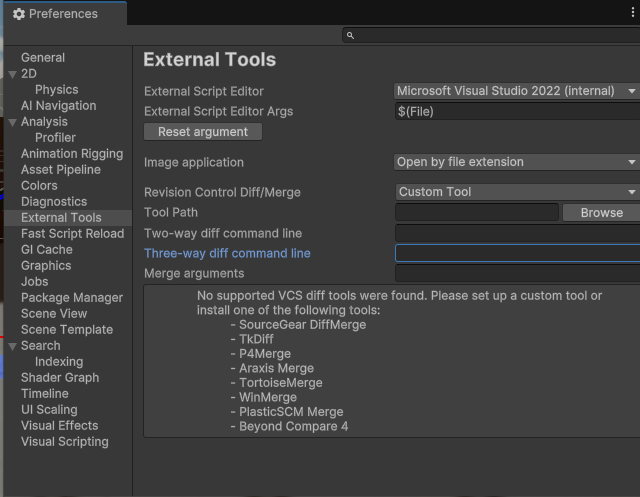
Hi I have had problems with VS all day now and do now wonder what’s wrong with my external tools section in preferences in unity. Now it looks weird and asks for some sort of diff/merge files:
VS opens up but does not have autocomplete. I don’t even know where to start with this.
Does anyone know what’s up and how to fix it? Every help is appreciated.
This may help you with intellisense and possibly other Visual Studio integration problems:
Sometimes the fix is as simple as doing Assets → Open C# Project from Unity. Other times it requires more.
Other times it requires you also nuke the userprefs and .vsconfig and other crufty low-value high-hassle files that Visual Studio tends to slowly damage over time, then try the above trick.
Barring all that, move on to other ideas:
Also, try update the package inside of Unity: Window → Package Manager → Search for Visual Studio Editor → Press the Update button
Depending on flavor and version of Visual Studio, it may also have an installation step that you perform within the actual Visual Studio. This step seems finicky at best and may require multiple openings of VS before it comes up.
Update: The VSCode extension has been deprecated and abandoned:
Update: the VSCode integration is back… maybe!?
There may be a community fork available that is receiving updates.
Recently (July 2023) I worked on a Windows11 system that required a Microsoft component to be installed from within Visual Studio before it would work properly with all the OTHER software installed under Unity. I have no documentation on that process as I have only seen it once and it surprised me as well.