Help with UniTask

I’ve heard many good things about UniTask. The most common thing is that UniTask is faster than Coroutines. The other one is that UniTask is completely garbage-free (in some places they say there’s a bit, but anyhow less than coroutines).

I’m trying to learn how to use them, so my implementations might be off. However, in the below test, I’ve seen that UniTask is 2-3 times slower than Coroutines, and generates between 3 to 4 times more garbage than Coroutines:

public async void OnPointerDown(PointerEventData eventData)
{
    StartCoroutine(ObjectRotateCoroutine());
    await ObjectRotateUniTask();
}

private IEnumerator ObjectRotateCoroutine()
{
    var end = Time.time + _duration;
    while (Time.time < end)
    {
        _transform.Rotate(new Vector3(1, 1) * Time.deltaTime * 60);
        yield return null;
    }
}
private async UniTask ObjectRotateUniTask()
{
    var end = Time.time + _duration;
    while (Time.time < end)
    {
        _transform.Rotate(new Vector3(1, 1) * Time.deltaTime * 60);
        await UniTask.Yield();
    }
}

I’ve tested each of them separately. The first call to the coroutine was 1.48ms and 256B of GC Alloc, whereas the UniTask was 6.23ms and 3.2KB of GC Alloc.

Subsequent calls to Coroutines reported 0.02ms and 64B of GC whereas calls to UniTask were 0.04ms and 240B.

Am I doing something wrong? Also, I didn’t even get to the part where I want to cancel active Unitask before starting new ones. With coroutines, I use the same Coroutine variable to check if it’s not null, in which case, you’d stop the current Coroutine variable, and start a new one using that variable (something similar to this):

private Coroutine _coroutine1;

// ...

if(_coroutine1 != null)
{
    StopCoroutine(_coroutine1);
}
_coroutine1 = StartCoroutine(Coroutine1());

I think in UniTask you’d use something like CancellationTokenSource bounceAnimationCancellationTokenSource = new CancellationTokenSource();, in which case, I wonder how you would avoid allocating memory. However, I have no idea how this would be implemented, or even if this is the correct thing to achieve something similar.

I’m not sure how things are done in UniTask overall, so if someone can help me out here I’d appreciate it.

Just a small thing, when testing you should do the action multiple times to get an average idea, there might be a slight overhead due to initialization and setup.

Also, try a native Task as well, interested in seeing what the result is:

    private async Task ObjectRotateTask()
    {
        var end = Time.time + _duration;
        while (Time.time < end)
        {
            _transform.Rotate(new Vector3(1, 1) * Time.deltaTime * 60);
            await Task.Yield();
        }
    }

I clicked like 20 times and and then checked the results. For UniTask, it always allocated 240B and took 0.04 ms after the first click. Coroutines did it with 64B and 0.02 ms. I’m genuinely curious why so many people were saying UniTask is faster and better overall. They say that but I couldn’t see any implementation example of how they got such good results.

I tried native Task the other day and if I remember correctly, the results were worse than that of UniTask. I’ll try your code later and see how it does.

Ok, a bit worse than UniTask. The first click:

Subsequent clicks:

They generate more garbage than UniTask and Coroutines.

The code:

public async void OnPointerDown(PointerEventData eventData)
{
    await ObjectRotateTask();
}

private async Task ObjectRotateTask()
{
    var end = Time.time + _duration;
    while (Time.time < end)
    {
        _transform.Rotate(new Vector3(1, 1) * Time.deltaTime * 60);
        await Task.Yield();
    }
}

This is most likely not the case, but MAYBE there’s some extra data being allocated for the click handler for the action?

Could you do a small test that calls the async function x seconds after app start, don’t use the pointer down event.

Do you mean something like this?

private async void Start()
{
    Application.targetFrameRate = 30;

    await UniTask.Delay(10000); // 10 s

    await ObjectRotateUniTask();
}

private async UniTask ObjectRotateUniTask()
{
    var end = Time.time + _duration;
    while (Time.time < end)
    {
        _transform.Rotate(new Vector3(1, 1) * Time.deltaTime * 60);
        await UniTask.Yield();
    }
}
}

Interestingly, while the first Task was running (when it was around 4-5 seconds in) I caught this LoopRunner generating garbage and taking a good chunk of milliseconds.

Then, when it runs the second UniTask, we get these values:

It doesn’t look good at all, I got hyped for nothing :frowning:

I’m not an expert of UniTask or Task things, just for your information: I copied your code (the Start() one) and run it on my pc, and the GC Alloc is 0B. (Unity2023.1.17, UniTask 2.3.1)
some possible reasons:

  • Unity Editor version cause?
  • UniTask version cause?
  • Maybe just a phenomenon only in editor? (build = 0B and high performance)

Thank you for the info!

I’m using Unity 2022.3.15f1. UniTask has been around for years now, so I believe it should be compatible with my version.

The UniTask version I’m running I believe is their latest (2.5.4).

I tested with both, in the editor with ‘Deep Profile’ and in a PC build with ‘Development Build’ and ‘Autoconnect Profiler’. This screenshot is from the build:
9753025--1395958--upload_2024-4-6_6-19-49.png

And here:
9753025--1395961--upload_2024-4-6_6-21-18.png(this one 24.62 ms out of nowhere!)
This is the code I used with the above results:

using Cysharp.Threading.Tasks;
using Cysharp.Threading.Tasks.Triggers;
using System;
using System.Collections;
using System.Threading.Tasks;
using UnityEngine;
using UnityEngine.EventSystems;

public class CoroutineUniTaskTest : MonoBehaviour
{
   float _duration = 1f;
   private async void Start()
   {
       Application.targetFrameRate = 30;

       await UniTask.Delay(10000); // 10 s

       await ObjectRotateUniTask();
   }
   private async UniTask ObjectRotateUniTask()
   {
       var end = Time.time + _duration;
       while (Time.time < end)
       {
           transform.Rotate(new Vector3(1, 1) * Time.deltaTime * 60);
           await UniTask.Yield();
       }
   }
}

Would you mind sharing more info about how you got it right? Was it a build, editor? did you use Deep Profile? Would you mind sharing a screenshot of the time it takes to run the task? Also, if it’s no so cumbersome, would you mind comparing it to a coroutine to see garbage generation and time usage between the two? For instance, for the coroutine you can use something like this:

using System.Collections;
using UnityEngine;

public class CoroutineUniTaskTest : MonoBehaviour
{
    WaitForSeconds wait10s = new WaitForSeconds(10);
    float _duration = 1f;
    private IEnumerator Start()
    {
        Application.targetFrameRate = 30;

        yield return wait10s;

        StartCoroutine(ObjectRotateCoroutine());
    }
    private IEnumerator ObjectRotateCoroutine()
    {
        var end = Time.time + _duration;
        while (Time.time < end)
        {
            transform.Rotate(new Vector3(1, 1) * Time.deltaTime * 60);
            yield return null;
        }
    }
}

You could just… look at the package’s code to see what it’s doing and why it’s allocating.

Calling Unitask.Delay ultimately ends up to this method: UniTask/src/UniTask/Assets/Plugins/UniTask/Runtime/UniTask.Delay.cs at master · Cysharp/UniTask · GitHub

In which it calls one of three static factory methods. In each case it seems there is some kind of pooling going on, so I don’t think it’s surprising that the first call allocates.

To test this I tried this code out:

using System;
using UnityEngine;
using Cysharp.Threading.Tasks;

public class CoroutineUniTaskTest : MonoBehaviour
{
    private void Start()
    {
        StartAsync();
    }

    private async void StartAsync()
    {
        Debug.Log($"Delay One ({Time.frameCount})", this);
        await UniTask.Delay(TimeSpan.FromSeconds(2));

        Debug.Log($"Delay Two ({Time.frameCount})", this);
        await UniTask.Delay(TimeSpan.FromSeconds(2));
    }
}

As expected, on the first delay we allocated, and on the second delay there was no allocations.

First:

Second:

2022.4.f1
In my case coroutines start and tick was also faster in editor, GC was almost the same on startup.
So I made development build with all debug tools enabled, 1000 unitasks and 1000 coroutines with warmup.

    private IEnumerator JobCor()
    {
        var x = 1;
        var y = 1;

        yield return null;
        var z = x + y;

        yield return null;

        var m = z + y;
    }

    private async UniTask JobTask()
    {
        var x = 1;
        var y = 1;
        await UniTask.Yield();

        var z = x + y;
        await UniTask.Yield();
        var m = z + y;
    }

Start:

Tick:

I also made a stress test with FPS measurement, where tasks and coroutines was infinite running loops (yield return null and UniTask.Yield).

Release L2CPP:
200k Coroutines: 10fps
200k UniTasks: 24fps

Release Mono:
200k Coroutines: 8fps
200k UniTasks: 37fps (it became 8fps on 1 million)

Conclusion:
Of course this test is a bit artificial, I didn’t test GC in release, I didn’t test startup speed in release, I didn’t test infinite loop in debug build, but it seems that UniTasks:

  1. Faster, you can launch more of them and that’s probably what matters and what will mainly affect your game performance.
  2. Have in fact less GC allocation by info from development build. They still do allocate a lot of memory, but you can’t escape that, because any unitask/coroutine will become an interface, IEnumerator or IPlayerLoopItem, and will live in a heap so the more actual state your method has the more garbage there will be later, but coroutines have additional garbage allocation for IEnumerator and you need to cache “new WaitForSeconds” and stuff like that, when UniTasks do that by default

So, this is what I mean. From @spiney199 's test, we assume the first call allocates garbage because the system does some pooling setup to avoid allocations later (0 Alloc).

But then we have this other test. You said we are supposed to expect memory allocations, right?

Yeah, I know. However, if I had to examine the inner workings of the package from scratch, it would be time-consuming. Not to mention that I’m quickly testing different packages. I could identify the “Unitask.Delay” method being called (and from which place it’s called and why), but doing it without really knowing the package (I learned about its existence 2 days ago) would be going down the rabbit hole a bit, and I’d be possibly making many wrong assumptions. That’s why I opted to ask here to see if I could find people with experience with UniTask to point out what I might have been doing wrong.

My main goal was to replace some Coroutines with UniTask if they were proven to be better. One of my use cases is to have a Coroutine animating a, say, button on button press. To try to replicate this behavior, I did this:

int index = 0;
public void OnPointerDown(PointerEventData eventData)
{
    index++;
    Debug.Log($"Press Nº {index}: ({Time.frameCount})", this);
    StartCoroutine(ObjectRotateCoroutine());
    StartAsyncPointerDown();
}
private async void StartAsyncPointerDown()
{
    await ObjectRotateUniTask();
}

calling their respective functions (Coroutine and UniTask):

private IEnumerator ObjectRotateCoroutine()
{
    var end = Time.time + 0.1f;
    while(Time.time < end)
    {
        _transform.Rotate(new Vector3(1, 1) * Time.deltaTime * 60);
        yield return null;
    }
}
private async UniTask ObjectRotateUniTask()
{
    var end = Time.time + 0.1f;
    while (Time.time < end)
    {
        _transform.Rotate(new Vector3(1, 1) * Time.deltaTime * 60);
        await UniTask.Yield();
    }
}

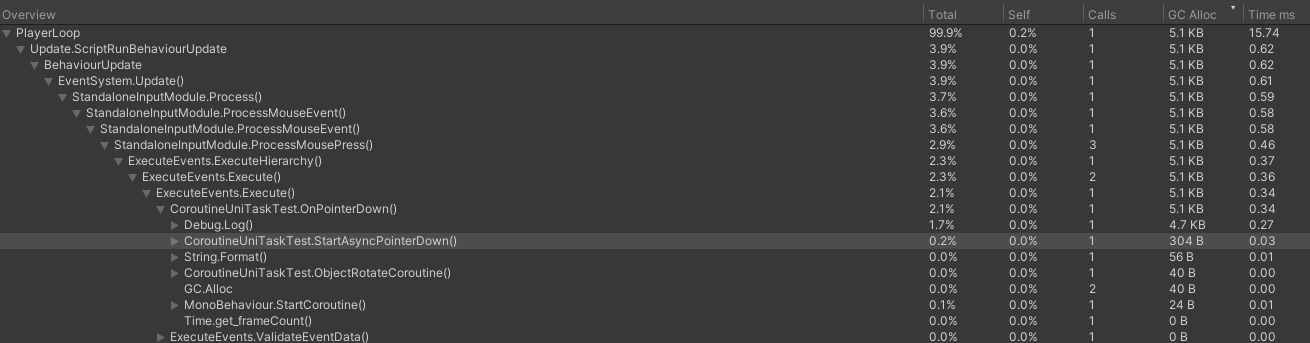
This is from the standalone build (first click):
9753511--1396168--upload_2024-4-6_15-28-46.png

Second click:
9753511--1396171--upload_2024-4-6_15-30-34.png

click Nº 26 (the same as any other subsequent click):
9753511--1396174--upload_2024-4-6_15-31-50.png


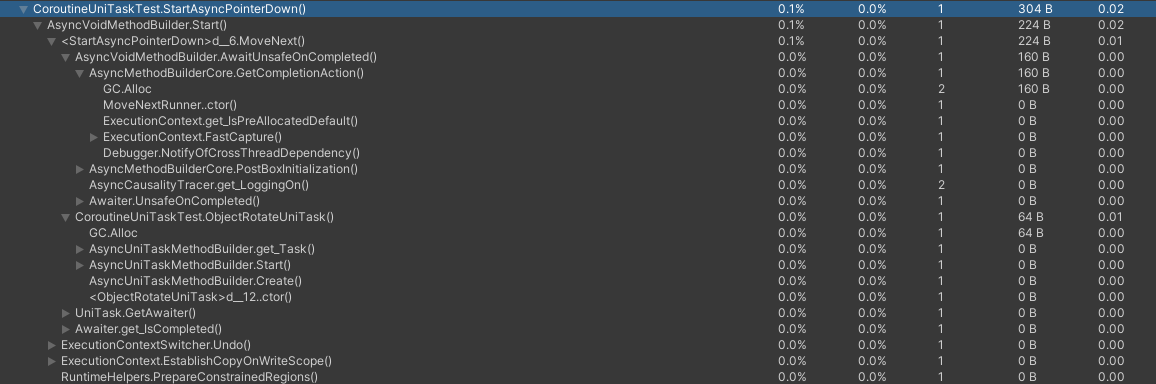
Here’s some detailed info about which methods specifically are allocating:
9753511--1396180--upload_2024-4-6_15-34-13.png

PS: I also tried in a standalone build without Deep Profile only using the UniTask (with no Coroutines or Debug logs):
9753511--1396186--upload_2024-4-6_15-58-31.png

More so if you queue up a task more than you previously have done at some point, a new DelayPromise is created. It’s all here: UniTask/src/UniTask/Assets/Plugins/UniTask/Runtime/UniTask.Delay.cs at master · Cysharp/UniTask · GitHub

It doesn’t pool a certain number. Just, say, if you had spun up two tasks before, and then later spin up three, a new promise is instanced.

Note this only applies to the use of UniTask.Delay.

It only took me a few minutes to dissect this, honestly, and I’ve never looked inside the package before that point, only used it.

Anyway the allocations you’re seeing I believe aren’t due to UniTask, but probably the compiler magic that happens when using async code. Async code is basically a ton of compiler magic and perhaps Unity’s Mono back end doesn’t handle it efficiently. Things like AsyncVoidMethodBuilder are from the .net library, not UniTask.

So UniTask is GC free, just Unity is not. This is testing in 2021 version. Perhaps results are different in versions like Unity 6 where there is better async support.

I think UniTask was created before (newer) Unity versions included their own implementation with the Awaitable types, is UniTask still “better” compared to these? I did not run any profiler tests but Im the kind of persons who would always try to use Unitys own implementation first (because they have access to native engine code and could in theory implement the “best” version) and only switch to a random github package if the included solution isn’t good enough for my use case.

Unity has a video about the Awaitable class where they explain the current limitations (5:15), and they said one of the main issues is the huge heap allocations.

I have no issues with it. The main problem (and is why I was disappointed) is that, in the forums, people often recommend UniTask as a replacement for coroutines since “they don’t allocate memory, as opposed to coroutines that do allocate” (+ they say they’re faster). Then, when trying to implement them as a replacement for regular coroutines, it turns out they are not just slower but they allocate even more garbage.

Regardless of who is at fault, what matters to me is the big picture. I wouldn’t care if UniTask is not allocating garbage on its own if, at the end of the day, it’s working in an environment where everything in conjunction will generate garbage. If the game objectively performs worse as a result of replacing Coroutines with UniTask, then I think it’s kind of pointless to switch to them if the purpose is to improve performance (over other aspects).

Well the question is to these tiny performance differences make an actual difference in the grand scope of your project? Chances are, unless you’re making a game that needs to eek out every last nano second of CPU time… probably not. Certainly hasn’t in any of my projects.

Not to mention the syntax of async code is more much flexible overall, and being a part of the C# language itself it gets treated more like a first class citizen. Just being able to only have to write await to do an asynchronous function is something I’ll take any day of the week over the PITA that coroutines are.

Don’t get too wrapped up in optimisation. You’ll never finish anything if you spend all your time fussing over every last byte of allocations.

I’d be all for it had people advertised them just like this.

Btw @spiney199 I don’t know if you have used UniTask extensively, but one of my questions in the first comment of this post was about how to stop UniTask appropriately. For instance, imagine this scenario:

private Coroutine _coroutineRef;

private void OnEnable()
{
    StopCoroutineRef(); // we stop any plausible ongoing coroutine before starting a new one
    _coroutineRef = StartCoroutine(CoroutineRef()); // we start a new coroutine (only one active at a time)
}

private void OnDisable()
{
    StopCoroutineRef(); // we make sure no coroutines are left running if the object is disabled or destroyed
}

private void StopCoroutineRef()
{
    if (_coroutineRef != null)
    {
        StopCoroutine(_coroutineRef);
        _coroutineRef = null;
    }
}

private IEnumerator CoroutineRef()
{
    // ...coroutine logic
}

Do you know what the equivalent in UniTask is?

UniTask’s claim that it - in and of itself - is still true though. It’s not responsible for the allocations that Unity’s mono back end creates.

It looks like you can use UniTaskVoid to prevent this in fact: GitHub - Cysharp/UniTask: Provides an efficient allocation free async/await integration for Unity.

So maybe this was a case where we should’ve just RTFM.

Pretty sure this is covered in the read me as well: GitHub - Cysharp/UniTask: Provides an efficient allocation free async/await integration for Unity.

In generall with async it’s with cancellation tokens. It’s a general C# thing you ought to read about.

I read the “Cancellation and Exception handling” section from the readme before writing this post. People often warn about the intricacies of working with async methods, so I want to ensure that I handle this situation correctly—preferably in the most efficient or safe manner. Therefore, I stand by this question . If anyone experienced with UniTask can give a hand, it would be much appreciated.