Hiding parts of terrain

I was reading up on the Depthmask Shader, but I’m not sure how to apply it. The example is a boat where the water inside of the boat is not rendered. How do you selectively say, “apply the shader to this part of the water only”?

I’m trying to hide the terrain that is inside a cave, so I can use a model for the floor of the cave. By placing a trigger at the cave entrance that will “shut off” collisions between terrain and player when the cave is entered, this allows me to let the player go deep into the ground by simply passing through the terrain. The thing is, it only works if I can hide the parts of the terrain that are inside of the cave.

Or, should the cave get the shader, instead? I’m just not sure how the depthmask shader works.

Here’s how the depth shader works in the boat example:

• First, everything but the water is rendered.

• Second, a cover is rendered over the boat. However, the cover is entirely transparent. The only thing that happens when it is rendered is that it goes into the depth buffer, preventing anything from being drawn behind it.

• Finally, the water is rendered. Because of the cover over the boat, no water is rendered inside the boat.

With terrain, you need to render everything but the terrain, then render the opening of the cave with the depth mask shader, and finally render the train.

To force rendering order, you’ll want to use Material.renderQueue or shader tags. If you can modify the terrain shader, it’s probably easier to have it render later than to explicitly render everything else earlier.

Note that the depth mask approach causes problems with realtime shadows viewed through the mask.

Thanks Daniel. 1 point of clarification. You said to place the “cover” over the cave entrance. My cave will be modeled into a rock outcropping model (they will essentially be one model, the cave being an interior portion of the outcropping). The interior tunnels will be intersecting the terrain object in multiple places, at all of which the terrain should not be visible. So, given that, do I just place the the depthmask shader on the entire cave system?

The depth mask shader itself produces an invisible result. You should use a regular shader to render the caves, and the depth mask shader on geometry that just covers the entrances to the caves.

You might get a better understanding of the depth mask shader’s functionality by downloading the project from the wiki, and tearing the cover off the boat, and then moving the camera around it.

Is it possible to change the terrain shader? More specifically, is it possible to change the shader so that you can use a transparent texture to paint holes in the terrain? I have the collision part handled. It just seems that it would be easier to do it that way.

And, while I am on the subject, is it possible to change the way terrain textures are handled to include a 5th texture? If I understand correctly, you currently can only use 4.

You can use as many splats as you want technically. It’s just that each fraction of a group of 4 greater than 4 (5-8, 9-12, etc.) add another pass to the rendering, which will bog down Intel or other integrated graphics.

Real graphics cards can handle 8 splats without any problem, but Intel is killed by the second pass. So if you are targeting integrated graphics, you have to keep it to 4 splats.

I know this is a bit of a Thread Revival, but this really great guy came up with a solution to the cave problem:

http://forum.unity3d.com/viewtopic.php?p=272009#272009[/quote]

You simply bring the terrain down to ground level, and model a cliff wall or whatever in (insert favorite modeling program here), Line it up with your pre-made cave model, and voila, you just “faked the entrance,” as he put it.

P.S. Check out the other pics in the thread. His stuff is amazing.

http://forum.unity3d.com/viewtopic.php?t=8354&postdays=0&postorder=asc&highlight=terrain&start=0

Have u looked at the unitypackage in that thread?

Yeah, I’ve taken a look at that post many times.

I’m just not too keen on that method for some reason :?

Another and non tested approach may be changing the inbuild terrain shader a bit to support alpha, and then use the alpha channel of the lightmap to feed the alpha info to the shader. I made this quick mod of the inbuild FirstPassLightmap.shader file. I have not tested it for sorting issues and such, but maybe it could give some ideas to someone.
What you need to do to get it to work, is saving this shader in your project, and then quit and re-open Unity.
And then, obviously, make sure to use lightmap as your type of lighting of the terrain :smile:
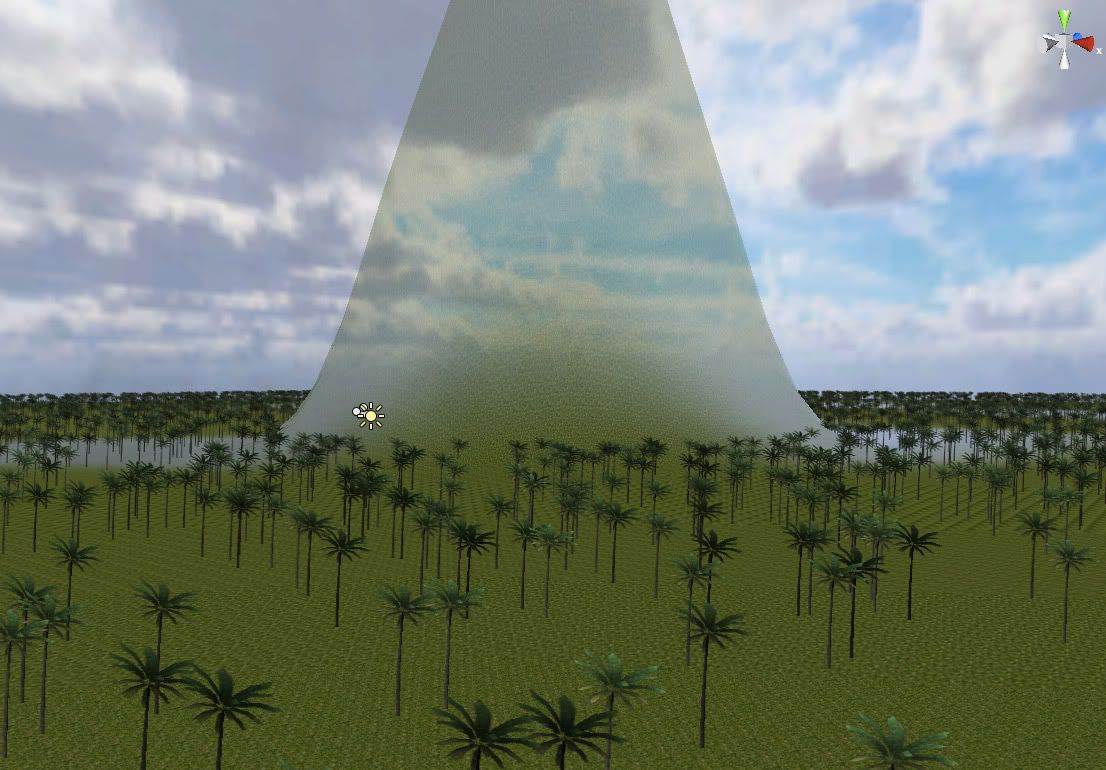
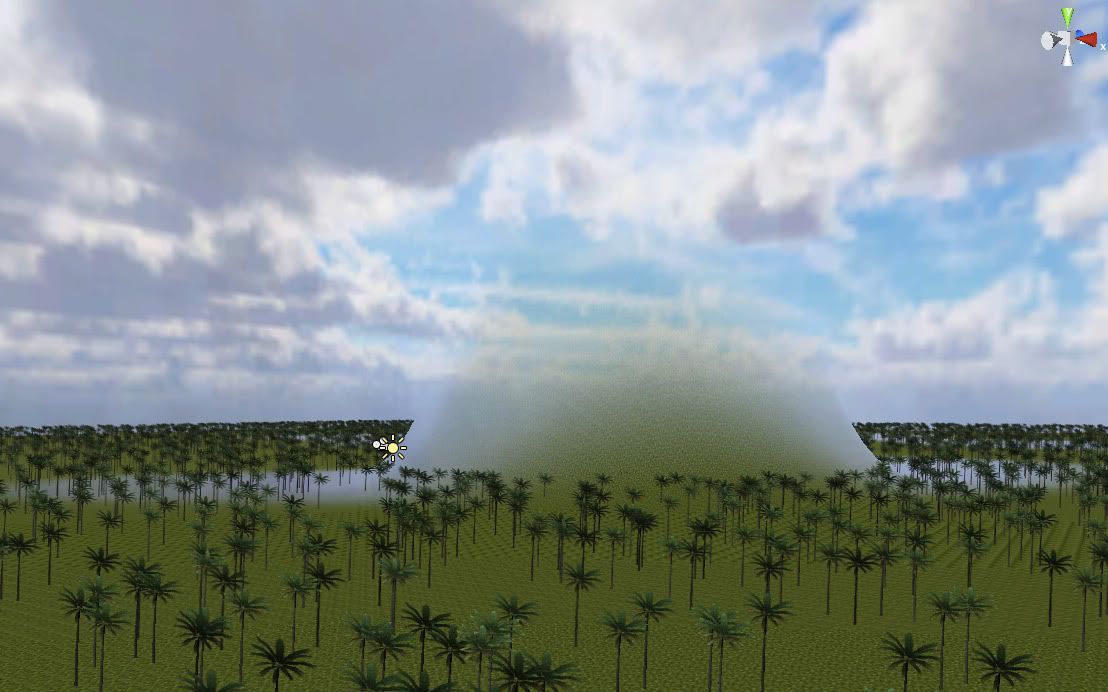
This is how the test looked:

Shader "Hidden/TerrainEngine/Splatmap/Lightmap-FirstPass" {
Properties {
	_Control ("Control (RGBA)", 2D) = "red" {}
	_LightMap ("LightMap (RGB)", 2D) = "white" {}
	_Splat3 ("Layer 3 (A)", 2D) = "white" {}
	_Splat2 ("Layer 2 (B)", 2D) = "white" {}
	_Splat1 ("Layer 1 (G)", 2D) = "white" {}
	_Splat0 ("Layer 0 (R)", 2D) = "white" {}
	_BaseMap ("BaseMap (RGB)", 2D) = "white" {}
}

Category {
	// Fragment program, 4 splats per pass
	SubShader {
		Tags { "SplatCount" = "4" }
		Pass {
			Tags { "LightMode" = "Always" }
			Blend SrcAlpha OneMinusSrcAlpha
			CGPROGRAM
			#pragma vertex LightmapSplatVertex
			#pragma fragment LightmapSplatFragment
			#pragma fragmentoption ARB_fog_exp2
			#pragma fragmentoption ARB_precision_hint_fastest
			#define TEXTURECOUNT 4

			#include "UnityCG.cginc"

uniform float4 _Splat0_ST,_Splat1_ST,_Splat2_ST,_Splat3_ST,_Splat4_ST;
uniform float4 _Splat5_ST,_Splat6_ST,_Splat7_ST,_Splat8_ST,_Splat9_ST;

struct v2f {
	float4 pos : POSITION;
	float fog : FOGC;
	float4 uv[(TEXTURECOUNT+1)/2 + 1] : TEXCOORD0;
	float4 color : COLOR;
};


uniform sampler2D _Control;
uniform sampler2D _Control1;
uniform sampler2D _Splat0,_Splat1,_Splat2,_Splat3;
uniform sampler2D _Splat4,_Splat5,_Splat6,_Splat7;


float4 CalculateVertexLights (float3 objSpaceNormal) {
	float3 normal = mul (objSpaceNormal, (float3x3)glstate.matrix.transpose.modelview[0]);
	
	// Do vertex light calculation
	float4 lightColor = glstate.lightmodel.ambient;
	for (int i = 0; i < 4; i++) {
		float3 lightDir = glstate.light[i].position.xyz;
		float lightAmt = saturate( dot (normal, lightDir) );
		lightColor += glstate.light[i].diffuse * lightAmt;
	}

	return lightColor;
}

void CalculateSplatUV (float2 baseUV, inout v2f o) {
	o.uv[0].xy = baseUV;	
	#if TEXTURECOUNT >= 1
	o.uv[1].xy = TRANSFORM_TEX (baseUV, _Splat0);	
	#endif
	#if TEXTURECOUNT >= 2
	o.uv[1].zw = TRANSFORM_TEX (baseUV, _Splat1);	
	#endif
	#if TEXTURECOUNT >= 3
	o.uv[2].xy = TRANSFORM_TEX (baseUV, _Splat2);	
	#endif
	#if TEXTURECOUNT >= 4
	o.uv[2].zw = TRANSFORM_TEX (baseUV, _Splat3);	
	#endif
	#if TEXTURECOUNT >= 5
	o.uv[3].xy = TRANSFORM_TEX (baseUV, _Splat4);	
	#endif
	#if TEXTURECOUNT >= 6
	o.uv[3].zw = TRANSFORM_TEX (baseUV, _Splat5);	
	#endif
	#if TEXTURECOUNT >= 7
	o.uv[4].xy = TRANSFORM_TEX (baseUV, _Splat6);	
	#endif
	#if TEXTURECOUNT >= 8
	o.uv[4].zw = TRANSFORM_TEX (baseUV, _Splat7);	
	#endif	
}

half4 CalculateSplat (v2f i) {
	half4 color;
	#if TEXTURECOUNT >= 1
	half4 control = tex2D (_Control, i.uv[0].xy); 
	color = control.r * tex2D (_Splat0, i.uv[1].xy);
	#endif
	#if TEXTURECOUNT >= 2
	color += control.g * tex2D (_Splat1, i.uv[1].zw);
	#endif
	#if TEXTURECOUNT >= 3
	color += control.b * tex2D (_Splat2, i.uv[2].xy);
	#endif
	#if TEXTURECOUNT >= 4
	color += control.a * tex2D (_Splat3, i.uv[2].zw);
	#endif
	#if TEXTURECOUNT >= 5
	control = tex2D (_Control1, i.uv[0].xy); 
	color = control.r * tex2D (_Splat4, i.uv[3].xy);
	#endif
	#if TEXTURECOUNT >= 6
	color += control.g * tex2D (_Splat5, i.uv[3].zw);
	#endif
	#if TEXTURECOUNT >= 7
	color += control.b * tex2D (_Splat6, i.uv[4].xy);
	#endif
	#if TEXTURECOUNT >= 8
	color += control.a * tex2D (_Splat7, i.uv[4].zw);
	#endif
	
	return color;	
}

float4 VertexlitSplatFragment (v2f i) : COLOR {
	half4 col = CalculateSplat (i) * i.color;
	col *= float4 (2,2,2,0);
	return col;
}

v2f VertexlitSplatVertex (appdata_base v) {
	v2f o;
	
	o.pos = mul(glstate.matrix.mvp, v.vertex);
	o.fog = o.pos.z;
	o.color = CalculateVertexLights (v.normal);
	CalculateSplatUV (v.texcoord, o);

	return o;
}

uniform sampler2D _LightMap;

float4 LightmapSplatFragment (v2f i) : COLOR {
	half4 lightmapTex = tex2D (_LightMap, i.uv[0].xy);
	half4 col = CalculateSplat (i) * lightmapTex;
	col *= float4 (2,2,2,0);
	col.a = lightmapTex.a;
	return col;
}

v2f LightmapSplatVertex (appdata_base v) {
	v2f o;
	
	o.pos = mul(glstate.matrix.mvp, v.vertex);
	o.fog = o.pos.z;
	CalculateSplatUV (v.texcoord, o);

	return o;
}


			ENDCG
		}
 	}
	
 	// ATI texture shader, 4 splats per pass
	SubShader {		
		Tags { "SplatCount" = "4" }
		Pass {
			Tags { "LightMode" = "Always" }
			
			Program "" {
				SubProgram {
"!!ATIfs1.0
StartConstants;
	CONSTANT c0 = {0};
EndConstants;

StartOutputPass;
	SampleMap r0, t0.str;	# splat0
	SampleMap r1, t1.str;	# splat1	
	SampleMap r2, t2.str;	# splat2	
	SampleMap r3, t3.str;	# splat3	
	SampleMap r4, t4.str;	# control
	SampleMap r5, t5.str;	# lightmap

	MUL r0.rgb, r0, r4.r;
	MAD r0.rgb, r1, r4.g, r0;
	MAD r0.rgb, r2, r4.b, r0;
	MAD r0.rgb, r3, r4.a, r0;
	MUL r0.rgb, r0.2x, r5;
	MOV r0.a, c0;
EndPass;
"
				}
			}
			SetTexture [_Splat0]
			SetTexture [_Splat1]
			SetTexture [_Splat2]
			SetTexture [_Splat3]
			SetTexture [_Control]
			SetTexture [_LightMap]
		}
 	}
}

// Fallback to base map
Fallback "Hidden/TerrainEngine/Splatmap/Lightmap-BaseMap"
}

If you want to use more than four textures for the terrain, you will have to mod the AddPassLightmap.shader file as well… :wink:

Looks pretty cool, but I think that would be better if you want subtle transparencies in terrain (for an invisible mountain ridge, or something), as you can still see the texture.

You know what? That actually could work if you were to get a plain texture (like the default non-textured gray that is originally assigned to the terrain), but then what? The terrain would still be there physically, right? :?

Oh, but that’s just because my alpha channel isn’t entirely black at that place…

:slight_smile:

Ahh, much better. Very nice, sir.

This could also be used to make invisible barriers, not like I’m really a fan of that idea, but sometimes it’s necessary.

[EDIT]:

Now that I look at this for a while, it seems like the A-Transparency is making the skybox seem a little lighter…Or is it just me?

It would probably be easier to just stick a box collider in front of people :wink:
I have no idea how this works with other stuff, it just struck my mind that the alpha channel of the lightmap is unused by anything, and covers the entire terrain. Which is good for this use…

Oh yeah, colliders.

Colliders are the solution to everything. :smile:

For the boat example my method would ofcourse be too hard to use, because it’s hard to define it sharp enough, and dynamically enough for moving objects. But for other stuff it would maybe be more intuitive to just use an alpha map. And it doesn’t remove the option to put on other ways on top, like an object blocking rendering of underlying geometry, like the terrain.

Great idea!!! This is exactly what i am looking for (transparent parts/edges of terrain)
But i couldn’t get it to work.
How do i change the inbuild terrain shader?

I put a FirstPassLightmap.shader file (with your code) directly into my project folder (not in Assets or Library). But it also didn’t work in Assets folder.
I applied my LightMap.psd (with Alpha) as Lightmap to my terrain (in Project Tab).
And reopened Unity.

But there are no transparent parts in my terrain.
I think i made something wrong (am not familiar with changing inbuild shaders).

Seems you have done what has to be done. Did you actually change the terrain lighting setting to “lightmap”? Have you made the import format of the the lightmap a format that contains alpha information? (Look for formats with RGBA or ARGB). I use DXT5 myself. Originally you had to choose the ARGB 24 or 32 format, but I have had no troubles using the others in the newer versions of Unity.
Other that that I have no idea what you do wrong. It works pretty straight forward here.

Btw, my shader was just a quick test, and is actually based on an older version of the lightmap shader for terrains. You might want to download the latest shader code, and change that instead…

currently it seems to work only on the Base Map.
In ‘Terrain Settings’ i pulled up the ‘Base Map Dist.’ slider. And it works great when the camera is near enough.

Unfortunately i have no time at the moment to work on the shader. So cause the terrain is not essential for my current job i decided to not use terrain at all for now to finish it in time.

But generally the idea is really great!!!.
Thanks a lot for the help

But if you move the basemap distance up (make the distance where it takes over bigger), and then go near the terrain, wouldn’t that mean you are not looking at the basemap? Or did I misunderstand your post? The basemap slider tells you at what distance the basemap will be shown.
If you want this to work on the basemap as well, you need to put in the alpha extras on that shader also. I can maybe give you a modified basemap shader next week.