I’m making a top-down, 2D, free-roaming game. My main camera needs to be orthographic so that I can use my setup with an infinitely scrolling background in 360 degrees of movement. However, I also would like to give objects layers of depth, which I’ve had no problem achieving if I turn off the orthographic camera and run a perspective camera (I just change the Z values of the objects to give them depth.) Both cameras should be following the player object.
I can’t get both cameras working at the same time, though–if I have the main orthographic camera on, the perspective camera doesn’t affect anything, whether it’s on or off.
I’ve tried raising and lowering the 2 cameras above and below each-other, but no change. I’ve tried making the perspective camera independent and also a child of the main, but no change.
Is it possible to get them to both work together? If so, what can I do?
A camera by default renders to the size of the game view. So even if you have two cameras, one will be atop of the other. You can combine them for sure, by having one camera render to a rendertexture, then adding a UI RawImage element, assign it the rendertexture and position it where you want the other camera‘s view overlay the rest of the game view.
Your approach is inherently flawed because you cannot „combine“ two cameras. How is that supposed to look?
Even if you had both cameras render to rendertextures and then ADD combine both textures the result will be … a total mess nobody can make sense of. It‘s like taking two images photographed with different lenses or focal length and lay them atop of each other. First question: What parts of each image are supposed to blend through, what parts are opaque? What is the viewer supposed to make of that emalganation?
Thanks for your reply. I’m certainly open to a new approach to achieve my goal, but I haven’t been able to figure out a way to do it. Is there a way to program a visual offset into objects, then, to achieve a parallax appearance?
My intent originally was to have both cameras showing the exact same angle, but with one set to perspective, it would achieve the parallax effect for objects that are set with different Z values. Orthographic, of course, ignores those Z values and puts everything on the same plane.
I don’t want to go into detail about why I need the orthographic in the first place, but suffice it to say that the game has been built around that and changing it to only 1 perspective camera would mess up over a year of work. My hope is to be able to achieve a parallax view of different objects with various Z values.
If my approach with trying to use 2 cameras at once is flawed, then is there a better way you can suggest?
Could you post an example shot how the game looks in both ortho and perspective cameras, and maybe even a sketch how it should look like combined? I have a hard time imagining the result.
One thing that comes to mind is to use lighting (=> shadows) to project some depth into the ortho view. For example attaching a point or spot light to the camera (possibly offset by some amount) should cause objects to have a moving shadow which can give a nice depth effect. Or not.  It‘s something to experiment with for sure.
Many 2D games program parallax in via scripts. You create separate images for other layers of the background, and those layers animate left and right based on how the rest of the camera is moving across the physical environment, but they move at variable rates based on their “depth.”
If this is actually a 3D game you’re referring to, CodeSmile is right that you technically could achieve your goal by having your main camera render one way, perhaps only certain objects according to layer tags, and have the other camera render, again perhaps only some of the environment, to a render texture that is then displayed over the main camera as UI. However, I agree that I have a difficult time imagining what that would look like, or why you would need to do it in my mind, and I have programmed 3D cameras from scratch with just C++ and graphics API calls. So, you probably need to think further about the specific effect you’re trying to achieve, and there may indeed be another way to achieve it.
Here’s an old SEGA Genesis game called Shining Force 2 that uses 2D parallax. As the camera moves around in this battle (at around 1 hour 36 minutes), the “valley below” background moves at a different pace, giving the illusion of distance.
To do it in 3d you don’t really need to render it to a texture.
Just have 2 cameras. 1 set to a depth lower than the other. The one with the higher depth should clear ‘Depth Only’. And give each some respective layers for the culling mask. Like so:
And then background:
And I get this result having ‘Background’ nested in ‘Main Camera’:
doevll
Not the prettiest because I didn’t really do much with it. But you could tweak it further. Get a better camera angle for the ortho cam, and then instead of nesting, have it move at a different rate (like 1 unit on main = 0.5 on orth) and you could get a 3d version of the 2d parallax like @CodeRonnie linked.
Thanks, everyone, for your replies and suggestions, I really appreciate it! Just for context, I’ve been teaching myself Unity for the last year, so I’m really not proficient with this, especially with how cameras work. This is a top down 2D space shooter game, and I want objects like asteroids and space stations to have different “levels” or depth as the player flies around with 360 degree movement on the X and Y axis.
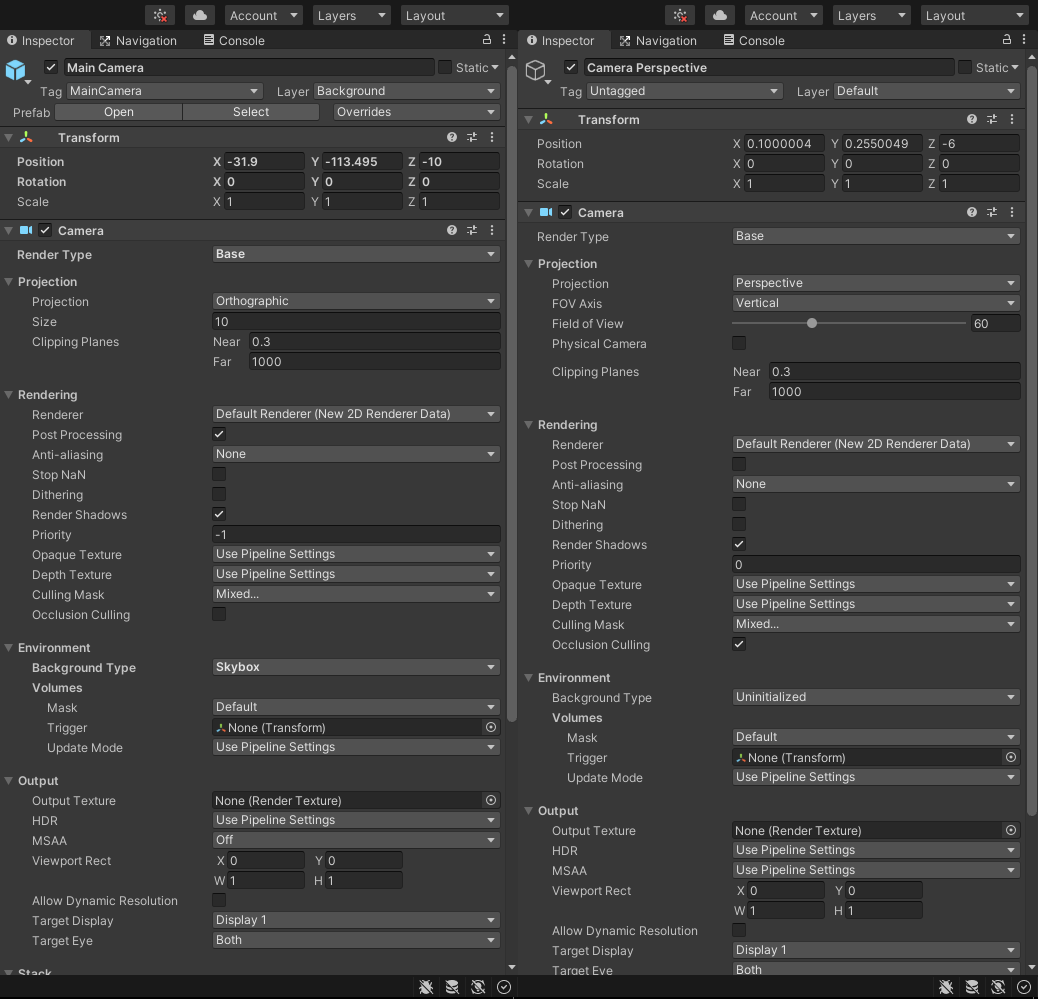
Before I posted here, I’d read a lot about the “Clear flags” and “Depth” functions, but since I’m using Unity 2020, I don’t have those options in the inspector for camera. I did find similar equivalents, though, and set my Perspective camera Background Type to “Uninitialized.”
It almost works now! Both cameras are working and I can see the scrolling parallax movement with the orthographic that I’ve had for months but also noticed the objects with different Z settings had a nice parallax/depth effect from the perspective camera. This is really close to what I’m hoping for, but…
The only problem is that some things are clipping in and out when I move the player (both cameras follow the player in the center of the screen). These are the lowest layer objects and anything that gets near the edge of the screen. I imagine it’s because I don’t quite have the settings for the perspective camera matching the orthographic properly? Here are my current settings: