How do i keep gravity as normal while still having drag for movement when jumping/falling? (847839)

So in my rigidbody fps controller, i ahve a bit of a problem. when you jump, the drag in the air decreases by 6x but there is still drag, you fall a lot slower(sort of like you are on the moon). how can i keep the drag for my movmeent but still have the same gravity?
heres my code

using System.Collections;
using System.Collections.Generic;
using UnityEngine;

public class PlayerMovement : MonoBehaviour
{
    float playerHeight = 2f;

    [SerializeField] Transform orientation;

    [Header("Movement")]
    [SerializeField] float moveSpeed = 6f;
    [SerializeField] float airMultiplier = 0.4f;
    float movementMultiplier = 10f;

    [Header("Sprinting")]
    [SerializeField] float walkSpeed = 4f;
    [SerializeField] float sprintSpeed = 6f;
    [SerializeField] float acceleration = 10f;

    [Header("Jumping")]
    public float jumpForce = 5f;

    [Header("Keybinds")]
    [SerializeField] KeyCode jumpKey = KeyCode.Space;
    [SerializeField] KeyCode sprintKey = KeyCode.LeftShift;

    [Header("Drag")]
    [SerializeField] float groundDrag = 6f;
    [SerializeField] float airDrag = 2f;

    float horizontalMovement;
    float verticalMovement;

    [Header("Ground Detection")]
    [SerializeField] Transform groundCheck;
    [SerializeField] LayerMask groundMask;
    [SerializeField] float groundDistance = 0.2f;
    public bool isGrounded { get; private set; }

    Vector3 moveDirection;
    Vector3 slopeMoveDirection;

    Rigidbody rb;

    RaycastHit slopeHit;

    private bool OnSlope()
    {
        if (Physics.Raycast(transform.position, Vector3.down, out slopeHit, playerHeight / 2 + 0.5f))
        {
            if (slopeHit.normal != Vector3.up)
            {
                return true;
            }
            else
            {
                return false;
            }
        }
        return false;
    }

    private void Start()
    {
        rb = GetComponent<Rigidbody>();
        rb.freezeRotation = true;
    }

    private void Update()
    {
        isGrounded = Physics.CheckSphere(groundCheck.position, groundDistance, groundMask);

        MoveInput();
        ControlDrag();
        ControlSpeed();

        if (Input.GetKeyDown(jumpKey) && isGrounded)
        {
            Jump();
        }

        slopeMoveDirection = Vector3.ProjectOnPlane(moveDirection, slopeHit.normal);
    }

    void MoveInput()
    {
        horizontalMovement = Input.GetAxisRaw("Horizontal");
        verticalMovement = Input.GetAxisRaw("Vertical");

        moveDirection = orientation.forward * verticalMovement + orientation.right * horizontalMovement;
    }

    void Jump()
    {
        if (isGrounded)
        {
            rb.velocity = new Vector3(rb.velocity.x, 0, rb.velocity.z);
            rb.AddForce(transform.up * jumpForce, ForceMode.Impulse);
        }
    }

    void ControlSpeed()
    {
        if (Input.GetKey(sprintKey) && isGrounded)
        {
            moveSpeed = Mathf.Lerp(moveSpeed, sprintSpeed, acceleration * Time.deltaTime);
        }
        else
        {
            moveSpeed = Mathf.Lerp(moveSpeed, walkSpeed, acceleration * Time.deltaTime);
        }
    }

    void ControlDrag()
    {
        if (isGrounded)
        {
            rb.drag = groundDrag;
        }
        else
        {
            rb.drag = airDrag;
        }
    }

    private void FixedUpdate()
    {
        MovePlayer();
    }

    void MovePlayer()
    {
        if (isGrounded && !OnSlope())
        {
            rb.AddForce(moveDirection.normalized * moveSpeed * movementMultiplier, ForceMode.Acceleration);
            //rb.MovePosition(transform.position + (moveDirection.normalized * moveSpeed * Time.fixedDeltaTime));
        }
        else if (isGrounded && OnSlope())
        {
            rb.AddForce(slopeMoveDirection.normalized * moveSpeed * movementMultiplier, ForceMode.Acceleration);
            //rb.MovePosition(transform.position + (slopeMoveDirection.normalized * moveSpeed * Time.fixedDeltaTime));
        }
        else if (!isGrounded)
        {
            rb.AddForce(moveDirection.normalized * moveSpeed * movementMultiplier * airMultiplier, ForceMode.Acceleration);
            //rb.MovePosition(transform.position + -(moveDirection.normalized * moveSpeed * airMultiplier * Time.fixedDeltaTime));
        }
    }
}

heres my inspector
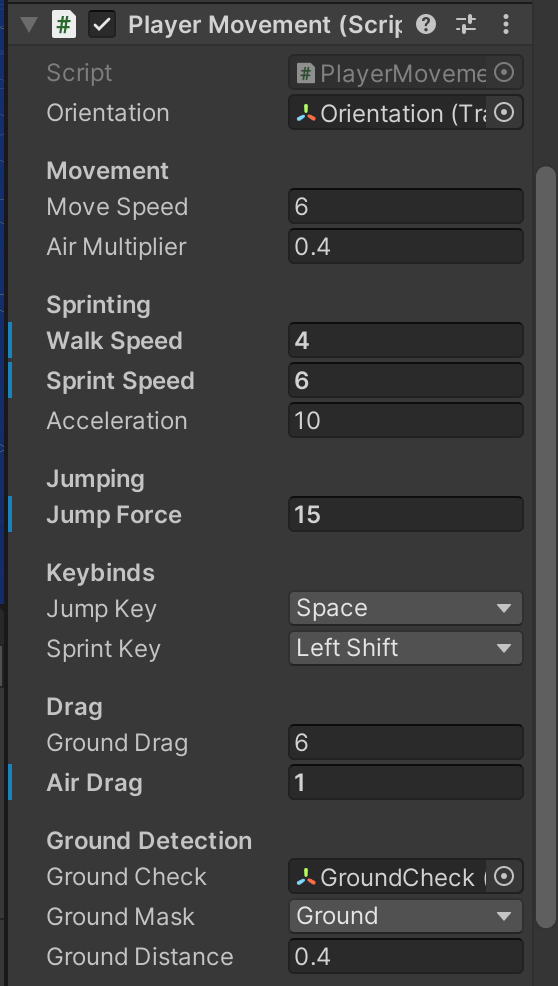
bump

bump… ;-; halp

That is simply not possible. Though it depends on what you mean by

You do still have the same gravity which is about 9.81m/s². You just have an additional counter force. If you have no drag at all, there is no resistance at all. So there is no terminal velocity. The longer the object falls the faster it gets. So the velocity can grow without any bounds up to infinity. If there is any amount of drag there is always a point where the deceleration due to drag equals the acceleration due to gravity. At this point the object does not get faster anymore since no net acceleration is applied to the object. This is called the terminal velocity. In the real world the drag force increases with the velocity squared. In Unity the drag force increases linearly with the velocity. So double the velocity, double the counter force. In both cases you reach a terminal velocity, though in Unity it would be much higher.

I’ve posted some code over here how to calculate the terminal / final velocity based on a constant acceleration and the drag value. I’ve also posted the other variants to calculate the required drag in order to reach a certain terminal velocity given a certain constant acceleration, or to calculate the acceleration required to reach a certain terminal velocity given a certain amount of drag.

Note that the terminal velocity is an asymptotic value. So you slowly get closer to it but in theory you will never reach it. So as you start falling you get faster and faster but as you approach terminal velocity the increase gets smaller and smaller.

That’s why I just said that what you want is not possible. You can’t get the “same behaviour” with or without drag. So the real question here is what exactly is your concern / issue you want to solve? If objects should have drag, it will get harder to accelerate them the faster they are moving. That’s the point of having drag, it resists movement. So you want it to slow down, but you also don’t want it to slow down? If it slows down too fast, make your drag value smaller. If the effect of gravity feels too weak, make it stronger. The physics system is not 100% based on real world physics. However drag already has less effect in Unity / PhysX compared to the real world. Though this statement is not exactly true since as mentioned, real world drag is proportional to the velocity squared and not a linear proportion. You can’t really compare a quadratic function to a linear one.

Of course regardless of how drag is implemented in PhysX / Unity, you can of course always roll your own drag forces. You could apply a drag only to horizontal movement but not to vertical.

To implement a custom drag, all you have to do is apply the inverted current velocity as a force to the object. To get real world drag you can even use the velocity squared. If you don’t want drag on the y axis, just zero it out before applying the force.

var v = rb.velocity;
v.y = 0f;
v = -v;
rb.AddForce(dragFactor * v);

Note that you should use the default ForceMode: Force. This is what actually makes the difference between a hammer and a feather falling. The downwards acceleration is exactly and assuming the hammer and feather have roughly the same projected area and coefficient, the only difference here is the mass. So while gravity is actually independent of mass (it’s an acceleration, not a force), the drag force is not. So while both objects receive the same counter force, it has less effect on the heavier object which makes it slow down less. Unity’s “drag” is not dependent on mass at all. So if you’re looking for a more realistic drag, you should implement it yourself anyways.

ps: Please note that when you posted your original question is was 2:40am here in germany. Your first bump was at 4:46am. At your second bump I just crawled out of bed ^^. So please do not agressively bump a thread without adding anything new.

o wow thx

sry

wait u said to do

v.y = 0f;
v = -v;
rb.AddForce(dragFactor * v);

where exactly would i add this? also could you explain it a little simpler?(sorry, it was kinda confusing)

using System.Collections;
using System.Collections.Generic;
using UnityEngine;

public class PlayerMovement : MonoBehaviour
{
    float playerHeight = 2f;

    [SerializeField] Transform orientation;

    [Header("Movement")]
    [SerializeField] float moveSpeed = 6f;
    [SerializeField] float airMultiplier = 0.4f;
    float movementMultiplier = 10f;

    [Header("Sprinting")]
    [SerializeField] float walkSpeed = 4f;
    [SerializeField] float sprintSpeed = 6f;
    [SerializeField] float acceleration = 10f;

    [Header("Jumping")]
    public float jumpForce = 5f;

    [Header("Keybinds")]
    [SerializeField] KeyCode jumpKey = KeyCode.Space;
    [SerializeField] KeyCode sprintKey = KeyCode.LeftShift;

    [Header("Drag")]
    [SerializeField] float groundDrag = 6f;
    [SerializeField] float airDrag = 2f;

    float horizontalMovement;
    float verticalMovement;

    [Header("Ground Detection")]
    [SerializeField] Transform groundCheck;
    [SerializeField] LayerMask groundMask;
    [SerializeField] float groundDistance = 0.2f;
    public bool isGrounded { get; private set; }

    Vector3 moveDirection;
    Vector3 slopeMoveDirection;

    Rigidbody rb;

    RaycastHit slopeHit;

    private bool OnSlope()
    {
        if (Physics.Raycast(transform.position, Vector3.down, out slopeHit, playerHeight / 2 + 0.5f))
        {
            if (slopeHit.normal != Vector3.up)
            {
                return true;
            }
            else
            {
                return false;
            }
        }
        return false;
    }

    private void Start()
    {
        rb = GetComponent<Rigidbody>();
        rb.freezeRotation = true;
    }

    private void Update()
    {
        isGrounded = Physics.CheckSphere(groundCheck.position, groundDistance, groundMask);

        MoveInput();
        ControlDrag();
        ControlSpeed();

        if (Input.GetKeyDown(jumpKey) && isGrounded)
        {
            Jump();
        }

        slopeMoveDirection = Vector3.ProjectOnPlane(moveDirection, slopeHit.normal);
    }

    void MoveInput()
    {
        horizontalMovement = Input.GetAxisRaw("Horizontal");
        verticalMovement = Input.GetAxisRaw("Vertical");

        moveDirection = orientation.forward * verticalMovement + orientation.right * horizontalMovement;
    }

    void Jump()
    {
        if (isGrounded)
        {
            rb.velocity = new Vector3(rb.velocity.x, 0, rb.velocity.z);
            rb.AddForce(transform.up * jumpForce, ForceMode.Impulse);
        }
    }

    void ControlSpeed()
    {
        if (Input.GetKey(sprintKey) && isGrounded)
        {
            moveSpeed = Mathf.Lerp(moveSpeed, sprintSpeed, acceleration * Time.deltaTime);
        }
        else
        {
            moveSpeed = Mathf.Lerp(moveSpeed, walkSpeed, acceleration * Time.deltaTime);
        }
    }

    void ControlDrag()
    {
        if (isGrounded)
        {
            rb.drag = groundDrag;
        }
        else
        {
            rb.drag = airDrag;
        }
    }

    private void FixedUpdate()
    {
        MovePlayer();
    }

    void MovePlayer()
    {
        if (isGrounded && !OnSlope())
        {
            rb.AddForce(moveDirection.normalized * moveSpeed * movementMultiplier, ForceMode.Acceleration);
            //rb.MovePosition(transform.position + (moveDirection.normalized * moveSpeed * Time.fixedDeltaTime));
        }
        else if (isGrounded && OnSlope())
        {
            rb.AddForce(slopeMoveDirection.normalized * moveSpeed * movementMultiplier, ForceMode.Acceleration);
            //rb.MovePosition(transform.position + (slopeMoveDirection.normalized * moveSpeed * Time.fixedDeltaTime));
        }
        else if (!isGrounded)
        {
            rb.AddForce(moveDirection.normalized * moveSpeed * movementMultiplier * airMultiplier, ForceMode.Acceleration);
            //rb.MovePosition(transform.position + -(moveDirection.normalized * moveSpeed * airMultiplier * Time.fixedDeltaTime));
        }
    }
}

Drag is simply a counter force that is exactly opposing the current velocity. The snipped of code I posted could be used instead of Unity’s “internal” drag. So you would set rb.drag to 0 and just execute those lines in FixedUpdate. Note that dragFactor is just a scaling factor like Unity’s own drag value.

If you look at the real world drag, it’s calculated like this:

F = ρ * v² * C * A

Here “F” is the amount of force that is counter acting the current movement.
“ρ” is the density of the fluid, in our case air
“v” is the current velocity.
“C” is a unit less coefficient that essentially encodes the form and aerodynamic shape of the object
“A” is the cross sectional area.

Since we’re just roughly simulating drag we don’t really care much about aerodynamics or how much area actually fights against the air or how dense the air might be. So we essentially just combine “ρ * C * A” into a single factor which we can fine tune to our liking. In my example I also applied a linear drag instead of a quadratic. If you want to stick closer to the real world, you can do

var v = rb.velocity;
v.y = 0f;
v = -v * v.magnitude;
rb.AddForce(dragFactor * v);

This would essentially be “v²”, though still the y component ignored. So we only apply a counter force in the x-z-plane but leave y alone. So it’s just how “normal” drag works. The faster you move, the greater the velocity vector, the greater the counter force.

i tried doing this

void ControlDrag()
    {
        if (isGrounded)
        {
            var v = rb.velocity;
            v.y = 0f;
            v = -v * v.magnitude;
            rb.AddForce(groundDrag * v);

        }
        else
        {
            var v = rb.velocity;
            v.y = 0f;
            v = -v * v.magnitude;
            rb.AddForce(airDrag * v);
        }
    }

but it didnt rly work…i coudl wall jump, everything was jittery, and you moved very slow when you jumped.

is there a way that i can only apply drag to the x and z axes?

That’s exactly what this code does. Are you sure you set rb.drag to 0? Also you may need to lower your airDrag and groundDrag values.

o…i just added a downward force when in the air