Hi. I am currently making a saving system for my grid-based inventory. I will try to explain how it works now.
I decided to do it by creating several lists. They hold item Id, item quantity, item position on X axis, item position on Y axis and a bool “rotated” which turns on if the item is rotated on the grid.(see picture *1)

Whenever I pick up an item I remove this item’s data from a list and whenever I place an item I add it.
    private void PlaceItem(Vector2Int tileGridPosition)
    {
        bool successfullyPlacedItem = selectedItemGrid.PlaceItem(selectedItem, tileGridPosition.x, tileGridPosition.y);
        if (successfullyPlacedItem)
        {
            selectedItemGrid.storedItemsId.Add(selectedItem.itemData.itemId);
            selectedItemGrid.storedItemQuantityList.Add(selectedItem.itemAmount);
            selectedItemGrid.storedItemPosXList.Add(selectedItem.onGridPositionX);
            selectedItemGrid.storedItemPosYList.Add(selectedItem.onGridPositionY);
            selectedItemGrid.storedItemRotatedBoolList.Add(selectedItem.rotated);

            selectedItem = null;
            rectTransform.SetAsLastSibling();
        }
    }

    private void PickUpItem(Vector2Int tileGridPosition)
    {
        selectedItem = selectedItemGrid.PickUpItem(tileGridPosition.x, tileGridPosition.y);
        if (selectedItem != null)
        {
            selectedItemGrid.storedItemsId.Remove(selectedItem.itemData.itemId);
            selectedItemGrid.storedItemQuantityList.Remove(selectedItem.itemAmount);
            selectedItemGrid.storedItemPosXList.Remove(selectedItem.onGridPositionX);
            selectedItemGrid.storedItemPosYList.Remove(selectedItem.onGridPositionY);
            selectedItemGrid.storedItemRotatedBoolList.Remove(selectedItem.rotated);
            rectTransform = selectedItem.GetComponent<RectTransform>();
            rectTransform.SetAsLastSibling();
        }
    }
I then save data from those lists to a .json file.
    [System.Serializable]
    public class InventoryDataStr
    {
        public List<int> itemIdList;
        public List<int> itemAmountList;
        public List<int> itemPosXList;
        public List<int> itemPosYList;
        public List<bool> itemRotatedBoolList;
    }


    public class InventorySaveSystem : MonoBehaviour
    {

        public void SaveInventory()
        {

            InventoryDataStr saveData = new InventoryDataStr();
            saveData.itemIdList = ItemGrid.instance.storedItemsId;
            saveData.itemAmountList = ItemGrid.instance.storedItemQuantityList;
            saveData.itemPosXList = ItemGrid.instance.storedItemPosXList;
            saveData.itemPosYList = ItemGrid.instance.storedItemPosYList;
            saveData.itemRotatedBoolList = ItemGrid.instance.storedItemRotatedBoolList;

            string json = JsonUtility.ToJson(saveData);
            string filepath = Application.persistentDataPath + "/playerInventory.json";
            System.IO.File.WriteAllText(filepath, json);
            Debug.Log(filepath);

        }
When i want to load the inventory i first load lists data from .json file
    public void LoadInventory()
        {
            string filepath = Application.persistentDataPath + "/playerInventory.json";
            string json = System.IO.File.ReadAllText(filepath);
            InventoryDataStr saveData = JsonUtility.FromJson<InventoryDataStr>(json);

            ItemGrid.instance.storedItemsId = saveData.itemIdList;
            ItemGrid.instance.storedItemQuantityList = saveData.itemAmountList;
            ItemGrid.instance.storedItemPosXList = saveData.itemPosXList;
            ItemGrid.instance.storedItemPosYList = saveData.itemPosYList;
            ItemGrid.instance.storedItemRotatedBoolList = saveData.itemRotatedBoolList;

            ItemGrid.instance.UpdateInventory();
        }
    }
    public void UpdateInventory()
    {
        inventoryController.CreatePrefabForLoading();
    }
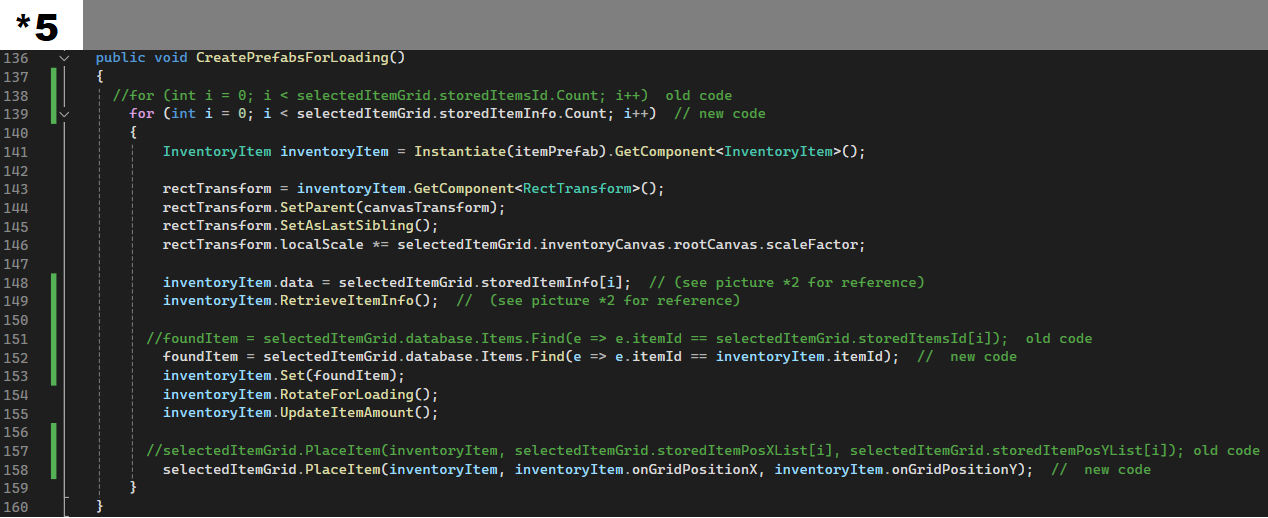
Then I create item prefab and assign it data that i take from saved lists. After that I place it on the grid.
    public void CreatePrefabForLoading()
    {

        for (int i = 0; i < selectedItemGrid.storedItemsId.Count; i++)
        {
            InventoryItem inventoryItem = Instantiate(itemPrefab).GetComponent<InventoryItem>();

            rectTransform = inventoryItem.GetComponent<RectTransform>();
            rectTransform.SetParent(canvasTransform);
            rectTransform.SetAsLastSibling();
            rectTransform.localScale *= selectedItemGrid.inventoryCanvas.rootCanvas.scaleFactor;

            foundItem = selectedItemGrid.database.Items.Find(e => e.itemId == selectedItemGrid.storedItemsId[i]);
            inventoryItem.Set(foundItem);

            inventoryItem.itemAmount = selectedItemGrid.storedItemQuantityList[i];
            inventoryItem.onGridPositionX = selectedItemGrid.storedItemPosXList[i];
            inventoryItem.onGridPositionY = selectedItemGrid.storedItemPosYList[i];
            inventoryItem.rotated = selectedItemGrid.storedItemRotatedBoolList[i];
            inventoryItem.RotateForLoading();

            inventoryItem.UpdateItemAmount();
            selectedItemGrid.PlaceItem(inventoryItem, selectedItemGrid.storedItemPosXList[i], selectedItemGrid.storedItemPosYList[i]);
        }
    }
The problem arises when i’m starting to pick up items with the same data (having the same position on an axis, having the save item amount, e.t.c.).
Since I’m using List.Remove command it removes the first element that matches selected item’s data.
How would I make it so that when I pick up an item it would remove that item’s data from the list instead of removing the first element that matches that data?