I have been searching for about a week now and cant seem to find an answer to this.
I’m creating a game for Ouya, so it will be 100% controller driven. No mouse or keyboard.
I know very little about programming, so everything I’ve done so far has been off stuff I’ve learned from these forums and youtube videos.
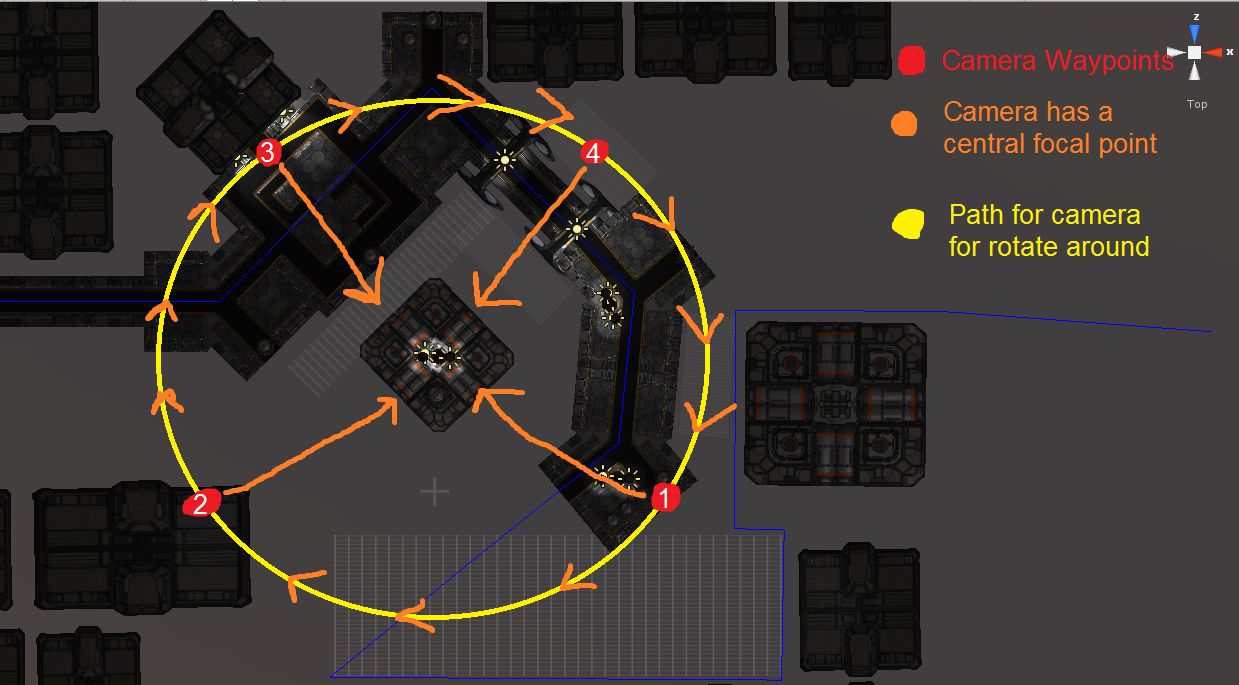
What I have is my main camera looking at a center focal point in the scene. I would like to be able to rotate the camera 45 degrees clockwise by pressing the left trigger, or be able to rotate it counter-clockwise by pressing the right trigger. Clicking a trigger 4 times will return the camera to the original position.
When the camera rotates, I do not want to lose focus on the focal point.
Below, I have a crude diagram of what I’m looking for. This a top down perspective (Y axis)
Any help would be greatly appreciated. And remember, I’m not a programmer so be gentle
var target : Transform;
var distance = 10.0;

var xSpeed = 250.0;
var ySpeed = 120.0;

var yMinLimit = -20;
var yMaxLimit = 80;

private var x = 0.0;
private var y = 0.0;

@script AddComponentMenu("Camera-Control/Mouse Orbit")

function Start () {
    var angles = transform.eulerAngles;
    x = angles.y;
    y = angles.x;

	// Make the rigid body not change rotation
   	if (rigidbody)
		rigidbody.freezeRotation = true;
}

function LateUpdate () {
    if (target) {
        x += Input.GetAxis("Mouse X") * xSpeed * 0.02;
        y -= Input.GetAxis("Mouse Y") * ySpeed * 0.02;

 		y = ClampAngle(y, yMinLimit, yMaxLimit);

        var rotation = Quaternion.Euler(y, x, 0);
        var position = rotation * Vector3(0.0, 0.0, -distance) + target.position;

        transform.rotation = rotation;
        transform.position = position;
    }
}

static function ClampAngle (angle : float, min : float, max : float) {
	if (angle < -360)
		angle += 360;
	if (angle > 360)
		angle -= 360;
	return Mathf.Clamp (angle, min, max);
}
This is Mouse Orbit script and can be changed a little to respond to key press.
On line 27 and 28 it is taking input from the Mouse, this is the line you have to modify.
Thanks Timer for the reply, however I was not able to get this to work.
I got it to work with the controller, but it would start off rotating correctly, but then would rotate under the level and come back up on the other side…weird.
The link you provided had some really good tutorials. Thanks for that. bookmarked it!