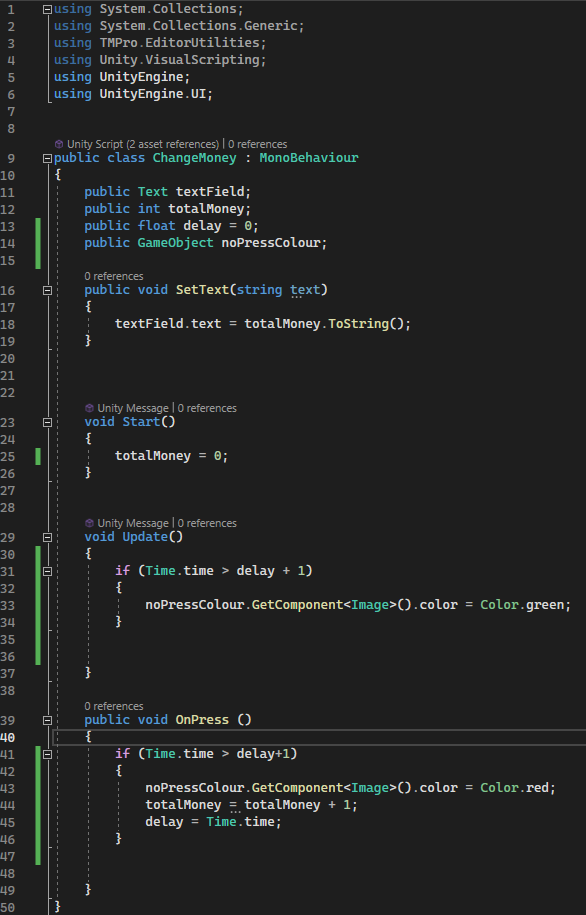
This actually works almost perfectly, it seems to add an issue where at the start of the game ( For about 3 seconds ) pressing the button does nothing.
And after some testing you can click fast enough to add 2 “money” instead of being able to do just 1, any ideas?
Some extra code in there to change the colour of the button to indicate that you can’t press it was added but works fine.
Edit:
This also comes up, even though I’ve assigned it?
The slight initial delay is a result of ‘delay’ being initialized to 0. You could initialize ‘delay’ to -2 to remove the initial delay. Personally I wouldn’t worry about it as I don’t see a user hitting your ‘Add Money’ button within a second of your application starting up.
Money being added twice within a second is probably a result of how you’re updating/viewing your money text. Is it being updated elsewhere with some sort of delay?. Or are you viewing the money variable directly in the inspector? Is it possible that your Unity editor is also being delayed for some reason?.
Tried to resolve this issue by using the debug.log to find what was returning as null, as expected the variable noPressColour was returning as null, so I assigned it on game start. Now not returning as null on the debug log
Although this worked after testing the button didn’t turn red, and I started writing this post but stopped halfway to figure out the problem myself. And it took me a while but the script was assigned to both the canvas and the button, and the script had all of the required components assigned on the button but not canvas which caused it to not work.
Point is thank you for mentioning that issue to me, would have ignored it otherwise.
That’s the full code, I also tried what @zulo3d suggested on the delay, but even increasing the delay to an extortionate number doesn’t seem the fix the small delay at the start. Not a big deal since as he mentioned nobody would realistically press the button that quick into the game but any fix or advice for it would be appreciated, thanks.
The issue for being able to double click seems to still be around, any help?
This is also the first project I’m trying to take “seriously” and I’m generally new to this, sorry for the hassle.
In general, DO NOT use Find-like or GetComponent/AddComponent-like methods unless there truly is no other way, eg, dynamic runtime discovery of arbitrary objects. These mechanisms are for extremely-advanced use ONLY. If something is built into your scene or prefab, make a script and drag the reference(s) in. That will let you experience the highest rate of The Unity Way™ success of accessing things in your game.