Hi everyone,
does anyone know how to calculate the Y rotation value of a surface.normal ?
In surf shader, I got the IN.WorldNormal.xyz?
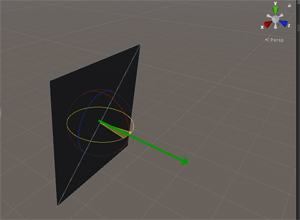
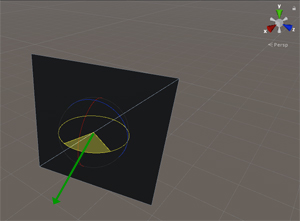
But how do I get the worldspace y-rotation ?
float yRot = ?? IN.WorldNormal.xyz
Thanks a lot!
Hi everyone,
does anyone know how to calculate the Y rotation value of a surface.normal ?
In surf shader, I got the IN.WorldNormal.xyz?
But how do I get the worldspace y-rotation ?
float yRot = ?? IN.WorldNormal.xyz
Thanks a lot!
You can get the Y axis angle of a vector by calculating the arc tangent of the xz components of the vector.
float yRot = atan2(IN.WorldNormal.z, IN.WorldNormal.x) * (180.0 / UNITY_PI);
You should also never, ever use that code, because it’s probably not actually what you want to do.
What are you planning on using the rotation angle for?
Thanks for you answer.
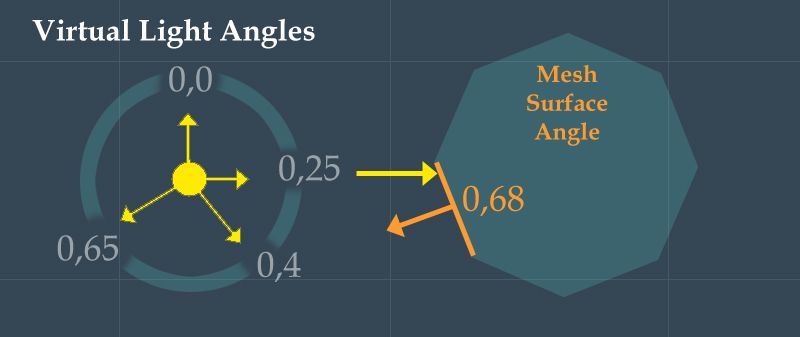
From another function I got a light angle from a virtual light. For performance reasons the light angle is a normalized single float from 0.0 to 1.0 in world space.
TopDown view:
The surface normals should be also calculated as normal angles from 0.0 to 1.0 in world space around the Y-axis.
I want to compare the light-angle with the surface-angle… and decide if the surface get lit or not. The delta result can be used to create a light falloff as well.
surf()
float lightAngle = virtualLightAngle(…);
float yRot = atan2(IN.WorldNormal.x, IN.WorldNormal.z) * (180.0 / UNITY_PI);
delta = yRot - lightAngle;
Currently the example returns 1 between 0.75 - 0.25 and 0 between 0.25 and 0.75.
Not sure what I have to change in this case to get a 0 to 1 value around 360°.

Shader "Custom/LightAngleSurface"
{
    Properties
    {
        _Rot("Rotation", Range(0,1)) = 0
    }
        SubShader
        {
            Tags { "RenderType" = "Opaque" }
            LOD 200

            CGPROGRAM
            #pragma surface surf Standard fullforwardshadows
            #pragma target 3.0

            sampler2D _MainTex;
            struct Input
            {
                float2 uv_MainTex;
                float3 worldNormal;
            };

            half _Rot;

            void surf(Input IN, inout SurfaceOutputStandard o)
            {
                float lightAngle = _Rot; // simply by testing via slider
                float yRot = atan2(IN.worldNormal.x, IN.worldNormal.x) * (180.0 / UNITY_PI);;
                .....
                o.Emission = yRot;

                o.Metallic = 0;
                o.Smoothness = 0;
                o.Alpha = 1;
            }
            ENDCG
        }
            FallBack "Diffuse"
}
atan2 returns the angle in radians with a range of -pi to +pi. Multiplying it by (180.0 / UNITY_PI) converts that from radians to degrees. You want an angle in tau units (1 tau == 2 pi (aka radians) == 360 degrees). For that you’d need to divide the output of atan2 by (2.0 * UNITY_PI) and add 0.5. That would rescale the -pi to +pi output to -0.5 to +0.5 and adding 0.5 would offset it to be 0.0 to 1.0 range.
However, for what you’re trying to do “for performance reasons” you really should be passing in a normalized float2 vector for each light direction and doing a dot product against the world normal. atan2 is very, very expensive, which is why I said you should never use the code example I gave you. Worse case if you still want the angle in the end you can take the dot product of the light direction and normal and put that through acos, which is still expensive, but less so than atan or atan2. If for some reason you’re really stuck on using a single float per light, convert it to a normalized vector with the sincos function.
// convert 0.0 to 1.0 range to a normalized direction vector
float s, c;
sincos(_Rot * (2.0 * UNITY_PI), s, c);
float2 lightDir = float2(s, c);

// dot product between the light dir and world normal
float ndotl = dot(lightDir, normalize(IN.worldNormal.xz));
// result is a value between -1 (away from the light) and +1 (towards the light)
Thanks a lot for your help!
    // convert 0.0 to 1.0 range to a normalized direction vector
    float s, c;
    sincos(_Rot * (2.0 * UNITY_PI), s, c);
    float2 lightDir = float2(s, c);

    // dot product between the light dir and world normal
    float ndotl = dot(lightDir, normalize(IN.worldNormal.xz));
    // result is a value between -1 (away from the light) and +1 (towards the light)
Works nice!
The result seems to be better without normalize(). It’s more smooth at the axis position.
I have optimized the sincos() part to some simple branches and math. Do you think the footway is a bit faster than sincos() ?
There is not much code between the if()else involved, so I think the compiler would decide to use FLATTEN as well.
half x = _Rot * 4.0;
if (_Rot > 0.75)      x = -1.0 + ((_Rot-0.75) * 4.0);
else if (_Rot > 0.25) x =  1.0 - ((_Rot-0.25) * 4.0);

half y = 1.0 - (_Rot * 4.0);
if (_Rot > 0.5)       y = -1.0 + ((_Rot-0.5) * 4.0);
half dotN = (x*IN.worldNormal.x) + (y*IN.worldNormal.z);
Args… you posted * in the first code, but I over read div. My fault!!!
float yRot = atan2(IN.worldNormal.z, IN.worldNormal.x) / (2.0 * UNITY_PI) + 0.5;
Now I got the correct result.  But anyway if atan2 use a lot more GPU cycles, then sincos() is better for sure.
Yeah, highly depends on what you want. Without the normalize it’ll act the same as if you were doing normal lighting which will probably look better with 3D objects.
Most hardware these days do sin and cos in hardware in a single cycle each, so 2 cycles. Your “optimized” option is more like 12+ cycles. Just stick with sincos.
atan2 is something like 30~50 cycles depending on the device. acos is more like 15~20. If you want is a full 360 gradient that’s linear, do the dot product and call acos on it. That’ll be faster than atan2.
Thank you again!
About testing the GPU speed. When testing code on a gpu, it’s very important to create code the compiler really execute. There are many and clever optimization logics on the compiler side.
If I use a for loop, to test the sincos vs my code, or any other code. I must use the result in a variable result += xxxxxx;
If I have loop with eg. 100 iterations for testing and do not add the result, then the loop will be running only 1 time, instead of 100 times.
Do you have any special test case or tool in this case? Or does nvidia provide information about cycles of commands?
I test normally with 100 fullscreen planes placed 1cm into z depth and ztest off and compare the fps simply.
Nope. Documentation wise they kind of explicitly avoid this. AMD often has more info on this, but it’s not always easily found (and a lot of the documentation is old).
A loop is a decent enough test, though there is a difference between unrolled and dynamic loops. Unrolled loops will generally be faster as long as the resulting shader doesn’t end up being abusively large (say, an unrolled loop of 500000, which might result in a single shader that’s in the tens or hundreds of MB), where as dynamic loops with a fixed count are still quite fast and can do hundreds of thousands of iterations on some GPUs without an issue (for simple math operations). I just make sure I look at the generated shader code to know which one the GPU is doing, and use [UNITY_BRANCH] and [UNITY_FLATTEN] to force a specific path if wanted.
Also a pretty good test, but be sure to compare against 100 full screen planes doing nothing but outputting a solid color. Lots of overlapping planes is a great test bench, but it’s potentially stressing the fill rate as much or more than the ALU (shader math) so you need to check the difference.
The other option would be to use something like Nvidia NSight or the Intel & AMD equivalents, which often give real timing information down to nanoseconds for execution. Won’t necessarily be per instruction, but can be per-primitive-pixel, which you can use to reverse engineer some of those timings.
2019,3,4f1 DX11 - WIN7/10/64
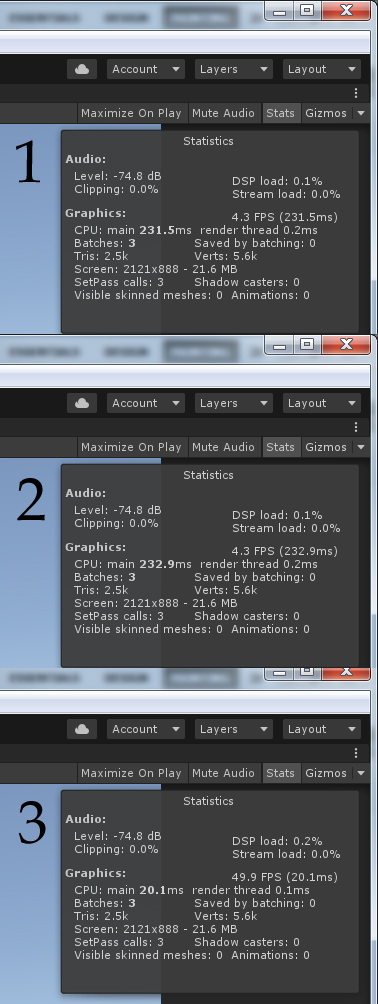
Today I’ve done a test with 3 different versions on a NVIDIA 1060 6GB. Added this to the surf() part of a simple standard shader. It was important to use: _Rot+i; and dotN +=; in all test cases. Otherwise the loop is in-existent.
 void surf(Input IN, inout SurfaceOutputStandard o)
           {
                half s, c;
                half2 lightDir = half2(s, c);
                half radian;
                half cosR;
                half sinR;
                half2 v = half2(0,1);

                half x, y, dotN;
                for (int i = 0; i < 100000; i++) {

                    //// Image 1
                    //sincos((_Rot+i) * (2.0 * UNITY_PI), s, c);
                    //lightDir = half2(s, c);
                    //dotN += dot(lightDir, IN.worldNormal.xz);

                    // ============================================

                    //// Image 2
                    //radian = (_Rot+i) * (UNITY_PI * 2);
                    //cosR = cos(radian);
                    //sinR = sin(radian);
                    //x = v.y * sinR;
                    //y = v.y * cosR;
                    //dotN += dot(half2(x, y), IN.worldNormal.xz);

                    // ============================================

                    // Image 3
                    x = (_Rot +i) * 4.0;
                    if (_Rot > 0.75)        x = -1.0 + ((_Rot - 0.75) * 4.0);
                    else if (_Rot > 0.25)    x =  1.0 - ((_Rot - 0.25) * 4.0);
                    y = 1.0 - (_Rot * 4.0);
                    if (_Rot > 0.5)         y = -1.0 + ((_Rot - 0.5) * 4.0);
                    dotN += (x*IN.worldNormal.x) + (y*IN.worldNormal.z);

                    // ============================================

                   // Image 4
                   // dotN += test(_Rot + i, IN.worldNormal.xz);

                   // Declare this above surf()
                   // float test(float i, float2 inwn) {
                   //      half x = (i) * 4.0;
                   //      if (i > 0.75)       x = -1.0 + ((i - 0.75) * 4.0);
                   //      else if (i > 0.25)   x =  1.0 - ((i - 0.25) * 4.0);
                   //      half y = 1.0 - (i * 4.0);
                   //      if (i > 0.5)        y = -1.0 + ((i - 0.5) * 4.0);
                   //      return (x*inwn.x) + (y*inwn.y);
                   // }
                }

                o.Emission = dotN;
           }
The benchmark results:
Scenario Image 4 was very expectable. A function call with parameters has exorbitant performance costs.
All tests running at the same resolution like this:
Could it possible that only Cuda can handle the sin/cos and other intrinsic commands in one cycle on SFU?
>A warp of 32 special-function instructions is issued in a single cycle but takes eight cycles to complete on the four SFUs<
Fascinating! Basically that means sin and cos can take one cycle, as long as the shader can do something else while it waits for the return value. Similar to sampling textures.
Still faster than atan or acos. I’d be more curious about the cost of using a float2 direction vector with the dot product. Something like.
dotN += dot(_Dir + float2(i, i+i), IN.worldNormal.xz);
That means, if it’s possible to use tex2d() at first place, you get the alu for free, while the gpu sit n’ wait for the texlookup also. But it’s not that easy task to coordinate previously what should happen behind the scenes.
surf() {
float4 n = tex2d(...);
float4 a = tex2d(...);
// do some alu for free here, if possible.
}
Yeah. Shader compilers will sometimes reorder the code so that textures get samples early for you, but it’s not guaranteed, and the graphics drivers can change things too.
It’s good to think about it, but even if you setup your code to be as optimal as possible, the shader compile is still going to do what it wants to it.
I also decided to prevent loop speed tests generally. 100 plane/ztest=off is more realistic and its quickly done by a script. Thanks for you kind help on this!
Unfortunately I need a small different approach and I must ask again for a little thing.
How to calculate the float2 lightDir= ?? from the surface worldNormal.xz and the lightPosition.xy?
Then to use in float ndotl = dot(lightDir, normalize(worldNormal.xz));
Thank you.
When saving a normalized single deg angle in a RGBM texture, then I can’t use bilinear filtering. Point Filtering caused extreme banding, if the surface is near the light position (left image).

You can’t. You need the light position and surface’s world position.
Yes, I have for sure the world position of the pixel, surface normal of the pixel and Lightposition,x.z
Normaly I can calculate the L=light position P=point position by <Lx1 - Px2, Ly1 - Py2>
float2 lightDir = lightPos-worldPixPos… but anything goes wrong here when i use:
float2 lightDir = lightPos-worldPixPos;
// dot product between the light dir and world normal
float ndotl = dot(lightDir, normalize(worldNormal.xz));
Or should that work?
dot(normalize(lightPos - worldPos), worldNormal)
But now you’re just doing generic Phong shading…
Thanks!
A) Great the direction light ambient light is now correct with.
float ndotl_dir = max(dot(normalize(lightDir), worldNormal.xz), 0);

… but unfortunately light fade is to harsh for an ambient effect. The unity ambient light use the following code to get a smoother result over an axis.
float3 ambdown = lerp(0, ambdown.rgb, smoothstep(0, 1, 1-worldNormal.y));
So I thought about to use smoothstep on worldNormal.xz, but that results in a totally wrong light direction behavior. I also tried different values, but it does not.
float2 wxz = float2(smoothstep(0, 1, worldNormal.x), smoothstep(0, 1, worldNormal.z))
float ndotl_dir = max(dot(no rmalize(lightDir), wxz ), 0);
Is there any chance to get a smoother fading result like this example when using
float ndotl_dir = max(dot(normalize(lightDir), ?? ), 0); ?

They’re doing a smoothstep on the y because worldNormal.y is the same as dot(half3(0,1,0), worldNormal.xyz). In other words you want to apply the smoothstep to the dot product, not the components of the vector.
That is, again, just modifying the results of the dot product. Could be as simple as dot() * 0.5 + 0.5 or smoothstep(-1, 1, dot()) for something slightly smoother.