World Space To Tangent Space

So, I tried googling this a bit, forgive me if its been answered before and I have failed to find the thread.

Basically I have a normal map that is in world space, as I understand it, it is not possible to convert this world space normal map to tangent space inside a surface shader, is that true?

I dont particularly want to write a vertex/fragment shader at the moment, so if the above is true, then the next best thing I can do is to turn the world space normal map into a tangent space normal map with respect to a single object. In this case, as the most common usage for the world space normal map will be to tile it on terrain, I would like to convert it into the tangent space of a quad facing up (which would be (0,1,0) in world space).

How would I go about turning the world space normal map to a tangent space normal map with respect to (0,1,0)?

Thanks for the help.

Surface shaders do indeed only work with tangent space maps. By that I mean the o.Normal value must be a tangent space normal for the object to render properly. It is possible to transform a world space normal into tangent space, but it’s a little ugly.

However my first question would be why are you using a world space normal map? Is there a reason you can’t regenerate the normal map as a tangent space normal map?

If not, then you could look at this shader which implements proper triplanar normal mapping in a Surface shader.

It generates normals in world space, but then transforms them into tangent space. The important lines for you are #37-#42 and #152.

2 Likes

Thanks for your response.

In regards to your first question, I would be interested in regenerating the normal map in tangent space, but I am unsure how. I do not want to use external tools to do it for me, so if there is an explanation for how to do it in Unity I would very much be interested (I know how to work with modifying textures either on import or selectively, so that detail can be skipped, I mainly require the math/logic behind doing the transformation).

As for your shader, I was very interested to know if it was possible to do something like that, however when I try and use it I get “expression left of .“internalSurfaceTtoW0” is not a struct or array” in my shader, even though I have
float3 worldNormal;
float3 worldPos;
INTERNAL_DATA

declared in my Input structure. Do you know why this might happen? Using WorldNormalVector function works just fine.

Did you include the long #if defined(...) line and everything else between line 37 and line 42? You really do need all of that for this to work. If you only copied line 39 it will give you that error. If you read the comment on line 37, the error you’re getting is explicitly what it is referring to.

You would want to do this in an external program from the original source assets used to produce the world space normal map. Assuming your world space normal map is 8 bits per channel (ie: 24 bit RGB), converting that to a tangent space normal map (which would also be 8 bpc) would introduce a lot of quality loss due to double quantization. To explain that your basic 24 bit image version of a normal map looses a lot of data from the original data that was generated, but this is usually okay as it’s not that obvious for most cases. When converting from world space to tangent space you’d taking that already lossy data of the 24 bit world normal map, and then loosing more information as that new tangent normal (which is going to be calculated in the shader using 32 bits of precision per channel) would also need to be saved into an 8 bit per channel texture. It’s like taking an image saved as a .JPG and saving it again as a .JPG, you loose data every time.

But is is possible, but not advised.

If you want to convert a world space normal map into a tangent space one you would have to render a mesh out using a shader which converts the world space normal into tangent space and renders that as a color using the mesh’s UVs to determine the screen space position. That mesh would need to be rendered with a camera that has a render texture as it’s target that is the dimensions of the texture you want, and then save that texture as an asset or to disk as a png.

Yea, I included the entire section, and then I noticed that it kept defaulting to the else clause, which doesnt actually do anything, because it simply returns the provided normal. So I removed the conditional and forced it and saw that it didnt work because as the error says, those variables of the Input IN do not exist.

I should have phrased my question better in light of that, my question is rather, why is the first conditional not being met
#if defined(INTERNAL_DATA) && (defined(UNITY_PASS_FORWARDBASE) || defined(UNITY_PASS_FORWARDADD) || defined(UNITY_PASS_DEFERRED) || defined(UNITY_PASS_META))

INTERNAL_DATA should be defined, because I am actually using it successfully for other functions (like WorldNormalVector) and I am assuming UNITY_PASS_DEFERRED is defined because I am using deferred rendering.
Do you have any idea why this conditional would keep failing even though I have the Input structure defined the same way you do and successfully use other functions that require me to have INTERNAL_DATA defined?

For reference, this is the shader im testing with:
https://hastebin.com/raw/judagawuxu

And actually it just produces (0,0,0) on all faces of an object, im not sure why. I would expect (0,1,0) as a world space vector to light all the surfaces given my current sun orientation.

Further edit:
It looks like this:

Basically, no matter what world vector I give as input, it turns every surface to face (0,0,0) in world space.
Also my interpretation above of which branch of the conditional being executed may be incorrect, I guess what you meant was that, the function does work but it breaks if I remove the else statement due to reasons that I dont know/understand. I naively assumed that if I comment out the else condition and the shader breaks, that its because the else branch is being executed, but I guess thats not the case, because its not actually replacing the definitions with “normal” but rather just orienting every surface to (0,0,0) in world space, regardless of my normal input.

As for the issue of doing it in an external program. The issue is that I dont have access to the source assets. Originally the material was made a while ago, and actually for UE4, where in the shader they simply use the transform vector node (from world space to tangent space): https://docs.unrealengine.com/latest/INT/Engine/Rendering/Materials/ExpressionReference/VectorOps/#transform

With this normal map as input. I have accounted for the differences in what each of x,y,z represent in UE4 vs Unity, such that I reorder whatever I sample from the normal map to correctly match Unity, but I still have the issue I described.

I understand your point about losing information by quantizing the data again into 8 bits from the 32 bit value that was computed using the 8 bit source, that wouldnt be ideal. But I guess my options are limited given by current position.

It seems however given your description on how I might do it, that either way I need to be able to convert from world space into tangent space inside a shader, and I am still unable to do that :frowning:

Because apparently the Surface shader generation code isn’t actually filling out the internalSurfaceTtoW0 vectors. You have to use WorldNormalVector somewhere in the surface shader and have that data really get used (even in multiplied by 0.000001, can’t be 0.0) for it to pass the data you need, which is silly, but that’s what Surface shaders do. It also seems additionally broken with custom lighting models, so that doesn’t help.

Surface shaders are painful … the data is there, but you have to go through so many hoops to get it to not “optimize” it away.

So, there’s option #2. Pass the data you need using custom input data.
https://discussions.unity.com/t/637023/6

Less efficient, but it has a better chance of “just working”.

Ah… okay that actually makes sense, I guess if the data is not being used then either Unity or the compiler is optimizing it away.

Here is a shader that tests both implementations, using your WorldToTangentNormalVector function, and also initializing all the data in a vertex shader (this one is a bit less appealing to me, because if I use tessellation I cant write into Input without making further modifications, at least for surface shaders).

https://hastebin.com/raw/ukunexilit

Both approaches work in this shader, at least as far as I can tell. So much appreciated :smile:

However you mentioned:
“It also seems additionally broken with custom lighting models, so that doesn’t help.”

Could you elaborate on this? Because I do actually use custom lighting functions, but mainly just modifications to LightingCustom_Deferred and LightingCustom_GI, as well as my own BRDF. Should I be expecting any problems,and if so, of what kind?

Yeah, for whatever reason Unity simply did not include a function to do that with their Surface shaders, which are roughly analogous to Unreal’s node based material, in terms of hiding most of the complicated parts of the shader from the user and just letting them fill out a list of needed values.

So you understand, there’s no problem doing any of this in a vertex fragment shader. It’s fairly straight forward there, you compute the data you need and use it, done. All this pain is from Unity Surface Shader generator code making assumptions and doing unnecessary optimizations.

The node based shader tools for Unity, Shader Forge and Amplify Shader Editor, both have ways to handling world to tangent space transforms. Shader Forge is all custom and directly generates vertex fragment shaders, so it has no problems. Amplify Shader Editor builds on top of Surface Shaders, so they do have this problem, but my understanding is they solve it with the brute force method … basically the option #2 I linked to above.

Because surface shaders suck if you want to do “simple” things. Here’s a shader that converts a world space normal map to tangent space and outputs the color in UV space.
Shader Code

Shader "Custom/World Normal to Tangent Normal" {
    Properties {
        [NoScaleOffset] _Normal ("World Normal", 2D) = "bump" {}
    }
    SubShader
    {
        LOD 100

        Pass
        {
            Cull Off

            CGPROGRAM
            #pragma vertex vert
            #pragma fragment frag
         
            #include "UnityCG.cginc"

            struct appdata
            {
                // float4 vertex : POSITION;
                float2 texcoord : TEXCOORD0;
                float3 normal : NORMAL;
                float4 tangent : TANGENT;
            };

            struct v2f
            {
                float4 pos : SV_POSITION;
                float2 texcoord : TEXCOORD0;
                half3x3 worldToTangent : TEXCOORD1;
            };

            sampler2D _Normal;
         
            v2f vert (appdata v)
            {
                v2f o;
                o.pos = float4(v.texcoord * 2.0 - 1.0, 0.5, 1.0);
                o.texcoord = v.texcoord;

                half3 wNormal = UnityObjectToWorldNormal(v.normal);
                half3 wTangent = UnityObjectToWorldDir(v.tangent.xyz);
                // compute bitangent from cross product of normal and tangent
                half tangentSign = v.tangent.w * unity_WorldTransformParams.w;
                half3 wBitangent = cross(wNormal, wTangent) * tangentSign;
                // output the world to tangent space matrix
                o.worldToTangent = half3x3(wTangent, wBitangent, wNormal);

                return o;
            }
         
            fixed4 frag (v2f i) : SV_Target
            {
                half3 worldNormal = tex2Dlod(_Normal, float4(i.texcoord.xy, 0, 0)).rgb * 2.0 - 1.0;
                return fixed4(normalize(mul(i.worldToTangent, worldNormal)), 1);
            }
            ENDCG
        }
    }
}

The issue is Unity’s Surface shader generator is pre-maturely optimizing it away, since the data is being used, just not in a way the generator was written to check for. Hence the error. They could pass the correct data along 100% of the time and the shader compiler would properly optimize it away for them, but they don’t. The vast majority of the time this isn’t a problem and it reduces shader compile times, so there is a reason they’re doing it, but since they did not anticipate people wanting to output world space normals in Surface shaders it becomes an issue for the few of us who do. The funny thing is after the surface function it immediately transforms the tangent space normal output of the surf function into world space. Much could be solved by having an option to simply skip that line. However I have a suspicion that Unity is looking to sunset Surface Shaders entirely as they’re overhauling their rendering systems from the ground up, so I don’t expect to see this feature ever added.

Just that my hack to get access to the tangents seems to fail when using the custom lighting model, but I didn’t spend time to figure out why. I converted the first shader you posted to use Standard and it all “just worked” (with the addition of WorldNormalVector() * 0.0001), but I could not reproduce it with the custom lighting function. With the “option #2” you don’t have to worry about that.

Yea, I guess all the problem starts when choosing a surface shader :smile:

Your vertex/fragment shader made things clear to me, tied in exactly with that the macro to give the rotation matrix was doing behind the scenes.

For whatever reason your hack works fine with my 2 custom lighting functions declared, at least I didnt notice any errors.

Well, I believe that answers everything that confused me originally, if I wish to make a new normal map out of it I can do what you presented before before. I assume that I dont need to do it through a shader and render target, if I want to transform into the tangent space of a uniform surface all with the normal (0,1,0) in world space, then I should be able to do that math in a script correct? As I no longer have to deal with vertices and their normals, the normal in question is always (0,1,0) and I just apply the matrix transforms?

Also this is entirely unrelated, but now that it worked I noticed an issue with the way I was converting world space normals from UE4 into unity. Using the following link:
http://www.aclockworkberry.com/world-coordinate-systems-in-3ds-max-unity-and-unreal-engine/

I assumed that if I sample the normal map into the vector3 topLayerNormalTemp then:
half3 topLayerNormal = half3(topLayerNormalTemp.y, topLayerNormalTemp.z, topLayerNormalTemp.x);

should give me the correct world space normal in Unity, but it seems this is incorrect. It would appear that
half3 topLayerNormal = half3(topLayerNormalTemp.x, topLayerNormalTemp.z, topLayerNormalTemp.y);
instead gives the correct normal, but im unsure as to why as I kind of just assumed matching the variables that represent forward, right, up would give the correct conversion. Would you happen to know why the top line is wrong and the bottom line is right?

In anycase, I appreciate all the help you have offered me so far, its been very enlightening.

I noticed that using the above techniques, if I rotate an object around the Y axis, the normals are not updating accordingly. What is the reason for this? Is the unity_WorldToObject variable not updating properly when the object is being rotated?

I couldn’t tell you why the world normals aren’t working as you expect with out more explicitly seeing what you’re trying to do and the world space texture you’re using. Your original assumption for the proper swizzle seems like it should have worked, but I haven’t had my head in Unreal Engine for a while so I couldn’t say for sure.

As for why rotation might not be updating unity_WorldToObject, if the object is getting batched, this will indeed prevent that from updating (it will always be an identity matrix for batched meshes). You can try adding Tags { "DisableBatching" = "True" } to your shader.

I added that tag, but doesnt seem to change anything, does batching even happen if I only have 1 object in the entire scene?

The way I am testing at the moment is the following shader code:
https://hastebin.com/raw/uzawoticam

And the following albedo + normal map:
https://www.dropbox.com/s/mqyk8uaqbhuw0k3/albedo_tex.TGA?dl=0
https://www.dropbox.com/s/4zn8mqbtsgj8x0b/world_space_nrm.TGA?dl=0

I use a single quad as the mesh and it looks fine at X rotation of 270 degrees (at 90 degrees the shadows are back to front). Also rotating around the Y axis does absolutely nothing to the shadows, only the X axis rotation causes an inversion (which is also incorrect).

I tried using a C# script to generate the appropriate matrix and pass it into the shader via a uniform variable, the script is:
https://hastebin.com/raw/omahugoret

Now, with this matrix the object does accurately update based on rotation, but still incorrectly, in a different manner. With this, as I rotate around the Y axis the entire mesh goes dark slowly.

Im leaning towards an error in the math/logic and maybe theres some features of unity I dont understand, but cant seem to get any further.

Edit: I feel one of the issues is maybe that tangent.w is not updating by rotating the object. Intuition tells me that the sign of this should flip as I rotate the object, but this its just a constant -1 no matter what I do.

That normal map is your average tangent space normal map, just in Direct3D format (i.e.: -Y, or green channel “down”, which is what Unreal uses) instead of OpenGL format (i.e.: +Y, or green channel “up”, which is what Unity uses). If you just invert the green channel in the graphics tool of your choice and use it as a normal map in a surface shader with out any of the world space stuff you’re doing it should “just work”. Maybe I’m not understanding why you’re trying to use it as a world space normal map.

edit: Note, if you’re using a world space normal map and shader that treats said normals as world space, rotating the object should have no effect on the normals. That is the definition of world space normals. If you want the object’s rotation to alter the normals, then they would be object space normals. However, as I mentioned above, the normal map you posted appears to simply be Direct3D tangent space normal maps. Those just happen to line up with Unreal’s world space if on an appropriately aligned quad facing up.

Thats strange. Actually flipping the green channel and using it normally was one of the first things I tried, however I was getting inconsistencies, like the following:

The cube in this case has the correct normals given the direction of the sun (coming from the left).
When you use the normal map I provided to you, and just unpack it normally (with a flipped green channel), does the normal map work properly on any mesh? (Say a cube and a quad).

I originally wanted to use it as a world space normal map because I wanted it to always point the same way, but then I figured that would require too many changes to my existing shaders. I think me expecting rotations from treating it as world space was me having a brain freeze, you are absolutely right, they would obviously not rotate with the object.

My goal now is to just use it as a tangent space normal map, but I am unsure why its not behaving the same on different objects, the mesh for the cube and quad are Unity standard meshes, and the shader is simply unpacking it so I dont really know what to look for now.

Yes. After flipping the green channel and using it with the Standard shader it worked like a tangent space normal map, which is to say it worked correctly on all geometry with proper normals & tangents. However I would note that in your example your quad appears to be inverted (upside down). If you notice your UVs are mirrored between the quad and box. Try switching to the Standard shader and I suspect the quad will stop showing from that view due to back face culling being enabled.

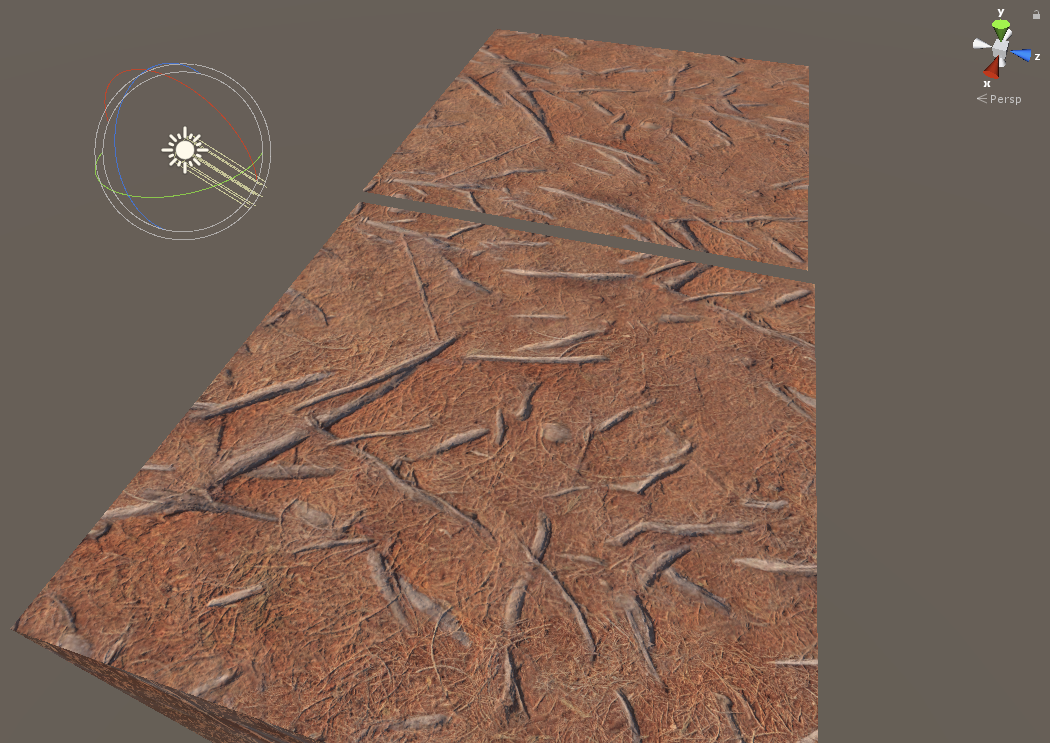
Here I have your normal map on a quad and box similar to your setup, though I have the quad’ X scaled to -1 to reproduce your example. I opened your normal map in Photoshop and inverted the green channel, then resaved. In Unity the texture is set to be a Normal Map. Both are using the same material using the Standard shader.
3293200--255141--mirrored normals.png

If you want a shader that has culling disabled, you’ll need to flip the normal in the shader using VFACE, but you only want to flip the Z direction, not the entire normal. Note, flip the normal, not the normal map.

struct Input {
    float2 uv_MainTex;
    fixed facing : VFACE;
};

...

o.Normal = UnpackNormal(tex2D(_BumpMap, IN.uv_MainTex));
o.Normal.z *= IN.facing;