How to do a random tiled map for a turn-based game in C# - Beginner Level

Hi there!

I am currently in the process of teaching myself C# and try to move along with problems that are pertinent to a game I have in mind.

The game is a turn-based squad combat game and at first may remind you of games like Space Hulk or the old XCOM.

When you send your squad on a mission (which happens a lot ;-)) obviously it’s preferable if the map you are on changes.

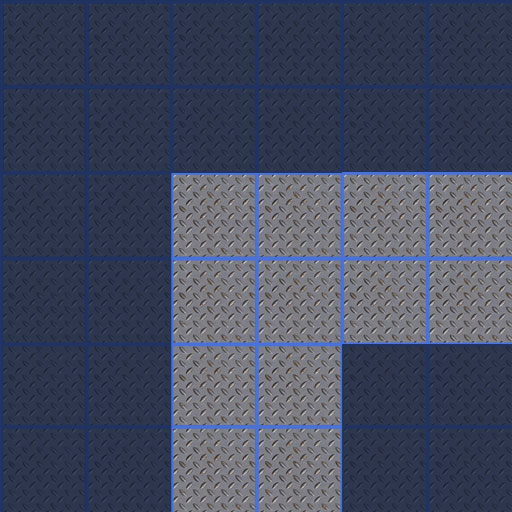
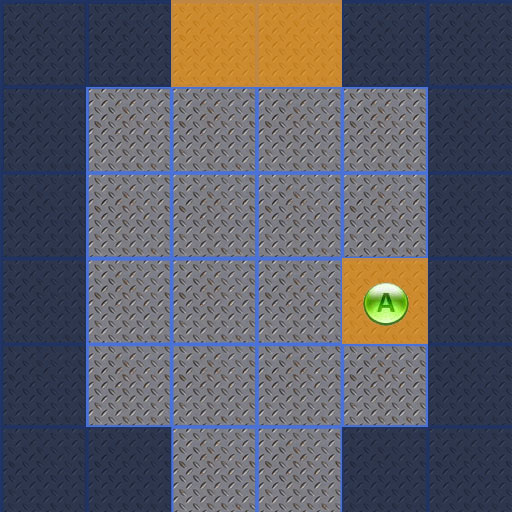
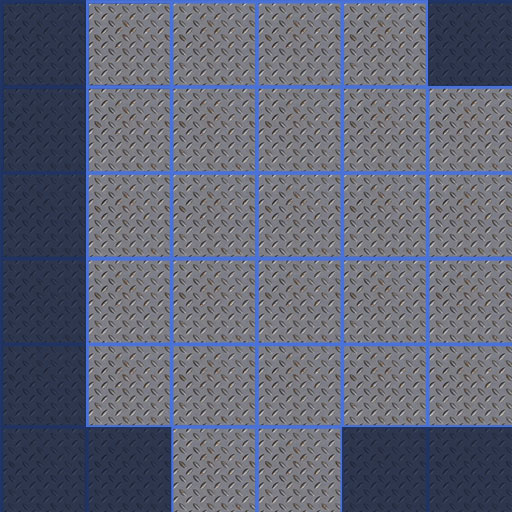
For this I’d like to randomly generate maps. Eventually these of course would be 3D prefabs, but for now 2D Textures like the following are overlaid on simple 6x6 cubes.

This of course are only some of the possible tiles - in general every possible combination exists in at least one version.

There are two special tiles, the entry and the exit tile. Both never change orientation.

Too make it not too complicated I am setting a 4x4 grid, numbering each tile:

1 2 3 4
5 6 7 8
9 10 11 12
13 14 15 16

Step 1: The special rooms are set. The exit tile can be assigned to any tile in the top row (1…4, 0), while the entry tile is on either 14 or 15.

Every tile has properties for each edge, north, east, south, west. The value for each can be A (wall), B (narrow corridor) or C (wide corridor).

Step 2: Set the edge properties that are known (those bordering the special tiles were set then, now it’s basically setting all outer edges to “A”).

Step 3: Starting at tile 0 examine all existing empty tiles and for those edges not yet set randomly assign A, B or C with the following rule in mind:

If a tile already has two “A” edges, the remaining edges cannot be “A”.

Step 3A: Once the edges have been assigned, look for existing tiles that fit the pattern, and randomly assign one, changing its orientation as needed.

Problem: Even with the rule above it is possible to get a section of four corners that is not accessible from the outside.

Having described what I WANT to do, now I find it daunting to get a start on it.

Any pointers to get me started? I have turned my mind around enough to get totally confusing on even declaring the variables on this (my background is not in programming, and I am still getting used this object-oriented thinking).
Also: are there any errors in my thinking (apart from the obvious “closed room” problem)? Is there any “best practice” way to make this much more efficient?

Thanks for anybody willing to discuss this!


I realized it’s not good etiquette to answer your own posts, but I’d like to describe the steps I make to a solution - maybe another beginner will benefit from it.

Taking the puzzle described above I started out making a prefab cube (basically a 6x6 slab). This is instantiated 16 times and the tiles are named individually.

using UnityEngine;
using System.Collections;

public class TileGenerator : MonoBehaviour {
	
	public GameObject floorTile;
	public int mapTilesX = 4;
	public int mapTilesY = 4;
	public float positionX;
	public float positionY;
	public int runningCount;
	public string runningString;
	public Transform FloorTilePrefab;
	public bool colorPicker;

	void Start () {
	
		for( int y = 0; y < mapTilesY; y++)
		{
			for( int x = 0; x < mapTilesX; x++)
			{
				positionX = (float)(-0.5 + x * 6);
				//Debug.Log (positionX);
				positionY = (float)(-0.5 + y * 6);
				//Debug.Log (positionY);
				
				// create individual names for the tiles
				runningCount = y + (x * mapTilesX) +1; // only works for a tile total of < 100
				if ( runningCount < 10)
					runningString = "Tile0" + runningCount.ToString();
				else					
					runningString = "Tile" + runningCount.ToString();			
				floorTile.name = runningString;
				
				// Alternate colors - one if either both Y and X are even, or both are uneven, else the other
				if ( ( y % 2 == 0  x % 2 == 0 ) || ( y % 2 != 0  x % 2 != 0))
					{
					colorPicker = true;
					Debug.Log("X = " + x + "colorPicker is "  + colorPicker);
					//Debug.Log("Y Mod 2 =" + y % 2 + "Y is " + y + " and X is " + x);
					floorTile.renderer.material.color = Color.red; 
					}
				else 
					{
					colorPicker = false;
					Debug.Log("X = " + x + "colorPicker is "  + colorPicker);
					floorTile.renderer.material.color = Color.black; 
					}
				Instantiate(floorTile, new Vector3( positionX, 0, positionY ), Quaternion.identity); 			
			
			} // end for x
		
		} // end for y
		
	} // end method Start
	
} // end class TileGenerator

Now the thing baffling me is that the entire area comes out red, instead of checkered. The variable colorPicker comes out properly, but the material is only assigned once and then not changed.

I tried to find a solution for that, but couldn’t find the cause. Can anybody tell me what I am missing here?

It’s not bad etiquette to answer your own posts, if you find a solution to your problem it’s extremely helpful to others if you post it :slight_smile:

If colourPicker is coming up correctly, I’m guessing it’s Unity trying to avoid instancing the materials, so it’s just making sure all the tiles use the same material.

You could assign a new material each time, instead of changing the current one, but that would mean you’d have a separate material for every tile, which is bad for draw calls. I’d suggest you have two materials exposed to the editor in your script, and instead of changing colour, just provide a different material, so then you’d end up with a maximum of two materials for the entire grid instead of x*y amount.

If you don’t know about draw calls yet, look into batching in Unity, and why it’s important for performance.

Thanks for the friendly reply! No, I hadn’t heard of draw calls batching yet. Looking it up on this page I am not quite sure it’s releveant at this point, though: Since I only call this method once at the start of the mission, the overhead can’t be that bad, can it?

Anyways – my own idea for solving my little problem was to try different prefabs (if I understand your suggestion correctly, it’s basically the same idea) – since I need to do that anyway once real prefabs come into play.

While adding another GameObject variable I had the weird situation that the Inspector View wouldn’t update the public variables and hence I couldn’t assign two different prefabs. Even detaching and reattaching the script didn’t help. Only when I closed Unity and reloaded it, it would show the new variables. :confused:

Now it does work, though, and here is my newer version. Of course this one only sets the entry and exit chambers as well as alternately inserting two other prefabs. It’s progress for progress’ sake. Next step is actually trying to make some sense out of the tiles.

The code feels a bit klunky, though. I just found the command Resources.Load("f_exitroom") and I need to play with that a bit, rather then have individual gameobjects instantiated.

Of course now the real work is starting - figuring out how to code the process to make it a real map :(.

The code so far:

using UnityEngine;
using System.Collections;

public class TileGenerator : MonoBehaviour {
	
	public GameObject floorTileA;
	public GameObject floorTileB;
	public int mapTilesX = 4;
	public int mapTilesY = 4;
	public float positionX;
	public float positionY;
	public int runningCount;
	public string runningString;
	private int rndExit;
	private int rndEntry;
	//public bool colorPicker;

	void Start () {
	
	generateMap();	
		
	} // end method Start
	
	
	void generateMap () {


		for( int y = 0; y < mapTilesY; y++)
		{
			//randomly assign exit /entry tile
			rndExit = Random.Range(	0, mapTilesX);
			rndEntry = Random.Range (1, mapTilesX-1);
			
			
			for( int x = 0; x < mapTilesX; x++)
			{
				positionX = (float)(-0.5 + x * 6);
				//Debug.Log (positionX);
				positionY = (float)(-0.5 + y * 6);
				//Debug.Log (positionY);
								
				
				// create individual names for the tiles
				runningCount = y + (x * mapTilesX) +1; // only works for a tile total of < 100
				if ( runningCount < 10)
					runningString = "Tile0" + runningCount.ToString();
				else					
					runningString = "Tile" + runningCount.ToString();			
					 
				if ( y == 0  x == rndExit ) {
					Instantiate(Resources.Load("f_exitroom"), new Vector3( positionX, 0, positionY ), Quaternion.identity); 			
				}
				else if ( y == (mapTilesY -1)  x == rndEntry ) {
					Instantiate(Resources.Load("f_entryroom"), new Vector3( positionX, 0, positionY ), Quaternion.identity); 			
				}
				else {
				
					// Alternate colors - one if either both Y and X are even, or both are uneven, else the other
					if ( ( y % 2 == 0  x % 2 == 0 ) || ( y % 2 != 0  x % 2 != 0))
						{
						//colorPicker = true;
						//Debug.Log("X = " + x + "colorPicker is "  + colorPicker);
						floorTileA.name = runningString;
						//floorTileA.renderer.material.color = Color.red; 
						Instantiate(floorTileA, new Vector3( positionX, 0, positionY ), Quaternion.identity); 			
						}
					else 
						{
						//colorPicker = false;
						//Debug.Log("X = " + x + "colorPicker is "  + colorPicker);
						floorTileB.name = runningString;
						//floorTileB.renderer.material.color = Color.black; 
						Instantiate(floorTileB, new Vector3( positionX, 0, positionY ), Quaternion.identity); 			
						}
				} // end if - else if - else
			
			} // end for x
		
		} // end for y
		
	} // end method generateMap
	
} // end class TileGenerator

Out of curiosity, what lead you to use Resources.Load? It’s an incredibly expensive function as Unity has to import the object and convert it to the Unity format before using it. When using Instantiate, it’s really best just to have a prefab. Loading from the resources folder is typically reserved for special cases when external files need to be loaded at run-time and cannot be included into the project before building.

And also you seem to have misunderstood the importance of batching, multiple materials isn’t a one off cost at the beginning, it’s a consistent performance hit and is a huge overhead, please don’t underestimate good planning from the beginning. It’s a classic mistake to think “I’ll just get it working for now, I’ll do the optimisation later”, when in actual fact doing it right first time usually saves you more time in the long run. If you’re using prefabs instead you avoid this problem, but it’s important to learn about efficient use of materials if you’re ever going to make anything serious with Unity.

Can’t really explain the public variables not exposing, you could check auto refresh in the Unity preferences perhaps? You shouldn’t need to restart Unity in any case, you can just right click the script and click refresh or re-import.

Simple answer: Because I don’t know better and that seemed to do the trick ;). Right now I do have several prefabs (stored in the Resources folder in the Project view), one for each basic tile form. But I don’t know (yet) how to make the best out of them.

I am still getting used to OOP as a concept and while I easily understand the basics, advanced constructs such as GameObject (and their instantiation) still confound me. Would you care to show me a snippet how it is best done?

Hmm. I guess with fulfilling the request above you can show me how its done? That would be great!

Again hmm. Auto refresh is checked. I checked that. So I don’t have any idea what happened. Not that important.

Added: In the next step I am trying to add an id to each instance and an array int side[4]. That way I would be able to set the sides to 0 (wall) or 1 (narrow passage).

int[ ] side = new int [4] (with the elements containing the value for the north, east, south, and west edge respectively).

I can’t figure out (yet), though, what the parent would be and how to declare that variable for each instance.

I guess at this stage of your learning, explaining the full theory behind a GameObject might do more damage than good, as it would introduce you to a lot of new concepts. But the basic explanation is just a Unity specific object that can hold multiple components, think of it of a master/high level class that links to many sub classes, but a lot of that is hidden from the user.

Unity collects all the scripts and content you create into it’s own propriety formats, and you can keep these in GameObjects in your scene, or behind the scenes as prefabs (which are just GameObjects with a different name). But the bottom line is that everything that goes into your hierarchy must be a GameObject.

If you use Resources.Load, you are making Unity import a resource, which takes time, so it’s best just pre-load as much content as possible in the editor.

The best practice for using Instantiate is to organise your content on a GameObject and save it as a prefab. In your script you can then expose a GameObject by marking it as public (there are other ways too, but I wont get into that just yet). Once the GameObject is exposed in the editor, you can drag and drop your prefab into it, and the script will have access to that prefab through the exposed variable. When you call instantiate, you will clone that prefab in the scene. Instantiating a prefab is expensive in itself, but it is much faster than Resources.Load because Unity has already done a lot of pre-caching beforehand.

Outside of Unity you will see people creating instances of classes via the keyword “new”. While you can do that with classes in Unity, most do not because they extend from Monobehavior, which has its own method of creation and destruction. Again the reason behind this is fairly complex (involves the fact that Unity is written in C++ but has to deal with code in C#/JS/Boo), so all you really need to know at this stage wherever you would normally use new, you use Instantiate, and if you want to destroy something, you call Destroy, instead of marking it as null.

I can’t really explain batching any better than the documentation you linked to. Just know that every material in your scene means another draw call, and to quote the article: “Every single draw call requires a significant amount of work on the part of the graphics API, causing significant performance overhead on the CPU side”. So keep materials to a minimum where you can. Draw calls aren’t a massive deal on Windows or OSX, but on mobile they are critical. Regardless it means only good things to keep your application lean and optimised from the beginning.

Thanks for being so patient with me! I have now a bunch of prefabs (for all corridor tiles I need for now) and assigned them to a variable in the script (floorTileCorridor, floorTileTJunction, floorTileExit and so on). So that’s taken care of.

The thing is that I can’t figure out how to add more parameters to the construct.

After (or before, depending on the case) instantiating a prefab, I need to know the id and I need to set what code each side has. For example, when the exit tile gets assigned to position 2 (0, 1) I need to have a way to assign the sides of 2 {1,0,1,0} and then assign the 2nd element of the tile to the left (current_tile_id -1) to the same as this 4th element (0 for “wall”), and the same to the next element in the row.

That way eventually I will be able to figure out what tile(s) can be fit into the position.

Something like this maybe (copied from elsewhere and slightly modified for my variables):

public GameObject spot;

GameObject go = Instantiate(spot, new Vector3(0, 0, 0), Quaternion.identity) as GameObject;

int go.id = runningCount;
int[] go.side = new int [4]

?

In that case you’ll have to maintain a two dimensional array of all the tiles. In the class that’s responsible for creating all the tiles, you should have that two dimensional array, and every time a tile is created, a reference to it should be stored in the appropriate location of the array.

When you have your tiles instantiated and registered, it’s pretty easy to find which tiles are next to each other.

Okay, I have been reading up a bit on namespaces, classes, objects and the like (yes, the basic C# stuff). The tutorial in the Wiki turned out be really worthwhile! That took awhile because one of the kids is ill.:frowning:

What I want to do basically is have a gameObject that in addition to its inherent (and inherited) variables has a variable int side[4].

I am a bit puzzled now. I managed to declare my array of tiles:

public int mapTilesX = 4;
public int mapTilesY = 4;
public GameObject[] tiles;
tiles  = new GameObject[(mapTilesX * mapTilesY)];

At runtime the program nicely generates sixteen tiles - which aren’t filled yet, of course. I’ll try to get that solved, but I still can’t figure out how to add that “side” to it…

Help?

One way of doing it:

// --- Inside of the Unity Editor --- //
// 1 - Create a class Tile (can be monobehaviour but does not need to be)
// 2 - Create an empty GameObject
// 3 - Drag the Tile Class onto the GameObject inside of the Scene window
// 4 - Turn that object into a prefab by dragging it from the scene windows into the Hierachy window.
// 5 - Rename the new Prefab to TilePrefab (etc...)


// --- Tile Class --- //
// 6 - Define your Tile attributes
public int id;      // Your ID attribute
public int[] side  // Your Side attribute


// In the Spawner Class
// 7 - Setup your Spawner attributes
public Tile tilePrefab; // This will contain your TilePrefab
public int mapTilesX = 4;
public int mapTilesY = 4;
public Tile[] tiles; // This will contain your tile objects

// 8 - Setup your Spawn Code
void Start()
{
    tiles  = new Tile[(mapTilesX * mapTilesY)];
    for (int i = 0; i < tiles.Length; i++)
    {
          GameObject go = Instantiate(tilePrefab) as GameObject // 9 - Clone your TilePrefab
          var tile = go.GetComponent<Tile>();   // 10 - Get a reference to your Tile Component
          tile.id = 123456                      // 11 - assign your tile attributes
          tiles[i] = tile;                      // 12 - assign your tile to the array of all tiles
    }

Hopefully the formatting is not all that bad, I am currently writing this from the browser.

Thanks for working that out. While I am trying to incorporate this into my code: I don’t see any connection between the tile class (which contains the id and the side array) and the GameObject / Prefab that I am instantiating.

Basically the Prefab needs to have the variable side[4] as well, each with assigned values, in order to compare my (not yet existing) part of the script which matches a suitable prefab to the position (tile) of the map.

Am I missing something? Wouldn’t i have to include something like this in my Tile class:

public GameObject go;

?

Have a look at the attached picture for some visual reference on the relationship between GameObjects and components.

Basically you would have a GameObject with a Tile Component, which you than save as a Prefab to be cloned later on.

On the Relationship between Tile and GameObject:
If your Tile class inherits from MonoBehaviour it will inherit a Property of gameObject which will point to the Component Owner. (gameObject where the tile Component is attached to)

Your Generator will have a reference to that prefab object.
Depending on how dynamic you want your generator to be:
A - You will setup the Tile during the Generation Process
B - You will setup multiple TilePrefabs and randomly instantiate them.

Let me know if my mumblings make any sense :slight_smile:

Demo project to visualize the relationship between the mentioned things:
943454–35345–$TileDemo.unitypackage (5.29 KB)

Hi AstaSyneri:

The others here have said much the same thing as I’m going to, but since you asked so nicely…

I’m using a similar trick for my Tic-Tac-Tut tutorial: each of the 9 tiles stores its own state (“isEmpty”, “isO”, “isX”). All 9 tiles are managed by a “board” GameObject with a dedicated game board management script. (The board itself is generated procedurally too.)

Whenever I want to change a tile’s state, I just tell the board script which piece—‘O’ or ‘X’—I want to play at which coordinates and the board takes care of informing the relevant tile to change its state. The tile itself handles its own state; the board merely calls a suitable function in that tile’s own prefab script.

Basically, you add state and other data to a GameObject by writing a script with that stuff in it and adding it to the GameObject as a component.

To access the additional data, you use the C# GetComponent<>() generic function to get a pointer to the script for each tile from another script. You’d normally grab this pointer when you instantiate each tile, as Joshimoo’s example does:

            // 9 - Clone your TilePrefab
            GameObject go = Instantiate(tilePrefab) as GameObject;

            // 10 - Get a reference to your Tile Component
            Tile tile = go.GetComponent<Tile>();     // This sets up the link to the Tile Prefab's "Tile" script.

It’s usually good practice to put the code related to the tile inside the same tile script, so it’s all in one place. You’d then have a separate GameObject that manages all the tile prefabs, instantiating them as needed and interfacing with the Tile script in each prefab. (See attached diagram.)

Another thing you’ll want to do is to parent each new tile prefab to the ‘tile map’ master prefab, or you’ll get an almighty mess of tiles in the Inspector. It also makes moving the entire tile map around trivial: just move the master prefab’s transform and all its little tiles will follow.

Once you have the Tile scripts and have stored them in your array, their parent GameObjects aren’t needed by the master Tile Map script any more: the individual Tile scripts can handle that level of detail. The tile scripts take care of dealing with tile states and such like, so your main script doesn’t have to care about how each Tile prefab actually works. This makes it much easier to change how your tiles work under the hood later, should you need to.

On a final note, you might want to consider using C#'s “[Flags]” attribute with an enumerated type, instead of an array of ints. You can pack a surprising amount of flexibility into a very small space like this. More info on the Flags attribute here. (And, of course, all over Google.) It takes a little wrapping your head around, but it may help you create a more elegant solution to the problem of storing state attributes with your tiles.

I hope this helps.

943740--35355--$Graph.png

Thanks for the great help so far! Hurt my left middle finger playing basketball yesterday, so typing is abysmally slow…

Will look at flags and then redo my code - and post it here of course.

Edit: I waived the flags (pun intended) before my head exploded. For now I’ll stick with understanding what the heck I am doing the ‘hard’ way.

Just to let you know - the script is working now, somewhat:

944697--35368--$babystep3.jpg

The tiles (all of which have their proper sides information) apart from entry and exit are still totally random. I have worked out (a probably very strange) method on how to assign proper tiles, but I am still wrestling with the proper coordinates and quaternion settings.

Haven’t read all of it, but what you are looking for is not “random map generation” but a procedural generation. Random is chaotic and what you can see on the screen shot is “expected” to happen in random generation, because random doesn’t have any logic which will ensure consistency.

Procedural generation is generation of content (maps, or whatever else) using fixed sets of rules, i.e only make 1 exit and 1 entrance, no unreachable blocks etc.

There is a Wiki out there about procedural content generation and can be found http://pcg.wikidot.com/, so you may find it interesting to read into it.

You also may want to read this, it’s a random dungeon generator which generates pen paper like dungeon maps, which explains basic concepts and has links to cavern generation (which may not be directly useful for you, but can be important if you are making outdoor maps and have areas with woods or stones and you want to avoid having areas which are surrounded by areas which can’t be passed by the units)

Guten Tag, Tseng!

Thanks for pitching in! You should definitely read all ;-). Yes, I am aware that we are talking about procedural generation. Thanks for the links, btw. Fortunately in my case my ambition is not as high: Fill a rectangle of X by Y tiles with connected corridors and rooms that make sense somewhat in the context of a turn- and squad-based strategy game. The result is supposed to look “moon base” or spaceship-like rather than the procedural dungeon maps that remind me of my youth spent slaying dragons (turned out to be the other way around, rather).

I opened this thread both to find help with Unity and some feedback on my ideas on solving the problem as well as leaving a more “dense” source for discussion, links, and hopefully solutions on the topic, since I couldn’t find any on the forum.

Rant cut short: By all means continue to add to a meaningful discussion, while I work on fitting those dastardly tiles together in a meaningful way ;-).

Ah. After a long (due to a holiday on Thursday and Kindergarten being closed on Friday) I decided to start anew as the code was getting way to convoluted and I was getting led around by the nose by the coordinate system. One problem I was having was that the orientation of the prefab tiles (their textures) in the Inspector wasn’t matching what I was seeing at runtime (180° difference).

Well, now at least (so far) my script is doing what I want it to do (all"random sides are set to "A = Corridor, hence the tidiness):

949705--35493--$babystep4.jpg

I changed the previous file “Tile” to “TileCode”:

using UnityEngine;
using System.Collections;

public class TileCode : MonoBehaviour{
	
	public string tileCode;      
	
	/* Codes connectors on each side of a tile prefab
	 * X = Wall
	 * A = Corridor
	 * 
	 */	
}

eliminating the extra step of converting an array of integers into a string.

The main script now looks like this:

using UnityEngine;
using System.Collections;

public class MapMaker : MonoBehaviour {
	
	public GameObject floorTileCorner;
	public GameObject floorTileCorridor;
	public GameObject floorTileDeadEnd;
	public GameObject floorTileEntry;
	public GameObject floorTileExit;
	public GameObject floorTileTJunction;
	public GameObject floorTileXJunction;
	public GameObject tilePrefab;
	public GameObject[] floorTilePrefabArray;
	public int mapTilesX = 4;
	public int mapTilesZ = 4;
	public int xTiles;
	public int zTiles;
	public float positionX;
	public float positionZ;
	public string[,] tileCodes;
	public string[,] assignedTileCodes; // x,z : contains the target code for each laid out tile
	public Hashtable tileCodesHits = new Hashtable();    
	public int rndRotate;
	public Tile[] tiles;


	void Start () {
	
		GenerateMap();
		
	}

	
	void GenerateMap () {
		
		
		SetupPrefabArray();	
		assignedTileCodes = new string[mapTilesX, mapTilesZ];
		SetupTileCodeArray();
		
		for( zTiles = 0; zTiles < mapTilesZ; zTiles++){ // build up further rows
	
			for( xTiles = 0; xTiles < mapTilesX; xTiles++){ // lay the first row left to right
				
				SelectTile();	// select legal tile. 
				
				positionX = (float)(-0.5 + xTiles * 6);//setup the coordinates for each tile
				//positionZ = -0.5f;
				positionZ = (float)(-0.5 + zTiles * 6);
				
				//GameObject go = Instantiate(tilePrefab, new Vector3( positionX, 0, positionZ ), Quaternion.Euler(0, rndRotate, 0)) as GameObject;
				//Tile tile = go.GetComponent<Tile>();   // Get a reference to your Tile Component - TileCode now!
				Instantiate(tilePrefab, new Vector3( positionX, 0, positionZ ), Quaternion.Euler(0, rndRotate, 0)); // go wasn't needed up to this point
				
			} // end for xTiles
		
		} // end for zTiles
		
	
	} // end GenerateMap()	
	

	string RandomBorder() {
		
		return "A"; // currently we just generate "Corridor"

	}
	
	
	void SelectTile () {
		
		//Debug.Log(xTiles);
		
		// tiles have a string code like XAAX (corner) at 0 rotation. At 90 rotation it would be XXAA
		// we need a table of "which gameobject at what rotation is a legal choice here" -> is set up in setupTileCodeArray
		
		// now we need to build our target string "1234", where 1 is North, 2 East etc. 
		
		string targetString = "";
		
		// 1st element: North
		
		if ( zTiles == (mapTilesZ - 1)) 
			targetString += "X";
		else targetString += RandomBorder();
		
		// 2nd element: East
		
		if ( xTiles == (mapTilesX -1)) 
			targetString += "X";
		else targetString += RandomBorder();
		
		// 3rd element: South
		
		if ( zTiles == 0) 
			targetString += "X";
		else targetString += RandomBorder();
		
		// 4th element: West
		
		if ( xTiles == 0) 
			targetString += "X";
		else {
			string westWall = assignedTileCodes[xTiles -1, zTiles];
			targetString += westWall.Substring( 1, 1);
			Debug.Log(westWall);
		}
		
		assignedTileCodes[xTiles, zTiles] = targetString;
		Debug.Log("TString: " + targetString);
		
		// compare targetString to tileCodes array
		
		for( int xx = 0; xx < floorTilePrefabArray.Length; xx++) {
			for( int yy = 0; yy < 4; yy++) {
				
				if ( targetString == tileCodes[xx,yy] ){
					print("We have a hit: " + xx.ToString() + " " + yy.ToString());
					tileCodesHits[xx] = yy; // Hashtable does not need type declaration 
					print("Hashtable: " + tileCodesHits.Count);
				} // end if
			} // end for yy
		} // end for xx
		
		// Hashtable tile CodesHits contains all suitable results
		
		int rndTile = Random.Range(0, tileCodesHits.Count);
		int r = 0;
		foreach (DictionaryEntry entry in tileCodesHits)
	    {
	        Debug.Log("Key: "+entry.Key+" Value: "+entry.Value);
			if ( r == rndTile ) {
			tilePrefab = floorTilePrefabArray[(int)entry.Key] ;
			rndRotate = (int)entry.Value * 90;
			break;
			}
			r++;
	    }
		
		tileCodesHits.Clear(); // need to clear Hashtable for next tile
		
	} // end SelectTile()
	

	void SetupPrefabArray () {
		
		floorTilePrefabArray = new GameObject[5] { floorTileCorner, floorTileCorridor, floorTileDeadEnd, floorTileTJunction, floorTileXJunction };
				
	} // end method setupPrefabArray
	
	
	void SetupTileCodeArray () { // multi-array: the first position contains the position of the prefab in floorTilePrefabArray, the second the rotation (* 90°)
		
		tileCodes = new string[floorTilePrefabArray.Length, 4]; // 4 is the number of sides and hence possible rotations
		
		for(int i = 0; i < floorTilePrefabArray.Length; i++) {
			// iterate all through all possible rotations for the tile and store the codes as strings
			TileCode ft = floorTilePrefabArray[i].GetComponent<TileCode>();
			
			tileCodes[i,0] = ft.tileCode;
			tileCodes[i,1] = ft.tileCode.Substring( 3, 1)+ft.tileCode.Substring( 0, 3);
			tileCodes[i,2] = ft.tileCode.Substring( 2, 2)+ft.tileCode.Substring( 0, 2);
			tileCodes[i,3] = ft.tileCode.Substring( 1, 3)+ft.tileCode.Substring( 0, 1);
			
		} // end for i		
				
	} // end method setupTileCodeArray
	
} // end class MapMaker

Next step: Randomize and add special rooms.
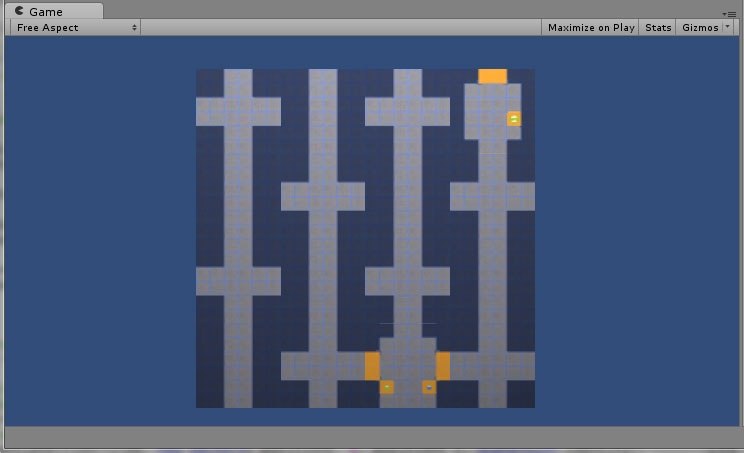
Now it’s starting to look good:

949750--35494--$labyrinthwspecialrooms.jpg

There are still two things to solve:

  • connection to special rooms from the left and below (exit only)
  • avoid non-accessible “idiot race tracks”