Two weeks ago, my app on Google Play was suddenly rejected for several Families Policy Requirements issues. I believe the policies changed this year which probably caused the rejection. I solved most of the issues but one is still pending and I’m not 100% sure how to fix it.
I received the following issue:
“Ads displayed to children or users of unknown age that involve interest-based advertising or remarketing”
I believe this is related to any ad tracking user’s interest and therefore collecting information, which is not allowed with children (in accordance with COPPA).
My Unity Ad setup has an age limit set to “do not show ads rated 9+” and my game on Google Play has a target age group set to “9-12, 13-15, 16-17, 18 and over”.
I noticed that the Unity Ads setup now has an “Age designation” option - I have it set to default (“This app is NOT directed to children under the age of 13”) and I believe this is where the problem is. Should I set it to “This app is directed to children under the age of 13” so no information would be collected for interest-based advertising?
I’m so sorry to ask for this question here, but all of this has been really confusing and I want to make sure I’m doing it right.
I’m a little confused though. I received a reply from the Unity Support advising me to enable “Google Designed for Families” in my project settings (although my game is not currently enrolled in the “Designed for Families program” in Google Play). Would setting the option to “This app is directed to children under the age of 13” be enough or should I also enable “Google Designed for Families” in my project settings? Unity Support also advised me to wait 24h before resubmitting my game on Google Play once the option is changed, is it correct?
I can’t speak for Google as I don’t have any particular insight into how their process works. However, since your app is targeting ages 9-12, it might be possible that they are applying the same Families Policy Requirements criteria to your app as the main program uses. Just to be sure, I would recommend enabling both options.
I think you are correct, I did more research yesterday and Google does apply the same Families Policy Requirements criteria since my app targets 9-12+:
“Target Audience: Children and Older Users - Entire app must follow Families policies or have a neutral age screen and follow Families policies when kids or unknown users use the app”
I will go forward and enable both options just to be sure. Do these options enable other things in Unity Ads under the hood? Or they just disable interested-based advertising (and therefore don’t gather user information)?
The main function is to disable interest-based advertising and a couple of other minor alterations to functionality to ensure we’re compliant with their policies.
Thank you for your reply. This is what I thought but I wanted to be sure, it all makes sense now
Thank being said, I submitted a new version with both options enabled and was rejected again. I bit the bullet and contacted Google about it. They replied and well, I didn’t realize they actually reviewed all release channels when I published a new APK… so old APKs were still being reviewed without my knowledge…
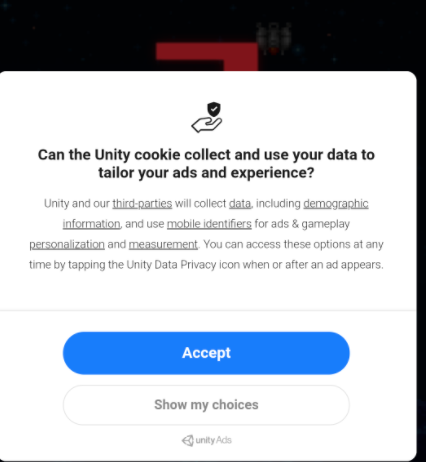
However, they sent me a picture that surprised me:
I’m still trying to investigate if this window appears after I enable the option “Google Designed for Families” and therefore “This app is directed to children under the age of 13”… would enabling both options prevent this? Because this window seems to be the main reason I’m being rejected…
Thank you again for your quick reply and for confirming this. I’ve now submitted a new version of my game to Google Play with all the fixes - fingers crossed
I wonder if Google Play changed some of the review/approval process. The issues I’m having started three weeks ago when they rejected a build that they actually approved two weeks prior (the rejection was triggered when I updated the game’s store listing). Then it kept being rejected and, after contacting them, I eventually realized that all release channels need to be updated - they were still reviewing the version they initially rejected although I had been submitting new builds to the internal testing channel, and because that version code was originally approved, it was not flagged as rejected on the Google Play console… Anyway, no need to reply to this, I just wanted to tell other devs to be very careful and make sure all release channels are updated when submitting a fix…
From the feedback we get from users, it looks like both Apple and Google frequently update their rules regarding which apps they accept onto the stores. Unfortunately, this means that it’s difficult for us to provide direct guidance and support on helping with those issues as we aren’t aware of the exact criteria that is required.
However, we’re always happy to help resolve any issues as long as we have concrete information we can work with.
It looks like everything is now resolved with my game! Yeah! And don’t worry, I do understand that Apple and Google must frequently update their rules - when you release an app in so many countries with so many different rules/regulations (especially if your app happens to target a young audience), I understand that things can change fast… I know it does hurt small devs like me, but, in the end, I believe they are protecting us.
That being said, I would like to thank you again for your help! Unity’s support has been amazing and I’ve always received timely replies to my issues. Your support team is excellent, having someone you can actually talk to makes all the difference in my book! There are still a few things I would like to see on the Unity Ads platform in the future, and I may start a new thread on this forum to discuss some of these ideas… but your help and support has been invaluable! Thank you!