How to replicate ARKitBackground.shader from AR Foundation in Shader Graph + displayMatrix 4x4?

I have been forwarded here but Unity AR Foundation Team Staff as they don’t seem to be able to explain how to do this (bit concerning).

I am trying to replicate some of the functionality of the ARKitBackground shader where it applies some form of displayMatrix 4x4 to the AR Camera Background image as you can see in my gif below, the Stencil mask received from the DisplayDepth script in AR Foundation Samples doesn’t match up with the onscreen camera image provided by the AR Camera Background component through the ARKitBackground Shader it uses on IOS.

The AR Camera is almost more zoomed in or scaled but also offsetted. This effect is only noticeable on Iphone, on Ipad the aspect ratio of the AR Camera Background matches very closely with the Stencil cutout image so I only found this issue when testing my app on an iphone. I want to use both the stencil and ar cam background textures in shader graph for an effect, an have them both line up as well as they can as I am currently doing that but they do not line up on Iphones.

7049563--836266--Handy1.gif

I currently have a shader graph where I nab the AR Camera Background renderer texture using:

Graphics.Blit(null, targetRenderTexture, m_ARCameraBackground.material);

Then separately, using the DisplayDepthImage.cs script from ARF samples, I save out that onscreen hand stencil texture to the same shader graph and overlay them buuut… obviously things do not line up on iphone. It works fantastic on ipad which is annoying.

I have been advised to recreate this line from the ARKitBackgroundShader in shader graph but I am fully stumped on how to do this as there is not much documentation of how the shader uses the Matrix 4x4 there:

// Remap the texture coordinates based on the device rotation.
float2 texcoord = mul(float3(v.texcoord, 1.0f), _UnityDisplayTransform).xy;

I have read - ARCameraFrameEventArgs.displayMatrix -

displayMatrix
Gets or sets the display matrix for use in the shader used by the ARCameraBackground. Use displayMatrix.HasValue to determine if this data is available.

Any help or tips on this would be really appreciated!

Linked Unity thread
Github Issue

This script describes the anatomy of the display matrix and its difference for Android and iOS. It should help in writing the Shader Graph version:

Thanks! Does your editor asset help with retrieving those textures from the stencil and ar camera background at runtime for me to test out with?

@ROBYER1_1 yes, my plugin supports all the depth textures, including the human stencil texture. It currently supports only accessing depth textures on GPU: this means you’ll be able to access these textures via AROcclusionManager.humanStencilTexture/environmentDepthTexture, but the CPU API (AROcclusionManager.TryAcquireHumanStencilCpuImage()/TryAcquireEnvironmentDepthCpuImage()) is not supported yet.

For writing shaders (your use-case) or displaying textures you need GPU textures, but if you want to process the image (in a computer vision algorithm, for example), you need to copy the texture to the CPU side (by using Graphics.Blit or using the AR Foundation’s CPU image API which is more efficient).

Also, the framerate is not that high as on the actual device, but it should be enough for testing in the Editor.

Currently I am taking the Texture2D displayTexture from https://github.com/Unity-Technologies/arfoundation-samples/blob/main/Assets/Scripts/DisplayDepthImage.cs, running it through a chroma key cutout asset using the black colour as the alpha then assigning it to a ‘background’ (used as cutout/opacity)texture slot on my shadergaph for the stencil to use as opacity leaving just the red cutout as full colour and black masked as opacity.

For the actual hand from the camera feed, I take the AR Camera Background renderer texture using : Graphics.Blit(null, targetRenderTexture, m_ARCameraBackground.material) to pump the AR camera background texture into a rendertexture assigned to the main texture slot on my shadergraph

This material is just used on a RawImage component on some UI over the top of various other things in the UI that the hand cutout needs to be over the top of for pointing, making hand gestures etc.

The main issue currently is on Iphone the textures from both of those sources do not match up in aspect ratio and are completely off from each other, on Ipad the aspect ratio is big enough that the two textures match up perfectly.

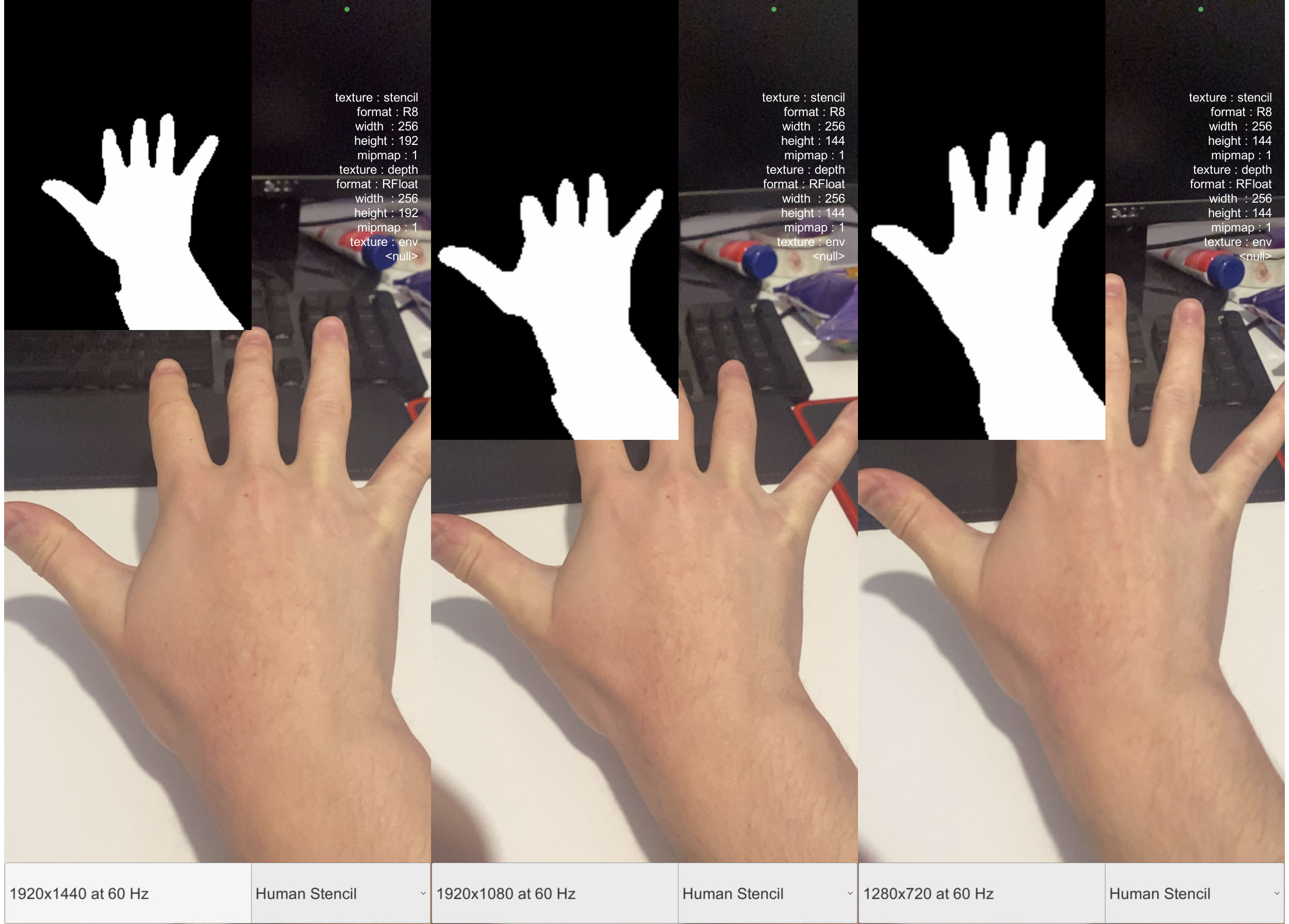
You can also see here I took some screenshots, this is just the original samples scene- the Rawimage texture on the top left of the stencil is always far off what the hand on screen is like aspect-ratio wise.

What can I do about this? I am using Shader Graph as it is quick to change things there and see what the nodes in the shader are doing, however it is quite tough to figure out a good way to handle a hand cutout using ARKit Hand Stencil if the textures for AR Camera Background and ARKit Hand Stencil are so far off from lining up well on Iphones only while they match up on Ipad.

I made this comparison to show the three different sizes I get on an Iphone 11 and none of the stencils match what AR Camera Background is showing me on screen in the Samples repo scene for this.

@KyryloKuzyk Just bought your asset, I hope it leads me to a good workaround!

I ran into this same problem.
I tried the method of aligning the resolution to the screen size and then passing it on, but it didn’t work.

I commented because I was able to solve this problem.
https://github.com/Unity-Technologies/arfoundation-samples/issues/796#issuecomment-1640228457