HTrace: Screen Space Global Illumination [RELEASED]

This forum thread has been updated and repurposed for the new HTrace: Screen Space Global Illumination asset. All owners of the original H-Trace Global Illumination and Occlusion asset (now deprecated) are eligible for the 50% discount for the HDRP version and the Bundle of the new asset.

HTrace: Screen Space Global Illumination

Grab your copy on the Asset Store join our Discord and support us on Patreon to get more content and news about upcoming features and updates!

HDRP Version | URP Version | BUNDLE (HDRP + URP)

HTrace SSGI is a fully dynamic screen-space global illumination system that aims for accurate and responsive indirect lighting with detailed secondary shadows.

Useful Links:

MAIN FEATURES:

• Full Integration into the Rendering Pipeline [HDRP]: automatic resource injection with no need for manual setup or package customization. HTrace SSGI overrides native indirect lighting resources, ensuring compatibility with other rendering effects.

• All Rendering Paths: fully supports Deferred / Deferred+ / Forward / Forward+ rendering paths, with no visual or quality differences between them.

• All Light Sources: compatible with all light types, including emissive materials that function as actual light sources and cast indirect soft shadows. Performance remains unaffected by the number of lights in the scene.

• Dynamic Environments: designed for fully dynamic and procedural environments where objects, materials, and lighting can change in real time with no extra performance cost or preprocessing.

• APV Fallback & Enhancement: natively supports Adaptive Probe Volumes as a fallback option. Enhances APV output by reducing light leaks and noise from low-resolution bakes, while adding fine GI details and occlusion from both static and dynamic objects.

• Advanced Denoising: powered by a cutting-edge ReSTIR Validation algorithm that maximizes temporal responsiveness, while preserving small details and keeping indirect shadows sharp during spatial filtering.

• Scalability: provides an adjustable Render Scale parameter for downscaled rendering, along with a wide range of options to fine-tune the effect and balance speed with quality.

• Infinite light bounces: simulated through a feedback loop, with each frame capturing an additional bounce of light.

• Render Layer Mask: selectively exclude objects from casting and/or receiving indirect lighting on a per-layer basis via the Render Layer Mask.

• VR Support [HDRP]: single-pass VR is supported.

• Open Code: the code is open for modification. If you have questions about how it works, feel free to reach out to us on Discord.


HTrace OFF comparison

HTrace OFF comparison

51 Likes

Consider me your customer. Let me know if there is anything I can help you with. Just keep posting screenshots and vids.

Amazing!

2 Likes

Thank you for your kind words! :slight_smile:
I’ll probably need some help with testing. And yep, new screenshots and videos are definitely coming! I think I’ll start with Sponza.

5 Likes

Do you think it can handle VR?
If you need a tester for that - let me know. We use unity for VR/Realtime-Training applications for enterprise. This could be really interesting for us

1 Like

Alwayas interesting to see work being done around the GI for Unity, it’s a major part of the engine lighting that need some love right now.

Keep up the good work.

1 Like

Hi! Thank you for your interest!

From the testing point of view: I don’t have a VR headset myself, but I have a friend who owns Oqulus Qest 2. I can ask him to lend it to me for testing. After that I can send the asset to you for further testing on your hardware.

From the technical point of view: I haven’t worked with VR yet and I’ve heard that VR is not the strongest side of HDRP (but maybe my info on that is outdated, so correct me if I’m wrong :)). But in theory it should work okay. And I’m implementing an upscaler, so the effect could be rendered in 1/2 or 1/4 resolution to handle high-res cases typical for VR hardware.

1 Like

Looking great.
Just saw your other related post as well, and learned new things.
Great job.

3 Likes

So amazing ! Unity needs to hire you

Looks good, I’d buy it :slight_smile:

Looks amazing!

Yeah it seems Unity is not really focused on real-time interactive environments running at 60 fps (games) nowadays. As a company they might be more interested in looking for new market shares in offline rendering.

Anyway, it’s really neat to see a user take up the mantle to try and improve the engine! :slight_smile:

5 Likes

Looks good. Consider this a +1 for built-in RP support down the line.

2 Likes

if considiring to port it to built_in RP
ill buy 20 units from store , to just help you
i have to say that is amazing

2 Likes

This looks awesome. We replaced our Maya V-Ray pipeline with Unity (HDRP + URP) to create high quality renderings and are also producing VR Trainings too. We would love to test this out. Especially HDRP + URP if it is someday available (URP is best for VR, HDRP IS TOO Heavy for rendering per eye).

Looking forward to your updates

I find myself checking this thread twice a day…

I am dying here!!! Gimme a screenshot! :slight_smile: :slight_smile: :slight_smile:

2 Likes

Hi! Sure :slight_smile:

So, I’ve been working on the normal rejection filter all this time. Finished it yesterday.
7974426--1023207--upload_2022-3-18_15-32-17.jpg

It may seem like a minor thing, but it’s very important to correctly filter out indirect lighting based on the normal data, otherwise wrong samples may be taken into account and there will be light transfer between surfaces that clearly can’t see each other.

Also, here’s a quick comparison with the DX12 Path-Tracer:
7974426--1023213--upload_2022-3-18_15-49-59.jpg

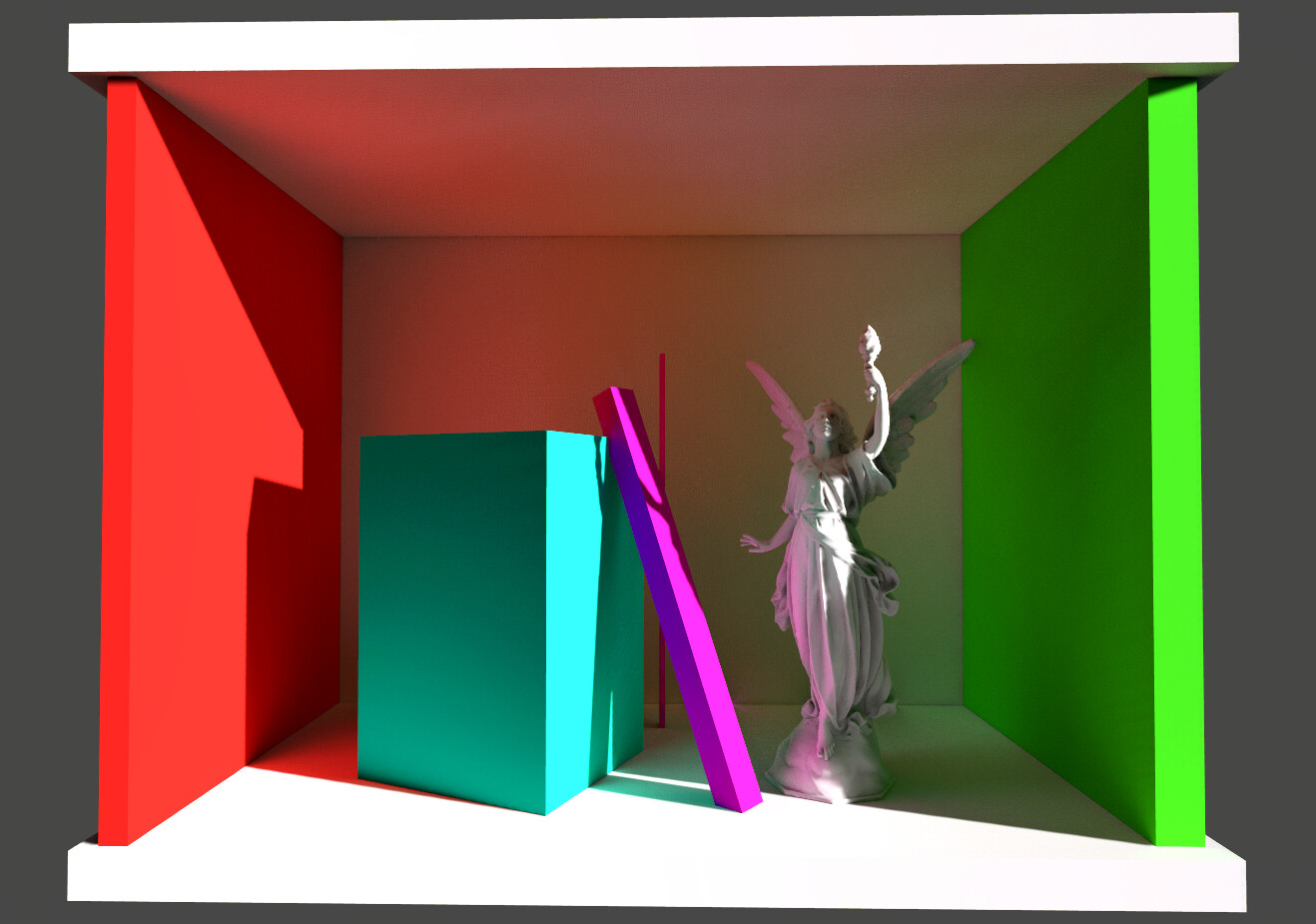
Btw, you can use any object of any shape as a light source. Even if you want to use a statue with an emissive material - it’s totally fine, it will cast proper GI:
7974426--1023228--upload_2022-3-18_15-58-52.jpg

There’s nothing unusual to it, because it’s just a byproduct of any SSGI algorithm, but I’ve noticed that people were kinda hyped about this thing in UE5, so worth mentioning, I guess. But it’s strongly not recommended to use emissive surfaces / meshes as primary light sources. It will lead to a noisier image and, obviously, you won’t get any direct lighting and direct shadows from them, since Unity doesn’t support it.

At the current moment, there are still some thickness artifacts, you can see them in the screenshots above. Objects in the foreground cast too much occlusion onto the background. It’s natural for screen-space effect, but I’m working on it.

Thank you everyone for your interest! It keeps me motivated :slight_smile:

15 Likes

Awesome! Already better than Unity’s SSGI!

This looks amazing! Can’t wait to test it. (And your AO as well btw.)

Yep, this will definitely be a day one buy for me. Keep it up, we’re all rooting for you. :slight_smile:

1 Like

A small update:
I’ve been working on the thickness parameter. That’s not really the strongest part of horizon-based effects, but nevertheless, here’s some progress:

This is without thickness parameter enabled:

This is with thickness parameter enabled:

It’s not perfect (and never will be in screen space), but it’s better than without it. The screenshot demonstrates the best-case scenario so far (objects and their shadows are not heavily overlapping each other)

The drawbacks are:

  • You have to manually select (on the layer(s) basis) objects that you want to participate in this effect, because there are cases when it’s virtually impossible to distinguish between a thin poll and an infinite wall in screen space, due to the nature of perpsective rendering.

  • Since HDRP doesn’t allow to use stencil buffers in shaders at all, I have to re-render all selected objects in forward mode to make a mask. So, this thickness has some performance cost. If stencil buffers will become available, I will rework this so there will be no second rendering and the peroformance cost will be minimal.

The advantages are:

  • Obviously, way more correct thickness appearance.

  • Due to the manual selection, this is supposed to be absolutely leak-proof (according to my tests it is, so far)

  • Since I have to re-render selected objects anyway, I can render them to a separate depth buffer with frontface culling to find out their backface positions. It improves thickness appearance even further.

  • Separate depth buffer can be later used for other imporvements. For example, in theory, it’s possible to get GI from objects that are fully occluded by other objects (that are not selected for thickness effect), which typically would’t be possible in screen-space. But no promises here, we’ll see :slight_smile:

7 Likes

Improving Thickness Mode:

Thickness OFF

Thickness ON

Here’s one more:

13 Likes