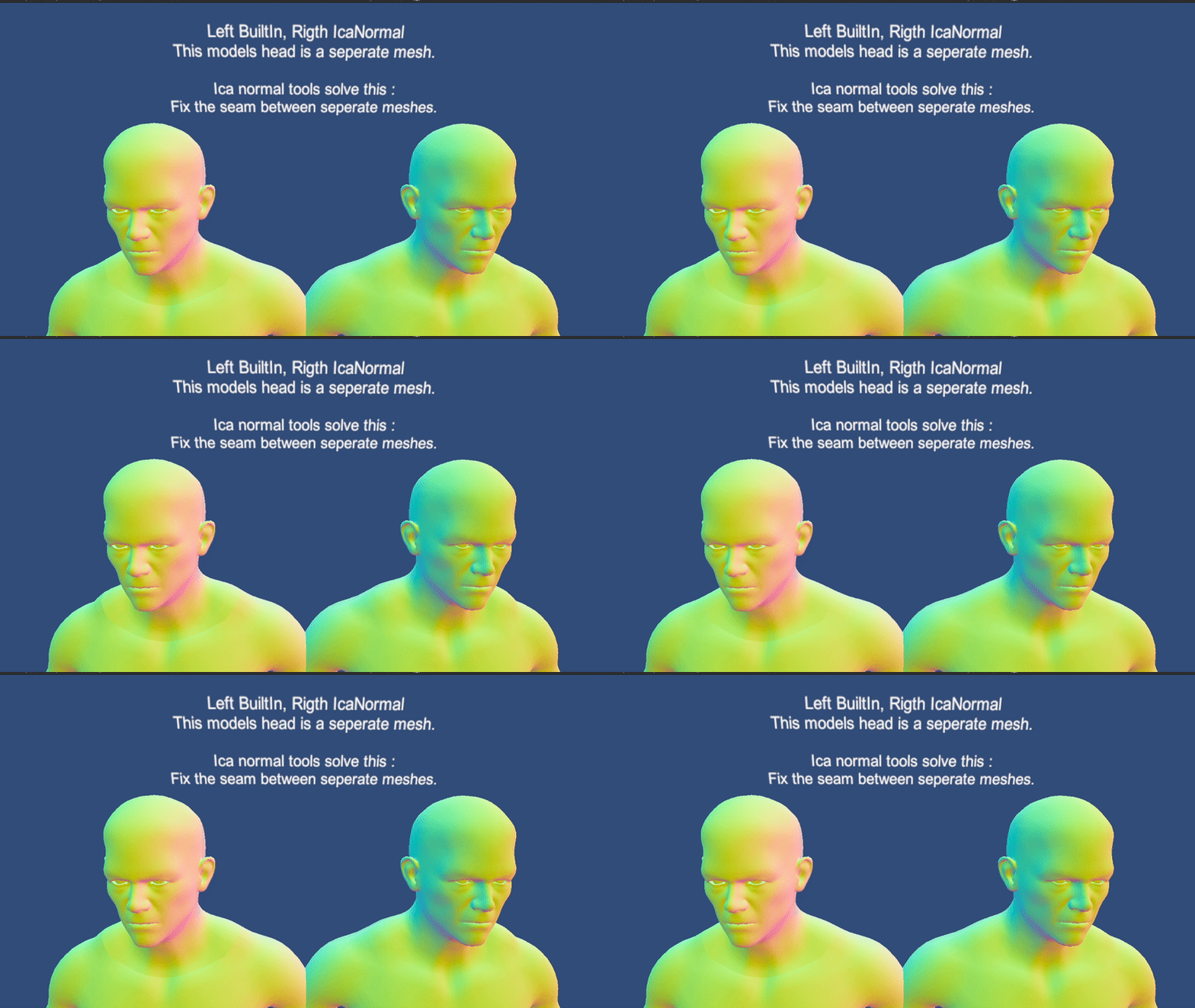
Ica Normal Tools - Normal Recalculation Library for Skinned and Procedural Meshes

Ica Normal Tools
Super Fast Normal and Tangent recalculation library for Unity. With power of Burst Compiler, Job System and Advanced Mesh API.

9333293--1306055--bs_gif.gif
9333293--1306058--head_gif.gif

For Download and more Info:
Github
This tool still in beta, I’m looking for feedbacks and help anytime.

When do you need?

  • You want to create custom character creation system based on blend shapes.
  • You want to reduce disk size of skinned meshes that have a lot of blend shapes.
  • You want to recalculate normals and tangents of your procedural meshes with smoothing angle and no UV seams or artifacts.
  • You want to split meshes without visible artifact between boundaries.
  • You want Post-Deformation Normal Recalculation feature in unity roadmap without waiting ten years

What problem does it solve?
When vertex positions change in any mesh, mesh normal data also should be recalculated to correct lightning. For this reason unity gives the Mesh.RecalculateNormals() or bake the normal and tangent deltas in skinned meshes for every BlendShape.

But there is a problem, firstly this method not counting vertices that same position on space. Which causes seams on UV island bounds and submesh bounds (occurs when using multiple material).
Also built in method not takes angle as an argument,so smooth all vertices no matter of how sharp is angle. Another downside this method not suitable for fix blendshape normals directly.

On skinned mesh renderers that stored delta values can only be correct when blend shapes not change same vertices. Which is very rare on morphs that used for character creation and face animations.

5 Likes

That’s literally should be a default option in the Unity core! Thank you so much for this, will give it a try asap

1 Like

Thanks, please let me know if you have any feedback.

This looks really awesome!

I develop and maintain a stack of tech for Unity’s ECS which among other things has an extremely performant skinned mesh renderer. It would be awesome to integrate your library into this tech, as it fills a big gap. Unfortunately, it doesn’t look feasible to simply drop your library in since the paradigms and memory models are different (in ECS there’s lots of batching and blob assets and stuff). The simplest solution would be for me to just borrow the algorithm bits directly and add your library to the third-party notices. But I wanted to run it by you first in case you want to discuss a possibly more elegant way forward. Thoughts?

1 Like

Hey, I know your framework and I was planning to learn it. I would be more than happy if I can help your work.
Please do whatever you like, no need to attribute me.
I was planning to create a compute shader first but later I gave up since I cant found a way to get vertex data from skinned mesh renderer between morphing pass and skinning pass.
And I’m not enough capable programmer to create custom SMR yet. Also underlying calculation systems uses parallel jobs and don’t use any nested collection, so should be straightforward to turn them Compute Shaders. They use mesh data only plus an adjacency list. The real bottleneck in the system caching methods. I couldn’t turn them into parallel jobs, or making them parallel yields worse performance, the real problem was creating a lot (per vertex) but small lists.
I tried Custom Rewindable allocator but couldn’t make it faster than Temp (maybe my bad).

Anyways, please let me know if I could help you, and since this is my first library, I’m open to any feedback, especially experienced framework developer like you :smile:

Thanks for the really kind words and being so receptive! I’ll explain my use case and some caveats, and then I’ll go over both potential library improvements and compute shaders.

In the ECS World, memory bandwidth is critical. It is often better to parallelize things by memory region rather than the work itself. What that means is instead of each mesh having a few parallel jobs, there would be a single parallel job where each worker thread does a whole mesh at a time. That may sound like a data management nightmare when just using jobs, but fortunately ECS has tools for this. The input vertices and output normals and tangents would be a DynamicBuffer, while the adjacency caches and source mesh indices, normals, tangents, and UVs would all be in a blob assets. These things don’t have typical safety concerns. I would always prefer using the cached approach, and constructing the caches at bake time if I were to integrate this. I do realize that the caching isn’t as general purpose, but it covers skinning, blend shapes, and various soft bodies which are the main things I want to do. One other thing is that in ECS, deformations rely on the shader graph output block nodes, and shader graph only accepts a float3 in the vertex tangent block node. I haven’t figured out the implications of that yet, but it is something to consider. EDIT: Shader Graph blends the graph-assigned tangent’s xyz with the raw input mesh tangent’s w.

So for the library, I might suggest you separate the math operations from the data storage. Right now the critical pieces are in jobs, with normals and tangents separated. But I can save myself having to load indices and vertices twice if I did both the triangle normal and triangle tangent calculations next to each other. But there may also be times I don’t need the tangents at all. Having static calculation methods where I can pass a bunch of references to the loaded triangle vertices would allow me to make the variants with much less code duplication. Another trick is to interleave data that is always accessed together, especially if it is random access. For example, Tan1 and Tan2 elements are always accessed in pairs. If you interleaved them into a single array by putting them into a struct, loading them random access will only require looking up one cache line instead of two. Similar could be done for positions and UVs (positions are always accessed randomly so they don’t need to be compacted). Though I personally wouldn’t take advantage of these memory optimizations as I’d likely fully rely on the static methods directly. My third suggestion is to maybe either make your names more verbose or add comments to elaborate on the semantics of the adjacency mapping, as well as better document and improve the API for computing caches with multiple meshes sharing vertices. Lastly, Temp allocator is very good in a job, because it is a rewinding allocator that is rewound at the end of the job. The only way to beat it is to make an allocator that can rewind multiple times during a job, such as for each iteration in a loop. I haven’t figured out a general-purpose way to do that either.

Now for compute, I noticed some of your calculations use double precision. You’ll need to fix that as compute shaders don’t normally support double-precision. I’d suggest trying renormalization after skinning. Normal and tangent skinning is a crude approximation, and you may get better results doing the calculation on the fully deformed mesh. I planned to puth the renormalization after skinning in the pipeline. The last challenge for compute will be to eliminate temporary buffers as much as possible, potentially by leveraging groupshared memory and meshlets instead. Temporary buffers are surprisingly expensive on the GPU at scale. I will probably try to solve this myself after I get a CPU-side version working. There’s still a use case for CPU-side where I want to perform softbody deformations with world objects after skinning.

Feel free to consider, ask about, or ignore any of my suggestions! :slight_smile:

@DreamingImLatios thanks for the detailed response. There a lot to digest and practice for me, because I’m just a beginner when it comes to ECS and Compute Shaders.
About documentation and naming, you are absolutely right, I just publish an update to make it slightly better but there is a lot of work to do. I found I have some “primitive obsession” which reduces the abstraction and readability of code without any benefit. I write a native nested list to make it better, I’m working on the implementation now. Also removed doubles which they was unnecessary anyways. Also I was wandering tangents w, its good to know.

and I have some question about some of your tips

  • The reason you recommend static methods, is because job system’s data copy overhead?
  • About static methods, do you mean logic should be in bursted static methods and they should be called from parallel jobs?
  • About interleaving, afaik cpu can have multiple parallel cache lines so Tan1 and Tan2 isn’t always cache optimized already?
  • Lets say job “Tan” dependent on job “Nor”. Do job system flush datas belong to “Nor” even it is still needed for “Tan” ? If it is, why?
  • Lets say I created my custom smr, considering 99% percent of blendshapes modify vertices only between 1mm and 50cm, using halfs for Blendshapes, normals, tangents is viable? Or do you using on your framework?

Thanks for your time.
Edit: also if it helps, demo team created a solution for the same problem and they were using compute shaders and custom renderer features (?Im not sure tbh), it is used on enemies.

No. It is because looping over data twice is more expensive than looping over data once if the data is large enough that cache lines get evicted.

Static methods called from Burst jobs will be Burst-compiled even without the attribute. Use them tohelp organize and modularize your code. If they are small, Burst will even inline them.

This is true if Tan1 and Tan2 are always accessed sequentially. However, one of their jobs, they aren’t.

What do you mean by “flush”?

How close does the camera get?

I’ve not been able to build a realistic test scene that pushes my solution hard enough for me to investigate such optimizations. I think if I did encounter performance issues, I would be more inclined to improve my shape batching analyzer first. The blend shape compute shader I use is a little unconventional.

I remember looking at it, but it didn’t look very scalable. It is fine for a few specialized characters, but not so fine for a few thousand. I’ll think of something at some point. I still want to get the CPU-side working first because I have a Burst deformation API that has been underutilized as it was missing a good renormalization algorithm.

1 Like

Hi
Your asset looks very interesting and it looks like it is exactly what I was looking for. But ran into a sudden problem that I can’t solve in any way. It has to do with MeshDataCache.
Unity 2022.3.8f1.
When I create it and drag my mesh there, then click on it in the inspector and click CacheData, Unity gives an error: "InvalidOperationException: Not enough space in output buffer (need //number of vertices of the specified mesh//, has 0).
This happens even with the assemblies you added to the project. Here is the full code of icoSphre.asset

InvalidOperationException: Not enough space in output buffer (needs 285, has 0)
UnityEngine.Mesh+MeshData.CopyAttributeInto[T] (Unity.Collections.NativeArray`1[T] buffer, UnityEngine.Rendering.VertexAttribute channel, UnityEngine.Rendering.VertexAttributeFormat format, System.Int32 dim) (at <10871f9e312b442cb78b9b97db88fdcb>:0)
UnityEngine.Mesh+MeshData.GetVertices (Unity.Collections.NativeArray`1[T] outVertices) (at <10871f9e312b442cb78b9b97db88fdcb>:0)
Ica.Normal.MeshDataCacheAsset.CacheData () (at Assets/IcaNormal/Core/MeshData/MeshDataCacheAsset.cs:34)

Found this error in the MeshData.cs script

if (buffer.Length < vertexCount)
                    throw new InvalidOperationException($"Not enough space in output buffer (needs {vertexCount}, has {buffer.Length})");

but I haven’t found if it’s possible to increase this buffer somewhere. Have you encountered this problem? Can you suggest something?

MeshDataCacheAsset not working right now. Just simply ignore it and leave the field blank. I pointed in caveats but forget to remove in code.