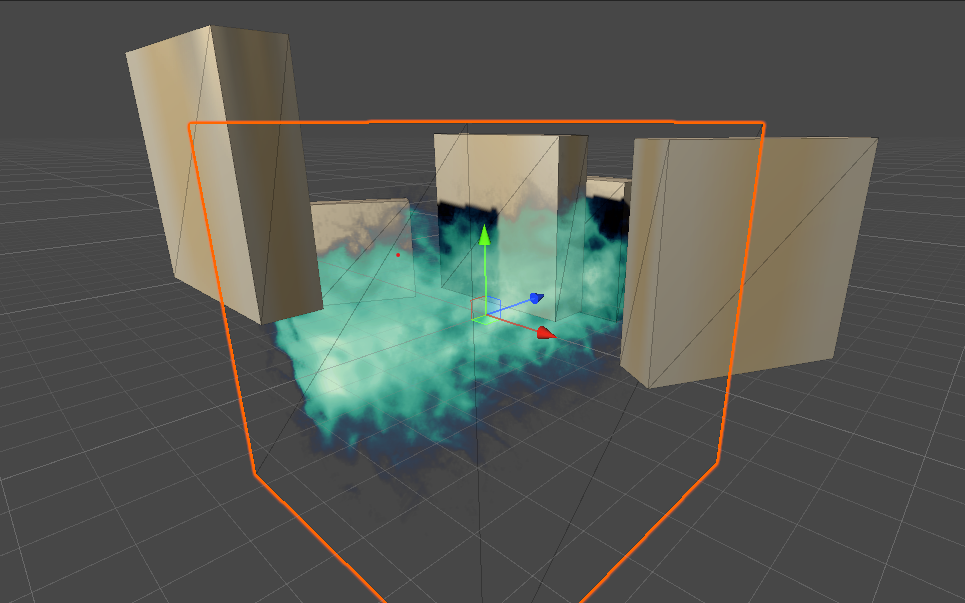
Using Unity 2020.3.4f1 and HDRP 10.4.0.
I have implemented a volumetric ray marcher for some cool looking clouds.
It works great but I have two problems:
Everything rendered in front or behind the mesh of the volume renders correctly. But when I move objects inside the volume, you can still see the volume being rendered. I thought of doing a depth test for each ray to see wether or not it insersects with geometry but that didn’t work out.
Shadows can’t be casted onto the volume and the volume itself can’t cast shadows.
The first point could be solved with the shadow coords for the shadow map I think (?) but I have no clue how I would make it cast shadows.
Hope you can help me out.
Update for the shadow casting problem:
I read some articles and posts and found out that the ray origin and direction should come from the light source.
And both need to be orthographic.
I’ve tried the approach from this blog but I can’t get any shadows to show up. Rendering a Sphere on a Quad. Making the Sphere Impostor Feel More… | by Ben Golus | Medium
 VertexOutput vert (VertexInput v)
            {
                VertexOutput o;
                o.vertex = UnityObjectToClipPos(v.vertex);
                o.uv = TRANSFORM_TEX(v.uv, _gradientTex);

                //o.ro = mul(unity_WorldToObject, float4(_WorldSpaceCameraPos, 1));
                //o.hitPos = v.vertex;

                float3 worldPos = mul(unity_WorldToObject, v.vertex);
                float3 worldSpaceViewPos = UNITY_MATRIX_I_V._m03_m13_m23;
                float3 worldSpaceViewForward = -UNITY_MATRIX_I_V._m02_m12_m22;//in shadowcaster light direction is the current world space view direction

                // originally the perspective ray dir
                float3 worldCameraToPos = worldPos - worldSpaceViewPos;
                // orthographic ray dir
                float3 worldRayDir = worldSpaceViewForward * -dot(worldCameraToPos, worldSpaceViewForward);
                // orthographic ray origin
                float3 worldRayOrigin = worldPos - worldRayDir * 100;

                o.rd = mul(unity_WorldToObject, float4(worldRayDir, 0.0));
                o.ro = mul(unity_WorldToObject, float4(worldRayOrigin, 1.0));

                return o;
            }
Another update for the shadow casting problem:
I’ve got some shadows to show up but they are still changing when I change the camera position/rotation and I can’t figure out why.
Here’s the code I’m currently using:
@bgolus sorry to bother you but since you wrote the blog article I’ve mentioned earlier, you might have an idea what’s missing here?
 VertexOutput vert (VertexInput v)
            {
                VertexOutput o;
                o.vertex = UnityObjectToClipPos(v.vertex);

                float3 worldPos = o.vertex;// mul(unity_WorldToObject, v.vertex);

                float3 lightPos =  UNITY_MATRIX_I_V._m03_m13_m23;//viewer position
                float3 lightDir = -_WorldSpaceLightPos0;//-UNITY_MATRIX_I_V._m02_m12_m22;//forward in view space is -z

                float3 worldSpaceRayDir = lightDir;
                float3 worldSpaceRayOrigin = worldPos - worldSpaceRayDir;

                // output object space ray direction and origin
                o.rd = normalize(mul(unity_WorldToObject, float4(worldSpaceRayDir, 0.0)));//0 treats vector as direction and not position
                o.ro = mul(unity_WorldToObject, float4(worldSpaceRayOrigin, 1.0));

                return o;
            }