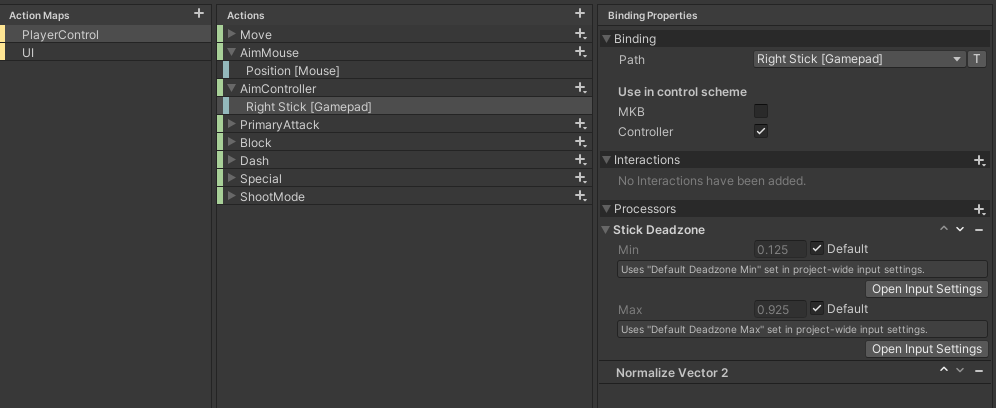
I am currently using the input system with two control schemes. One for mouse, pointer, and keyboard. The other is gamepad. I am using Invoke C# Events. I could just not understand, but my understanding is that the control schemes are supposed to detect when input devices change and then change to that control scheme. Which I can see in the player input component when the game is running.
I am working on a top down shooter. In my input actions I have a Look action. The gamepad control scheme is set to Right Stick [Gamepad] and my KBaM control scheme is set to Position [Pointer].
My issue is when I set the Look action type to Value, even though unity detects when the control scheme has changed in the player input component , the player only looks at the Position [Pointer]. If I use the mouse and click off screen to disable the mouse pointer then the gamepad works just fine.
If I use the action type Pass Through it works as intended but the player snaps to -90 after the user stops using the Right Stick [Gamepad]. If I use Value this does not happen.
My Code:
public class PlayerMovement : MonoBehaviour
{
    private InputMaster input;
    private InputAction Look;
    private Rigidbody2D _rigidbody;

    private void Awake()
    {
        _rigidbody = GetComponent<Rigidbody2D>();
        input = new InputMaster();
    }

    private void DoLook(InputAction.CallbackContext cont)
    {
        if (cont.control.displayName == "Right Stick")
        {
            Vector3 targetPosition = cont.ReadValue<Vector2>();
            Vector2 lookDir = targetPosition.normalized;
            float angle = Mathf.Atan2(lookDir.y, lookDir.x) * Mathf.Rad2Deg - 90f;
            _rigidbody.MoveRotation(angle);
        }
        else if (cont.control.displayName == "Position")
        {
            Vector3 targetPosition = cont.ReadValue<Vector2>();
            Vector3 ObjPos = Camera.main.WorldToScreenPoint(_rigidbody.transform.position);
            Vector3 dir = targetPosition - ObjPos;
            float rotZ = Mathf.Atan2(dir.x, dir.y) * Mathf.Rad2Deg;
            _rigidbody.MoveRotation(-rotZ);
        }
    }

    private void OnEnable()
    {
        Look = input.Player.Look;
        Look.Enable();

        input.Player.Look.performed += DoLook;
        input.Player.Move.Enable();
    }

    private void OnDisable()
    {
        Look = input.Player.Look;
        Look.Disable();

        input.Player.Look.performed -= DoLook;
        input.Player.Move.Disable();
    }
}