Hello, I’m new to shaders but am trying to learn. Currently, I’m attempting to make an ocean shader. So far I’ve created a surface shader that scrolls a single normal map in three different directions, and have a vertex shader from Unity 5.x Shaders and Effects Cookbook that rolls a sine wave function across a plane. Here’s what they look like:
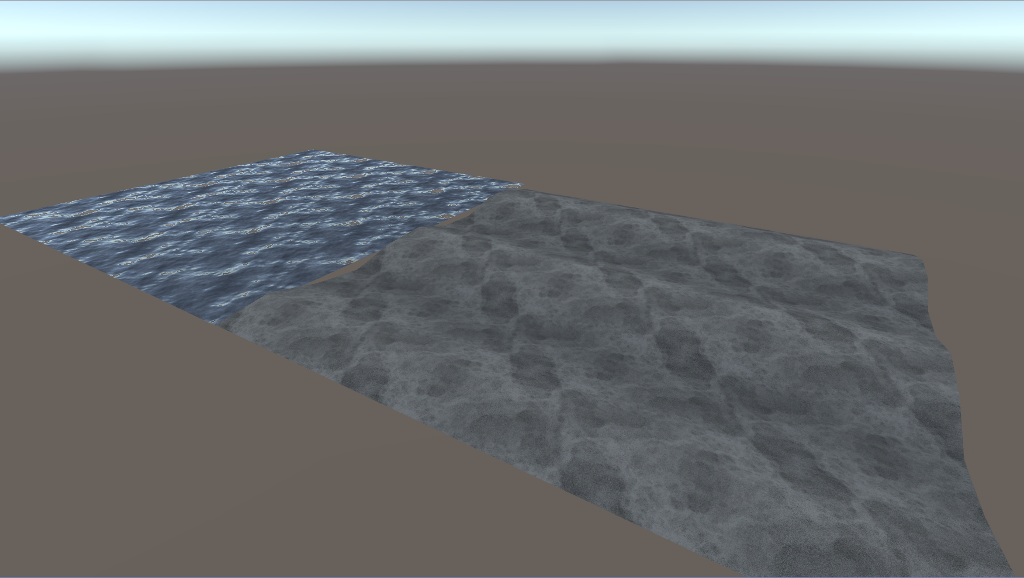
What I would like to do is combine them. Is this possible? Thanks in advance…
Also, here’s the shaders if interested:
Shader "Custom/SeaShader" {
	Properties {
		_Color ("Color", Color) = (1,1,1,1)
		_MainTex ("Albedo (RGB)", 2D) = "white" {}
		_NormalTex("Normal Map 1", 2D) = "bump" {}
		_Glossiness ("Smoothness", Range(0,1)) = 0.5
		_Metallic ("Metallic", Range(0,1)) = 0.0

		_ScrollXSpeedN1 ("N1 X Scroll Speed", Range(-10, 10)) = -0.5
		_ScrollYSpeedN1 ("N1 Y Scroll Speed", Range(-10, 10)) = 0.5

		_ScrollXSpeedN2 ("N2 X Scroll Speed", Range(-10, 10)) = 0.5
		_ScrollYSpeedN2 ("N2 Y Scroll Speed", Range(-10, 10)) = 0.5

		_ScrollXSpeedN3 ("N3 X Scroll Speed", Range(-10, 10)) = 0
		_ScrollYSpeedN3 ("N3 Y Scroll Speed", Range(-10, 10)) = -0.5
	}
	SubShader {
		Tags { "RenderType"="Opaque" }
		LOD 200

		CGPROGRAM
		// Physically based Standard lighting model, and enable shadows on all light types
		#pragma surface surf Standard fullforwardshadows

		// Use shader model 3.0 target, to get nicer looking lighting
		#pragma target 3.0

		sampler2D _MainTex;

		struct Input {
			float2 uv_MainTex;
			float2 uv_NormalTex;
		};

		sampler2D _NormalTex;
		half _Glossiness;
		half _Metallic;
		fixed4 _Color;

		fixed _ScrollXSpeedN1;
		fixed _ScrollYSpeedN1;
		fixed _ScrollXSpeedN2;
		fixed _ScrollYSpeedN2;
		fixed _ScrollXSpeedN3;
		fixed _ScrollYSpeedN3;

		// Add instancing support for this shader. You need to check 'Enable Instancing' on materials that use the shader.
		// See https://docs.unity3d.com/Manual/GPUInstancing.html for more information about instancing.
		// #pragma instancing_options assumeuniformscaling
		UNITY_INSTANCING_CBUFFER_START(Props)
			// put more per-instance properties here
		UNITY_INSTANCING_CBUFFER_END

		void surf (Input IN, inout SurfaceOutputStandard o) {

			//Create separate variables to store UVs
			//before passing to tex2D() function
			fixed2 scrolledUV1 = IN.uv_MainTex;
			fixed2 scrolledUV2 = IN.uv_MainTex;
			fixed2 scrolledUV3 = IN.uv_MainTex;

			//Create variables that store individual
			//x and y components for the UV's scaled by time

			fixed n1XScrollValue = _ScrollXSpeedN1 * _Time;
			fixed n1YScrollValue = _ScrollYSpeedN1 * _Time;
			fixed n2XScrollValue = _ScrollXSpeedN2 * _Time;
			fixed n2YScrollValue = _ScrollYSpeedN2 * _Time;
			fixed n3XScrollValue = _ScrollXSpeedN3 * _Time;
			fixed n3YScrollValue = _ScrollYSpeedN3 * _Time;

			//Apply final UV offset
			scrolledUV1 += fixed2(n1XScrollValue, n1YScrollValue);
			scrolledUV2 += fixed2(n2XScrollValue, n2YScrollValue);
			scrolledUV3 += fixed2(n3XScrollValue, n3YScrollValue);

			//Apply textures and tint
			half4 c = tex2D(_MainTex, scrolledUV1) * _Color;

			// Albedo comes from a texture tinted by color
			o.Albedo = c.rgb;
			// Metallic and smoothness come from slider variables
			o.Metallic = _Metallic;
			o.Smoothness = _Glossiness;
			o.Alpha = c.a;

			float3 normalMap = UnpackNormal(tex2D(_NormalTex, scrolledUV1) + (tex2D(_NormalTex, scrolledUV2)*2-1)) + (tex2D(_NormalTex, scrolledUV3)*2-1);
			o.Normal = normalMap.rgb;
		}
		ENDCG
	}
	FallBack "Diffuse"
}
Shader "Custom/WaveShader" {
	Properties {
		_MainTex ("Albedo (RGB)", 2D) = "white" {}
		_Color ("Color", Color) = (1,1,1,1)
		_tintAmount ("Tint Amount", Range(0, 1)) = 0.5
		_ColorA ("Color A", Color) = (1,1,1,1)
		_ColorB ("Color B", Color) = (1,1,1,1)
		_Speed ("Wave Speed", Range(0.1, 80)) = 5
		_Frequency ("Wave Frequency", Range(0, 5)) = 2
		_Amplitude ("Wave Amplitude", Range(-1, 1)) = 1

	}
	SubShader {
		Tags { "RenderType"="Opaque" }
		LOD 200

		CGPROGRAM
		// Physically based Standard lighting model, and enable shadows on all light types
		#pragma surface surf Lambert vertex:vert

		// Use shader model 3.0 target, to get nicer looking lighting
		#pragma target 3.0

		sampler2D _MainTex;
		float4 _ColorA;
		float4 _ColorB;
		float _tintAmount;
		float _Speed;
		float _Frequency;
		float _Amplitude;
		//float _OffsetVal;
		fixed4 _Color;

		struct Input {
			float2 uv_MainTex;
			float3 vertColor;
		};

		void vert(inout appdata_full v, out Input o)
		{
			UNITY_INITIALIZE_OUTPUT(Input,o);
			float time = _Time * _Speed;
			float waveValueA = sin(time + v.vertex.x * _Frequency) * _Amplitude;

			v.vertex.xyz = float3(v.vertex.x, v.vertex.y + waveValueA, v.vertex.z);
			v.normal = normalize(float3(v.normal.x + waveValueA, v.normal.y, v.normal.z));
			o.vertColor = float3(waveValueA, waveValueA, waveValueA);
		}

		// Add instancing support for this shader. You need to check 'Enable Instancing' on materials that use the shader.
		// See https://docs.unity3d.com/Manual/GPUInstancing.html for more information about instancing.
		// #pragma instancing_options assumeuniformscaling
		UNITY_INSTANCING_CBUFFER_START(Props)
			// put more per-instance properties here
		UNITY_INSTANCING_CBUFFER_END

		void surf (Input IN, inout SurfaceOutput o)
		{
			half4 c = tex2D(_MainTex, IN.uv_MainTex);
			float3 tintColor = lerp(_ColorA, _ColorB, IN.vertColor).rgb;

			// Albedo comes from a texture tinted by color
			//fixed4 c = tex2D (_MainTex, IN.uv_MainTex) * _Color;
			o.Albedo = c.rgb * (tintColor * _tintAmount);
			//o.Albedo = c.rgb;

			// Metallic and smoothness come from slider variables
			o.Alpha = c.a;
		}
		ENDCG
	}
	FallBack "Diffuse"
}
It's already what he/she has done with the lambda function.
– Hellium