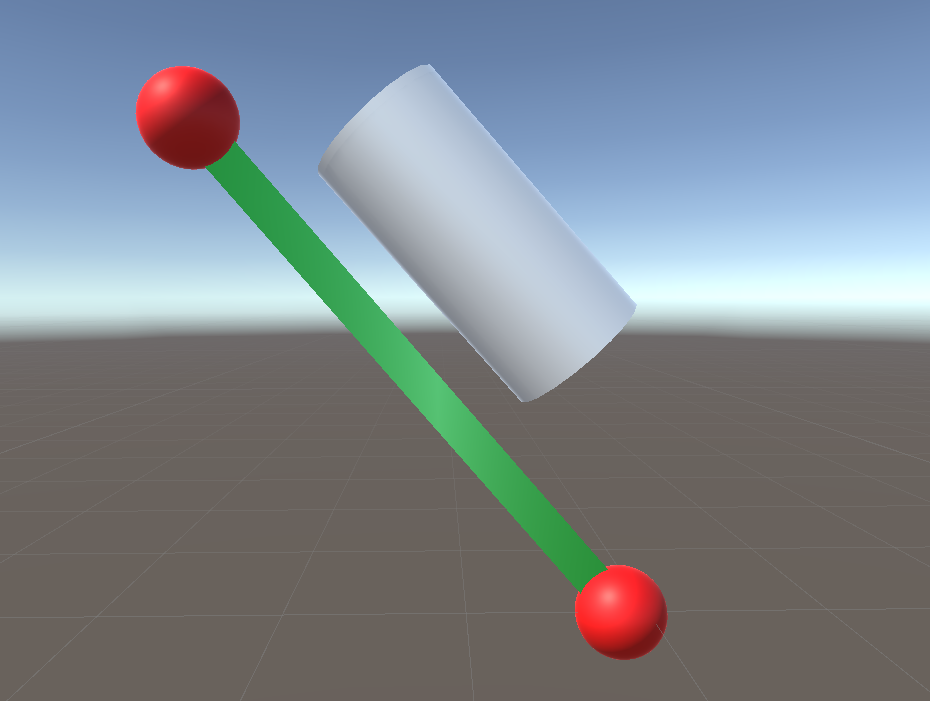
Hi, I’m currently working on a project where the program takes inputs from an outside script and map it to spheres. But, now, for an example, let’s say we have only 2 spheres, and I want to map an object to said spheres where if the 2 spheres moved a line between them will form, and my object will be parallel to that line.
Looks like it’s aligned but just the local coordinates are 90 degrees off in the direction that is right in your picture. Find out which local axis that is by selecting the tube. Then add a 90 degree rotation around that axis.
So, if the local axis to the right in your picture is the X axis, do this:
Quaternion.Euler works with rotation angles around each axis. Relative position vector is not a set of angles.
For something like this you will want to use Quaternion.FromToRotation or Quaternion.LookRotation .
Vector3  line = sphere1.transform.position - sphere2.transform.position;
tube.transform.rotation =  Quaternion.FromToRotation(Vector3.up, line.normalized);
The first argument of FromToRotation will depend on the default orientation of tube object. Might have to use Vector3.forward instead of up if the tube is normally horizontal.
        cylinder.transform.position=sphere1.transform.position+(sphere2.transform.position-sphere1.transform.position)/2; // set to midway position
        cylinder.transform.up=(sphere2.transform.position-sphere1.transform.position).normalized; // direction
        cylinder.transform.position+=cylinder.transform.right; // make parallel