Lightmap packing with xAtlas in Unity 6.3

Overview

In Unity 6.3, we have added a new algorithm for packing lightmaps based on the third-party UV packing library xAtlas. xAtlas is a fork of thekla_atlas, which was written for use in The Witness.

The new packing algorithm should in most cases produce more efficient and tightly packed lightmaps, with less authoring effort required, thus saving VRAM and disk space usage. In our testing, we observed anywhere from a 0% to 27% saving in memory usage across a variety of representative test scenes. The primary benefit of this new packing algorithm is that it considers the shape of each renderer’s UV layout, unlike the older packing algorithm, which only packs based on bounding boxes:
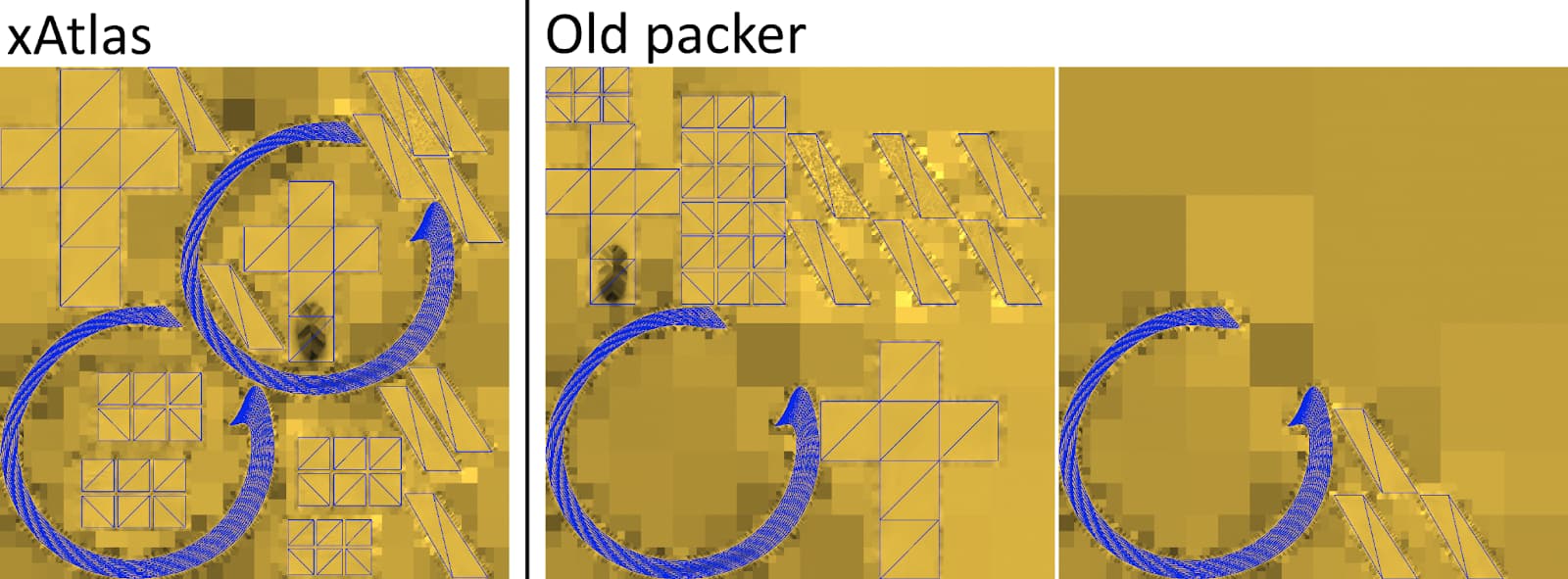
Because the new packing algorithm is solving a more difficult problem, it is generally slower than the older packing algorithm. For most of the scenes we tested, packing took on the order of a few seconds with the new packing algorithm, where it was essentially instant with the old packer. The time taken to calculate packing will scale with the size of the scene, and is logged in the editor log. If it becomes too slow, the quality can be reduced for faster packing, using a slider in the Lighting Window.

The new packing algorithm has been made the default for new scenes, but existing scenes will continue to use the older lightmap packing algorithm. The 2 algorithms will produce lightmaps with different layouts, and slight visual differences may therefore occur when switching between them. If you wish to continue to use the older packing algorithm, you can simply select it via a setting in the Lighting Window.

New features

The new packing algorithm brings a few new features with it, which the older algorithm couldn’t support:

Packing speed/quality tradeoff: xAtlas is a stochastic UV packer, meaning it places UV layouts into an atlas at random positions, hoping to ‘discover’ an efficient packing. It repeats this process many times, and selects the packing from the best attempt. This allows for direct control over the tradeoff between the time taken to compute the packing, and the quality of the packing. This tradeoff is configurable via the “Packing Iterations” setting in the Lighting Window. You can also force the packer to try every possible layout by setting LightingSettings.bruteForcePacking to true via script. This is intentionally not exposed in the UI, as it can take a very long time for larger scenes, so should be used with caution.

Block aligned packing: xAtlas has the ability to align all UV layouts to the boundaries of a 4x4 block of texels during packing. This can help mitigate compression artifacts, such as discoloration due to color bleeding, when using GPU block compression formats such as BC6H, BC7 and DXT5. It does come at the cost of slightly less memory-efficient packing, though. This feature can be toggled via the “Block Aligned Packing” setting in the Lighting Window.

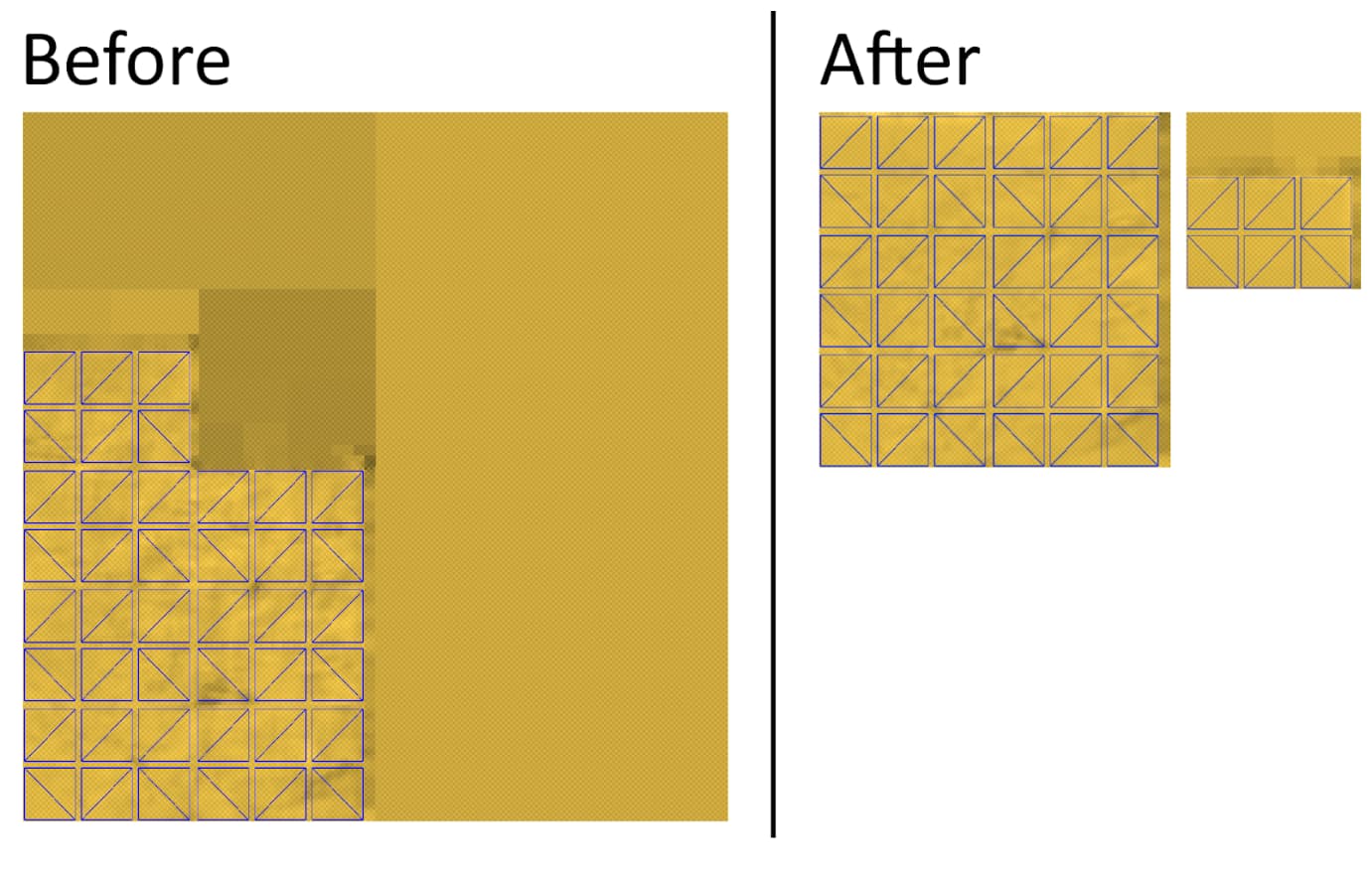
Repacking of underused lightmaps: The older packer produces poor packing when a lightmap is just barely about 25% full, as it never attempts to split larger lightmaps into several small ones. With the new packer, we have added a setting “Repack Underused Lightmaps” which does this. Below is an example of of problematic lightmap before and after the setting is applied:
Setup instructions and settings

The Lighting Window UI has been slightly redesigned to accommodate the new packing algorithm. A new dropdown labelled “Lightmap Packing” has been added. The options are “Custom” and “Auto”.

image

Additionally, the “Lightmap Padding” and “Fixed Lightmap Size” settings have been moved into a new section which is only visible when Lightmap Packing = Custom. In Auto mode, xAtlas is used for packing, with some reasonable default settings.

When Lightmap Packing = xAtlas, the section expands to accommodate a few additional xAtlas-specific settings, controlling the features mentioned in the previous section. To use xAtlas for lightmap packing, simply select it in the “Packing Method” dropdown, or use Lightmap Packing = Auto.

We’ve also added scripting API to the LightingSettings class for controlling these new settings.

As a final note, xAtlas also contains functionality for lightmap UV generation / UV unwrapping, which has not been integrated in this release. We intend to investigate whether this makes sense to integrate in the future.

Let us know if you have any questions, or encounter issues with the new packing algorithm. :slight_smile:

34 Likes

This is the sort of features that not one person who uses the built in baker asked for because it’s too technical and if you really need XAtlas, you use Bakery.
We’d rather see you work on features that a 3rd party tool cannot access.

1 Like

Great work! Can you guys also add ability for packer to not override my custom authored uvs?

2 Likes

Not everyone can necessarily use Bakery because it still only supports NVIDIA GPUs for baking and, according to guycalledfrank, that likely won’t change in the foreseeable future.

Even though I use Bakery myself, I can see the advantages for people stuck using Unity’s Lightmappers. xatlas is vastly better and even used by e.g. ArmorPaint and Godot, so it’s good to see that Unity is catching up.

5 Likes

Probably an odd request, but how difficult would it be to port the functionality of xAtlas to the runtime, so we can generate these UV maps for runtime meshes? I feel like one could already do so if they feel so inclined, but now it’s right there.
This could aid in the process of making a home-made lightmapper or anything else that just needs the scene unwrapped, at least as long as Unity isn’t providing a runtime lightmapping function, which I doubt.

1 Like

This is so untrue. There can be so many problems with Bakery, both technical and legal. Some types of businesses won’t be able to use Bakery, although they’re in the minority. Technically, it does things unity no longer supports (literally gives warnings in the console) and can mess up version control.

2 Likes

No plans to do this at the moment. There’s a lot more scrutiny when adding dependencies to the player. If you need this I suggest submitting a feature request with your use case described https://portal.productboard.com/unity/1-unity-platform-rendering-visual-effects/c/561-didn-t-find-what-you-were-looking-for-

We’re currently considering it. That’s all I can say for now.

2 Likes

This is great! Appreciate this and will try it out soon

Is the idea here that because a 3rd party solution exists that they shouldn’t improve the built in stuff?

Not one person asked for this? C’mon :wink:

We use the built in lightmapper for SSR and we’re incredibly excited for this, cheers! Long overdue, but so happy to see it. Especially repacking underused atlases!

4 Likes

Great to see Unity’s lightmapper getting some love. Nice work!

When using xAtlas for packing, does it modify the UV2 generated during model import, or the UV2 already contained in the model? That is, will it result in changes to the model asset itself?

I would appreciate your response. Thank you. @Pema-Malling

It makes no changes to the UVs of each mesh. This change is purely about packing already-existing UV layouts with a smarter algorithm. We want to look into using XAtlas for generating lightmap UVs as well, but it isn’t currently implemented.

1 Like

The XAtlas Packing Method has been a huge benefit to my Unity 6.3 project and seems to have produces a very clean result. I have updated my project to use Unity 6.4 and I’m wondering if anyone has noticed a regression where smaller meshes overlap and intrude onto the sides of the cavities found in larger meshes. It is not as though the smaller mesh could not fit in the larger cavity, It is that the smaller mesh is not centred in the cavity and seems to have been pushed unnecessarily sideways until it overlaps the side of the cavity.

Do you have a screenshot of one such problematic case? Sounds like a bug

Last week when I reported this bug I was consistently unable to get a clean light bake. Now when I re-baked the scene using the XAtlas Packing Method I got a cleaner result with only a hint of the dark blobs that were present last time. I have added more geometry to my scene in the past week so I don’t know if that has had an effect on how XAtlas packs the geometry. I don’t have Unity 6.3 installed on my system any more so I’m not sure how it would have handled my latest geometry updates.

Here is a screenshot showing the Unity 6.4 editor with all the Lightmapping Settings that I used on my scene. Last week the beige door jamb on the right side of those red doors was a huge black mess. Now it is relatively clean with a hint of darkening visible only when you come close to the corner edge…

Here you can see the Baked Lightmap showing the yellow arch that represents the beige wall surrounding the red doors. This time the blue geometry doesn’t overlap the yellow arch anywhere near as much as it did last week but as you can see, it is still pushed up against one side of that yellow arch rather than being placed in the centre of the available space…

Even though I wasn’t able to reproduce the bug as it presented itself last week, It feels like the off centre placement of those smaller bits of geometry might be the clue to the heart of the problem.

Hmm.. Different pieces of geometry may get packed very close to one another, but they should never overlap. If you see overlapping again in the future, I’d suggest filing a bug report with the scene attached, so we can investigate it.

About the objects being packed closely together: The “Lightmap Padding” setting is supposed to mitigate that. If you increase the setting, do you see the objects being packed less tightly?

You may also be able to get more desirable results by increasing the “Packing Iterations”.

The object not being ‘centered’ in the gap is to be expected, xAtlas generally prefers placing objects as far towards the bottom left corner as it can.