Hi!
I’m new at UnityECS. I’m trying repeat some tutorials (simple cube rotating in this case), but I faced an unknowing problem: changing params of LocalTransform on it’s entity doesn’t change params of common Transform of this cube in Editor, which means cube doesn`t even move
Currently I’m using Unity 2022.3.12f1 and Entities 1.0.16
Tell me pls how to fix this strange issue
Editor window for clear example:
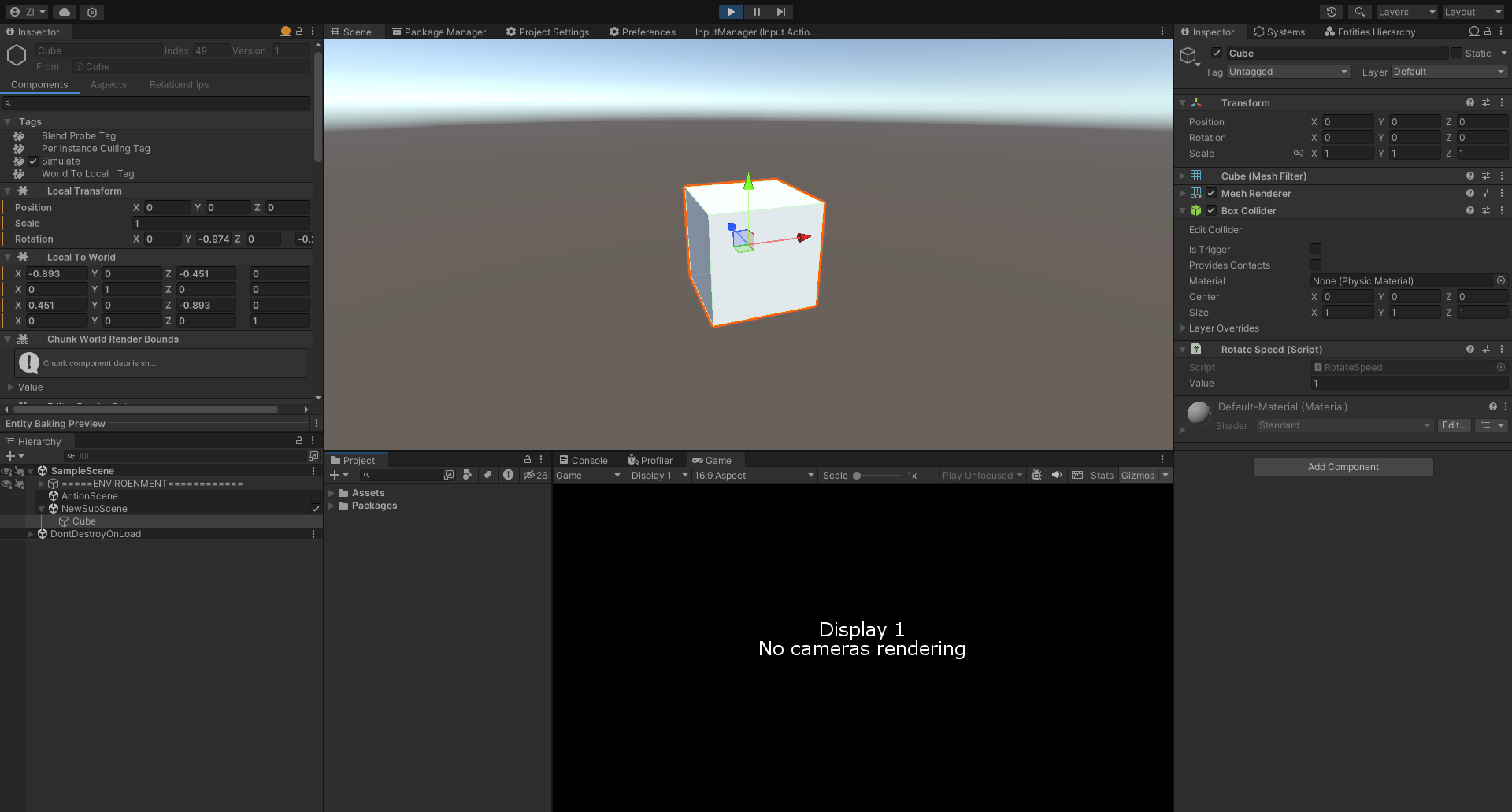
Component&System scripts:
public class RotateSpeed : MonoBehaviour
{
    public float Value;

    private class RotateSpeedBaker : Baker<RotateSpeed>
    {
        public override void Bake(RotateSpeed authoring)
        {
            Entity entity = GetEntity(TransformUsageFlags.Dynamic);
            AddComponent(entity, new RotateSpeedData
            {
                Value = authoring.Value
            });
        }
    }
}
public struct RotateSpeedData : IComponentData
{
    public float Value;
}
public partial struct RotatingCubeSystem : ISystem
{
    public void OnUpdate(ref SystemState state)
    {
        foreach (var (transform, speed) in SystemAPI.Query<RefRW<LocalTransform>, RefRO<RotateSpeedData>>())
        {
            transform.ValueRW = transform.ValueRO.RotateY(speed.ValueRO.Value * SystemAPI.Time.DeltaTime);
        }
    }
}


Thanks for your answer, but for me this is still unclear ;/ I understood the difference between Runtime and Authoring inspectors and I thought that exactly initial values of this cube's transform change it's rotation on scene. Is that wrong? You told me close this subscene in Hierarchy window, but when I'll close it there won't be cube on scene at all Sorry, but can you explain it a little bit wider for me?
– ZedikusI had this specific checkbox in mind there. Unchecking it will end authoring mode for this subscene and triggers
– andrew-lukasikGameObject->Entitybaking process. Technically, you can go into authoring subscenes while in Play mode, but consider this being outside of standard workflow.These initial values, sourced from this
– andrew-lukasikGameObject, change values on correspondingEntity- you got this part right. This happens in one direction,GO->Entity, only. What you miss, in my estimation, is that subscene in Authoring mode (i.e. open) makes the Editor render it's content AuthoringGameObjects and hide corresponding entities (ones that will be rotated byRotatingCubeSystem).RotatingCubeSystemis not interested in authoringGameObjects.