Basically, like this - the two green hatched circles are joined and become one shape:

I’m essentially looking for a combine operation with 2 circle sprites. Is there an easy way to do this sort of thing with Unity, or do I have to go with a mesh, or is there another way/plug-in that would do this?
Thanks!
There are multiple ways to go about it, but none of them are “easy”.
Basically you can calculate circle intersection yourself, and create outline using line renderer.
Or you could implement them as an image effect.
Or you could try using stencil buffer for masking.
Or you could try depth masking with invisible sprite. (first you render a transparent mask sprite which is invisible but writes into depth buffer, and is slightly in front of the “green line” sprite, then you render the “green line sprite”)
The screenshot you posted seems to belong to some sort of 4x game, meaning there will be more than just two circles.
I know this post is old, but I’m sharing this info anyway.
Simple!
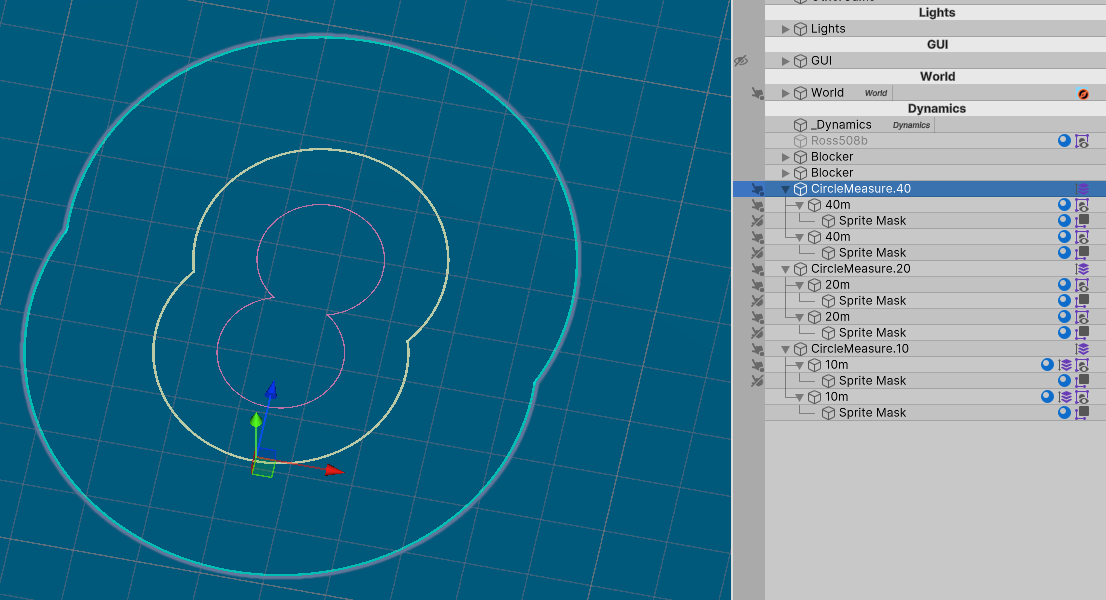
You can merge the circles, using two objects. “A” circle sprite and “B” sprite mask.
If you set A’s to “Visible Outside Mask” then B will mask all instances of A. Creating nice merging.
If you want different circle merges for different purposes, the layer setting can be used. Attack range, build range, etc.
( Ignore that I duplicated the prefab inside itself, it’s just to demonstrate )
Old post, but got a question regarding the merging, masks etc.: When trying to merge separate circle “types”, it seems that they have to share the same parent object? As example:
- Circles “Attack Range”, are under a “Attack Range” GameObject (parent has sorting group component)
- Circles “Build Range”, are under a “Build Range” GameObject (parent has sorting group component)
- …
So it seems to be not possible to have each circle placed on their own units, like Unit 1 has all it’s related circles, Unit 2 has all it’s circles, … (which I see as a must-have, else have to manually move all circles manually… per unit)… I assume this is where rendering layer masks should come into play - but they don’t work at all.