Is it possible to make a isometric 2D role-playing game similar to Diablo with Unity3D, and how do I get started?
Hello,
Yes it’s possible, you should have good gemetroy and maths knowledge and learn how unity engine works and kind about scripting to develop by your self. Indeed you can buy some stuff in asset store that would help you.
I have no idea what gemetroy is, what type of stuff are you talking about?
1 Like
Sorry my bad, Geometry.
In asset store you will find many kind of game things that would be useful, like source codes, art (3d model, 2d sprites), audio (musics and sfx).
Sorry for the late reply, unity didnt want me to login for some reason.
I found some sprites. So how do I get started with making the game?
https://docs.unity3d.com/Manual/GettingStarted.html
https://unity3d.com/learn/tutorials
If you’re in 3D mode, and you click the word “Persp”, it will shift the editor into isometric view mode. You can use that to build your scene.

I created my own project with my game.
But I don’t see the word “Persp” and I don’t see any information about being in 3D mode.
This gizmo will only appear in the “Scene” tab. As long as you don’t have the “2D” button selected along the top of the scene view, you’re in 3D mode.
You can use normal assets, and an Orthographic camera rotated to create the isometric effect you’re going for, or you can use an orthographic camera with no rotation, and create all your assets to appear visually isometric.
I have unchecked the 2D button, but I still don’t see a button called “Persp” when I click on gizmos.
Nevermind, I just saw your screenshot. I had to click on the button called persp in the top right corner to change to isometric, so I now have the correct view in my game.
Seems like the program doesn’t save my game.
I just opened unity after clicking save project and my game has been rolled back to 2D again and the isometric view has been changed back again.
1 Like
At the top right of your Unity window, click the “Layout” button, and click “Save Layout”. See if that preserves the changes.
Keep in mind that the Camera in the hierarchy is what you will actually view the game from when playing, and it must also be set up to be orthographic, and viewing at the correct angle. The “Scene” view camera is merely a camera used as a level-editor view of sorts. Clicking on the camera in the hierarchy will give you a small preview of what it sees, as well as in the “Game” tab.
I just tried clicking save layout, but it still rolls back to 2D as well as changing the isometric view when I open unity.
That is strange, the state of the editor interface should stay the same. Can you then load your saved layout from the same menu?
Anyway, it’s not that big a deal to just click the 2D off and set it to isometric again. Like I said in my previous post, the editor view is just for scene editing, the Camera in the scene is what matters for gameplay.
I think I found what was causing the problem.
When I created the game, I selected 2D, so unity was rolling back to 2D again whenever I would uncheck the 2D button.
So I created a new game and selected it to be a 3D game so now the settings with unchecking the 2D button and selecting isometric view sticks.
I just put the character model that I found from the assets store in the game, but its a little too big. Is there a way to change the size of the character models in the game?
Is this a 3D model? The asset should have a “scale factor” property.
If it’s a 2D texture then if you click on it, in the import settings you can set “PixelsPerUnit” which is how many pixels equals one unity unit. It defaults to 100, so making that larger will make the object appear smaller.
You can also use the Transform scale property on the actual GameObject you create using that visual component.
I am using this model. But it says it is a 3D model. I am trying to make it the same size as the monsters in Diablo 2. But it seems to me that some of the monsters in Diablo 2 are sprites? I also don’t see any option called scale factor when I click on it.
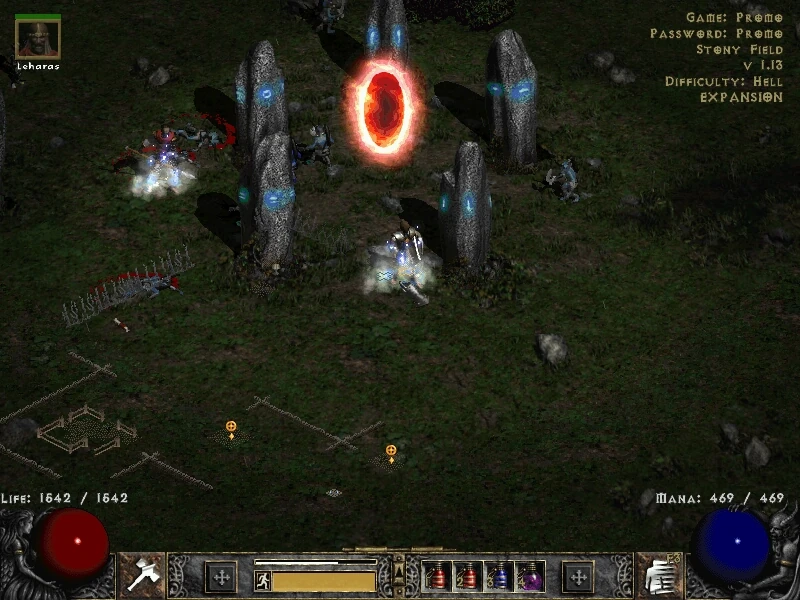
I did some research. The characters and models in Diabo 2 are indeed sprites, but they are animated sprites. I took a look in the assets shop but I couldn’t find any animated sprites.
I couldn’t find any animated sprites so I downloaded this pack just to get started.
But the characters and models looks completely different from the screenshots as can be seen on this picture.

I also can’t seem to drag any of the trees into the gamefield.
Im still looking for help, the videos and guides I found on the internet weren’t really helpful to be honest.
You may want to create a new thread with a more specific question.
Your original question was:
Yes, it is possible. It’s just the perspective of the game. Isometric can be an orthographic camera at an angle, or an art style. Try setting an orthographic camera to rotation (30,45,0).
Pretty much everything else is the same as making any other game. Just keep in mind that 2D physics only works on the XY plane, and by angling the camera it will not be aligned with that plane.