So I’m trying to make a decent rigidbody character controller in unity, and I’m stuck with this problem:

As you may notice from this gif, when I jump and land on a slope, my character seems to slide down the slope a little. I’m trying to find a way to make the character not move at all when it lands.
I’ve unsuccessfully tried the following, which basically resets the velocity to zero when the character detects a collision while it was in the air:
void OnCollisionEnter(Collision coll)
    {
        if (CurrentControllerState == ControllerState.InAir)
        {
            _characterRigidbody.velocity = Vector3.zero;
        }
    }
I’ve Debug.Log()'d a bit and this code really DOES execute at the right time, but the character still moves a bit. Friction doesn’t change anything either. I’m guessing this is due to the fact that the collision resolves its position in the direction of the slope’s normal when the character’s collider intersects the slope’s collider, making the character move a little. But that’s just a guess. Here’s another gif to show you exactly what’s happening, frame by frame:
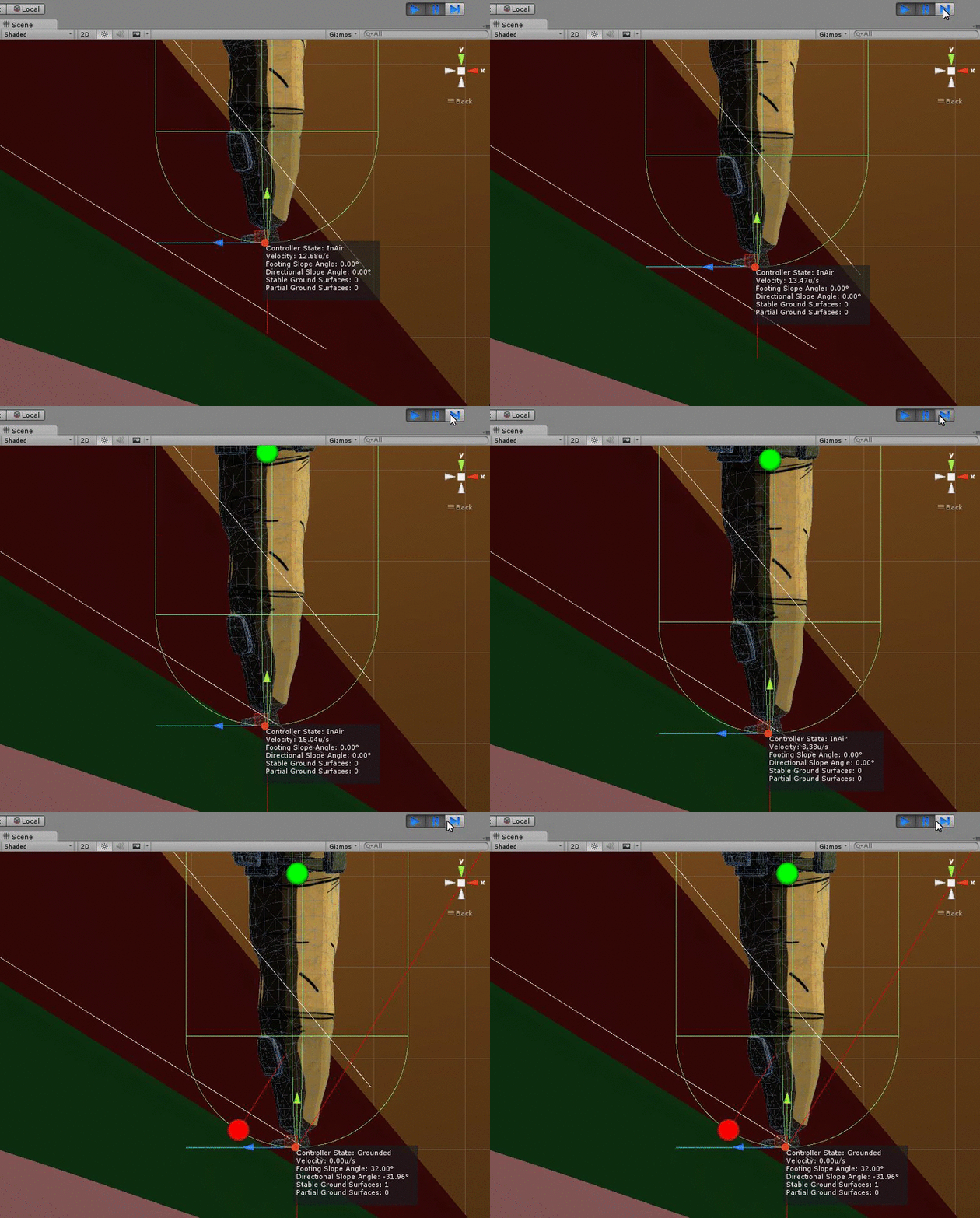
Also, this character’s rigidbody does not use gravity. Instead, I manually apply artificial gravity whenever it is not touching any ground.
Does anyone have ideas on how I could fix this?