Making a shader that creates noise-like color variation on mesh texture

Hi, I’m currently looking to add a functionality to a shader, if possible, that adds color varation to my existing grass meshes.

Disclaimer: I am not using the terrain engine stuff from Unity.
My shader does animated vertex displacement and optional texture blending on uvchannel 1 (for snow or dirt on the grass).

My grass patch consists of ~5000 subobjects that come from a scatter object in 3ds max. They look satisfying, however they all have the same grass texture and tint:

Which looks too cheap.

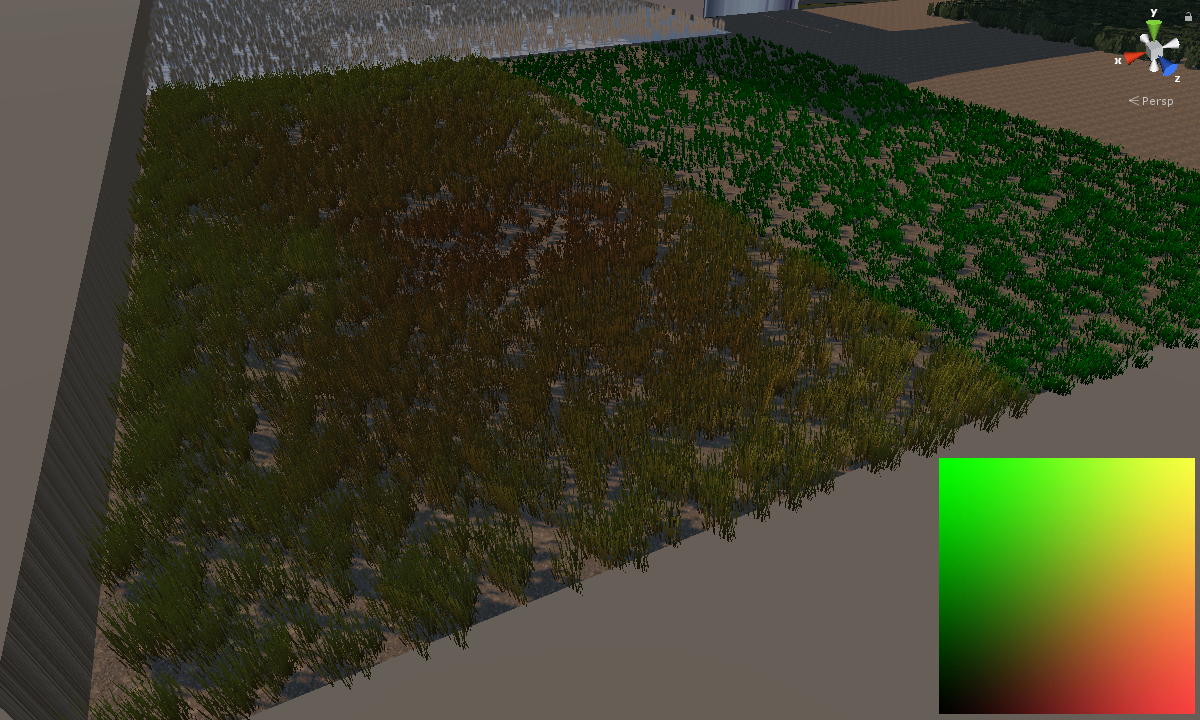
I would like to have either a pattern type function, that uses a color range and somehow creates random “spots” that are a little darker or brighter, or use a noise type texture that somehow is treated as a planar overlay over the entire object and multiplies it’s pixels over the normal grass texture, so it looks something like this:

This was made on a terrain with 3 different grass “healthy” colors.

I really would like to have this done already inside the shader, the only other option I can think of is make a uvchannel2 that has a planar mapping that projects the noise texture downwards and covers the entire grass object, but that would distort around the grass polys.

I’d appreciate any tips or links to docs that could help me learn about such a shader topic, if it exists.
I am really disappointed in the Unity shader documentation, it does not seem to really be a documentation, but rather a list of basic examples.

Thanks
You could just read a suitable tiling tint texture in the vertex shader (or frag for simplicity) and modify the vertex colours in a nice way. You merely need to use xz for the uv to sample from the texture. You probably would want to multiply the value till it looks right.

The resulting colour can be used to tint the uvs or other strategy.

other options

  • randomize and bake vertex colors in max already or inside editor with a script (like using some perlin noise to set colors, or take from terrain texture below)
    *ive tested something similar with editor grass generator here see image#7

i think unity waving grass shader already used vertex color for tinting, so you can check from that.

although it sounds a bit heavy to have 5000 objects for the grass mesh… have you checked asset store for those optimized grass plugins, can paint them on meshes too, no need terrain.

They’ll likely look substantially better as well.

Thanks for the suggestions!

By the way, I’m not using the same grass texture (not even that texture I used for the images) on every mesh like you see on the images since this is just an example to show you what I mean. Random height, rotation, etc…and such details are also left out because this is about the color variation only. It will definitely look better when it’s done ^^
The final result will have a few different gras, flower, and small bushes on an atlas, similar to the generator mgear linked.

@hippocoder
I forgot to mention that the shader is a surface shader.
My general shader writing knowledge is…spotty…to say the least.
I take parts from shaders that I know do work, and try to understand them by modifiying some parts and comparing the result.

After your advice, I’ve managed to do this currently:

CGPROGRAM
    #pragma target 3.0
    #pragma surface surf Lambert alphatest:_Cutoff vertex:vert addshadow
     
    sampler2D _MainTex;
    fixed4 _MainColor;

    sampler2D _NoiseTex;
    float4 _NoiseColor;

    struct Input
    {
        float2 uv_MainTex;
        float2 uv_NoiseTex;
        float4 color : COLOR;
    };

   void vert (inout appdata_full v, out Input o)
   {    
      /...vertex animation stuff
      UNITY_INITIALIZE_OUTPUT(Input,o);
      float4 nc = tex2Dlod(_NoiseTex, float4(v.vertex.xy, 0, 0));
      v.color = nc * _NoiseColor;
   }
   
   void surf (Input IN, inout SurfaceOutput o)
   {
      fixed4 c = tex2D(_MainTex, IN.uv_MainTex) * _MainColor;
      o.Albedo = c.rgb * IN.color;
      o.Alpha = c.a;
   }

Which results in this using the tint texture at the bottom right:

As you can see it does somewhat project the noise texture over the entire mesh like I intended, but it is weirdly distorted, like there is a pattern that is always the same for every other texture I use as tint. I’m not sure where this pattern comes from, maybe you can shed some light on it?

Here is another tint texture to better show what happens:

@mgear :
I’m personally not a fan of using assets, I basically try do everything myself.

Doing the vertex colors inside max is one way, but I would rather have the shader do all the work. ^^

5000 scattered objects is actually medium quantity, I want to achieve fast, dense patches of grass (or other plants) that are actually able to hide small creatures. I don’t like the way grass is done in most popular games today.

Also, the shader does perform quite well, I get 100+ fps when sprinting through the patch. All meshes cast and receive shadows, which I can actually cut down to 1/3 later.
I expect to get even faster performance when I remove the doublesided polys, the shader already does render back and frontfaces, so I can cut the actual polycount by 1/2, and later I will add distance culling, but that is all not important at the moment, I just need to get over this step first. :wink:

Thanks

1 Like

You’re using local vert space here… which means if these batch the texture will pop around. Also you’re using v.vertex.xy and you probably want XZ. Mul your vert pos into world space and use XZ and you’ll get what I think you’re after.

1 Like

Thanks for the help. Yes I wanted to use the vertex xz, that was a typo.

I’m currently trying to understand the world-local conversions…

I tried this:

float4 pos = mul(unity_ObjectToWorld, v.vertex); //converting vertex position to world right?
float4 nc = tex2Dlod(_NoiseTex, (pos.xz, 0, 0)); // using the world position to sample the corresponding pixel
v.color *= nc; // applying that pixel color to the vertex

This is what I get:
3327162--259223--gras.PNG

Hope this is not too much to ask, the shader documentation is quite difficult to comprehend compared to the normal Unity docs.

Yep that’s what you want. Looks like a noise texture to me.

Sorry, maybe I should have included the noise texture as well. It is actually not what I want, the texture used for this was:

3327478--259259--tint.PNG

It is not the distorted result like on the previous post, but now it seems like the vertex colors are totally chaotic.

I would like to actually see the tint texture overlayed properly like a heightmap. like the entire mesh is one tile for the texture.

What’s the size of your mesh in world units? If the tiling is very small you could see weird averaging because your vert count is so low. You probably need to mul world xz by a small number to get a bigger repeat of the texture.

Also eliminate v.vertex color for now. Just set it to the noise sample.

1 Like

The mesh is 50x1x50 units.

Wow, I haven’t even thought about the actual tiling of the texture, I somehow assumed it would automatically use the bounds of the mesh as base…don’t hit me please ^^

Thank you so much for the hints.

Look what I got now:

3327669--259285--Grass.png

I WAS going to insert a gif here where I show the worldspace tiling of the texture, but this forums upload functrion is so incredibly dumb, I just spent 2 minutes looking at my file being uploaded, when it was done, it said too large file.
First, I wanted to just insert a wmv here, that also uploaded, and when it was done it said not allowed filetype.
What the hell…

Just…thank you for your hints, I liked that you didn’t just paste some code, but actually tought me something! :smile:

1 Like

always very proud when I see a developer asking for help on here who is actually willing to do some work to get there instead of getting someone to do the work for them!

Keep it up! :slight_smile:

1 Like

Thank you very much! :smile:
Yes, that’s why I left the Answers Forum. 100 duplicates of the same “how to rotate object” question every day and most people just want others to post only code that works and don’t want to learn anything.

I started with Unity in 2014, and continue to learn everything game-development related myself, with help of the internet.
I’m not an expert on a specific topic, but I am intermediate in modeling, coding, texturing, audio engineering, etc…since I work alone, I do it all.

That’s also why I don’t use assets like terrain generators or AI modules, etc… I do all that myself with the skills I have a the moment. If I learn something new about them, the project get’s updated to be more efficient. Actually I think the asset store is detrimental to the learning curve of the individual indie developer. Most of them buy a xxx$ model pack instead of just learning how to model and texture.

PS: Here a quick result with more added features to the shader, it uses a scrolling bark texture to simulate wind blowing over it. Also I would like the vertex height be influenced by the scrolling texture’s rgb value, but I have troube figuring out how to only affect the top vertices of the individual objects.

3329100--259418--ScreenCapture_20-12-2017 07.27.20 PM.gif

Maybe someone has an idea?

if(v.vertex.y > threshold)

works, but it is a world position.

My scatter distribution object has one slight hill and one slight valley.
Imagine the scattered object is a box. It has 4 low vertices and 4 top vertices…
Some of the low vertices of the boxes scattered onto the hill are above the threshold and therefore are affected as well.

Should I store the starting lower vertex positions and somehow compare them to something else?
Do I need a script to cast rays for each vertex to see if it is the low vertex of the “box” and supply it back to the shader?

Thanks.

Nevermind, I figured it out just now. Using the texcoord.y value in appdata_full and muliplying it with the greyscale value of the scrolling texture does work perfectly.

It get’s better each iteration :smile: