Hi. I have a mesh collider and a sphere collider.
The sphere collider is a trigger. OnTriggerEnter is not called when colliding at certain angles, but is triggered in other cases.
Turning on Convex won’t help since it’s a pipe inside which the sphere must fly.
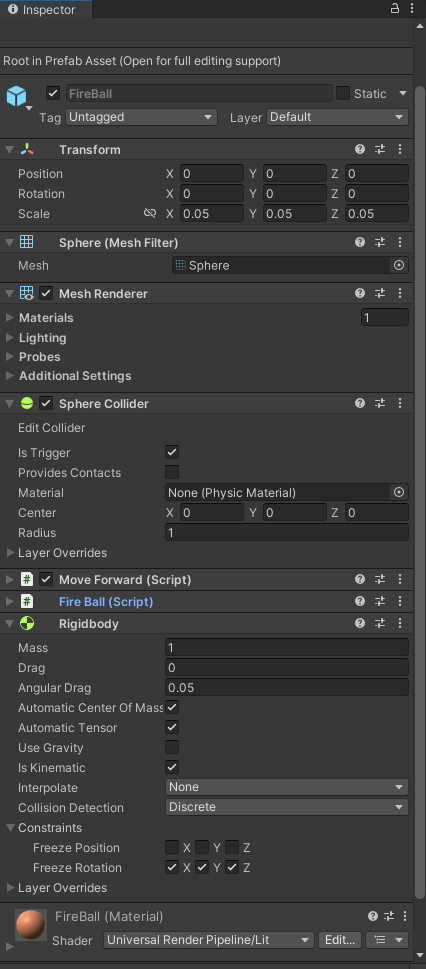
Sphere parameters
Mesh object parameters
Sphere movement script
public class MoveForward : MonoBehaviour
{
    [SerializeField] private float _speed = 10f;
    [SerializeField] private GameObject _pathMarker;
    private bool _isMoving = true;
    private List<GameObject> _path = new List<GameObject>();

    private void Update()
    {
        if (_isMoving)
        {
            transform.Translate(Vector3.forward * _speed * Time.deltaTime);
        }

        _path.Add(Instantiate(_pathMarker, transform.position, transform.rotation));
    }

    public void Stop()
    {
        _isMoving = false;
    }

    public void DestroyPathMarkers()
    {
        foreach (GameObject marker in _path)
        {
            Material material = marker.GetComponent<MeshRenderer>().material;
            material.color = Color.blue;
        }
    }
}
Collision handling script
public class FireBall : MonoBehaviour
{
    private MoveForward _move;

    private void Awake()
    {
        Init();
    }

    public void Init()
    {
        _move = GetComponent<MoveForward>();
    }

    private void OnTriggerEnter(Collider other)
    {
        if (other.CompareTag("Player"))
        {
            return;
        }

        _move.DestroyPathMarkers();

        _move.Stop();
        Destroy(gameObject);
    }
}
With Physics (or Physics2D), never manipulate the Transform directly. If you manipulate the Transform directly, you are bypassing the physics system and you can reasonably expect glitching and missed collisions and other physics mayhem.
This means you may not change transform.position, transform.rotation, you may not call transform.Translate(), transform.Rotate() or other such methods, and also transform.localScale is off limits. You also cannot set rigidbody.position or rigidbody.rotation directly. These ALL bypass physics.
Always use the .MovePosition() and .MoveRotation() methods on the Rigidbody (or Rigidbody2D) instance in order to move or rotate things. Doing this keeps the physics system informed about what is going on.
Remember that this isn’t “real” physics but rather a discrete simulation: if you move something fast enough, you will pass through other stuff simply because on one frame you are “before” it and on the next you are “beyond” it.
To some extent this can be mitigated by using continuous collision check on the Rigidbody in question.
Better ways involve either checking dot products vs destination to see when you pass it, or else raycasting if you insist on a collider-based solution.
If you know the destination of the fireball you can also just use a tweener like DOTween or LeanTween and let that take care of things…