I’ve scoured through this issue for ages and haven’t found a good solution. I’m working on a top-perspective shooter game, where the camera is in an angle above the player, but not exactly above. The player is rotated towards the mouse cursor at all times, which is done with ScreenPointToRay:
        Ray camRay = Camera.main.ScreenPointToRay (Input.mousePosition);

        RaycastHit floorHit;

        if (Physics.Raycast(camRay, out floorHit, camRayLength, floorMask))
        {

            // Vector3 from the player to mouse cursor position
            Vector3 playerToMouse = floorHit.point - transform.position;
            playerToMouse.y = 0f;

            // Vector3 from aiming camera to mouse position
            Vector3 camToMouse = aimCam.transform.position - floorHit.point;


            Quaternion newRotation = Quaternion.LookRotation(playerToMouse);
            playerRigidBody.MoveRotation(newRotation);
}
The aiming is locked to XZ axes, so you can’t shoot up or down. This brings up a problem with how you’d expect the game to work. You point the mouse cursor at a point, and the shot should go there right?
Here, the player is pointing the mouse cursor at the target and shooting. However, the shot is offset “above” or left of the target.
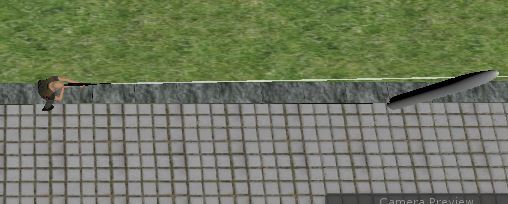
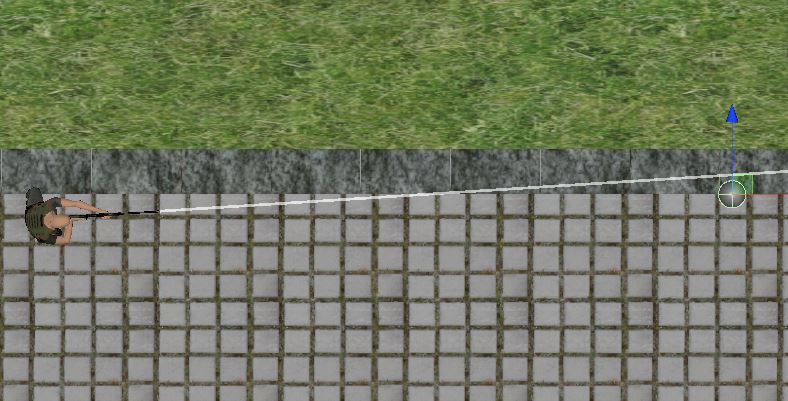
(Pictures taken in two different situations but you get the idea)
I expected this to be because of the floor mask used to detect the mouse position was at ground level and not at the actual height of where the shot would be, so I tried creating another layer which is located exactly at the gun barrel height, but it didn’t change the offset at all.
So next I created another camera (only for aiming purposes), which is always exactly above the player character and angled 90 degrees down. This corrected the aiming for the top part of the screen, but middle- and lower areas of the screen would still have the offset.
After fiddling around for a while I ended up giving a fixed correction to the aim with a Vector3 offset defined in the inspector:
//offset the rotation by a fixed offset to correct the perceived aiming offset
Quaternion newRotation = Quaternion.LookRotation(playerToMouse + offset);
            playerRigidBody.MoveRotation(newRotation);
with a Vector3 of ~0f,0f, -0.2f. This corrects the aim quite well in the lower part, but offsets it in the upper part.
So, how should this really be fixed instead of the jury-rig approach that I have? It kind of works, but at times it feels odd, because if you’d like to aim spot-on you’d still have to aim in a slightly different way depending on which part of the screen you are aiming. I also tried some trigonometry to calculate the offset at runtime, but I suck at maths and I feel I have reached a dead end with my own solutions.
