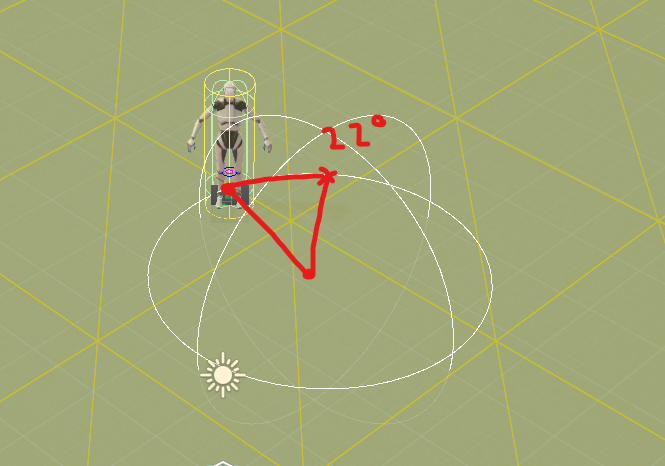
I have some code that sets my agents destination to a random point on a circles border, this circle originates from my agents target (the enemy). The goal being that my agent moves around the enemy in a circle, randomly within an angle range, this works great using the following code:
void SetDestinationOnCircleBorder(Transform target)
{
   // Random angle between 0-360 degrees
   float angle = Random.Range(minAngle.Value, maxAngle.Value) * Mathf.Deg2Rad;

   float x = Mathf.Sin(angle) * radius.Value;
   float z = Mathf.Cos(angle) * radius.Value;

   SetDestination(new Vector3(target.position.x + x, 0, target.position.z + z));
}
So the agent runs into “circle range”, then pick a destination on the circle border. The problem I have, is that the first time the destination on this circle border is set, the agent does not account for its current position, so the agent can move “across” the circle to get to the destination, which I dont want, since I want it to move back and forth close to its current position like you would in combat when circling an enemy. Then from that point on it moves as I want it to between minAngle and maxAngle.
Then you don’t want the circle centered on the target, but halfway in between the attacker and the target with half the radius.
Like so:
Subsequent positions should simply ensure they are reasonably close to that and not at an angle that’s more than 90° away from the current target=>attacker angle (see Vector2/3.Angle method).
Save that angle as a global, since you’ll go there in steps. Then set the destination to be just 5 or 10 degrees along the circle, in the correct direction (clockwise or counter-clockwise – I think Unity even has a function to help find this). When you get there, set it 5 or 10 degrees more, until you reach the target angle. It will move in small straight lines, but I’m assuming the target is moving.
You could pick 5 or 10 or 15 so it’s far enough not to waste movement. Or you could use small angles and move in a loop – while(movementLeft>0) { move towards the destination, if there’s movement left: subtract and pick a new destination }
For computing locations on a circle the easier more game design way is Vector3 circlePos=Quaternion.Euler(0,angle,0)*Vector3.forward);. Your way seems to work, so I wouldn’t change it, but if you need to rewrite then Quaternion math is more flexible and simpler.
Thanks for the suggestions! Maybe I was unclear, I just want help figuring out how to move X degrees along the circle based on my current position, right now it doesn’t not take my current position into account.
X is a large number, like 90 ninety degrees. They want to move there a curve over time (for mrChar: halley’s code snaps to the spot in a single frame).
For mrChar: the problem is that setting a destination will always move in a straight line. There’s no easy setting to say “move from A to B but around a circle”. To move in a circle around the player there are 2 ways (and maybe more). One is to set very short destinations to spots around the edge (which is what I wrote). The other is to change movement into “angle around a circle”. Instead of moving at a real speed, you move at X degrees per second and do circle math. Halley’s math is the start of that. A problem is the object will be obviously locked into orbit, which might look fake if it’s supposed to be self-powered and the player is moving.
The newPosition can either be a goal (straight movement) or you can multiply your x_degrees by a speed and delta time, to get tiny steps in that direction. The question wasn’t clear and the math doesn’t care.
I think it should be all I need to make progress, I didn’t have time to try yet. I understand it will move in a straight line but that part I can figure out my self how to solve
Had no idea you could use Quaternion like this so I learned something new!
I am still curious how to solve this using Quaternion, so Id love to hear from you halley, but for anyone interested in an answer to the original question, I copy/pasted it into ChatGpt and it spit out the exact code I needed:
// Calculate the relative position of the agent to the target enemy
        Vector3 relativePosition = transform.position - target.position;

        // Calculate the angle between the forward direction of the agent and the relative position
        float currentAngle = Mathf.Atan2(relativePosition.z, relativePosition.x) * Mathf.Rad2Deg;

        // Calculate the random angle within the specified range
        float randomAngle = Random.Range(minAngle.Value, maxAngle.Value);

        // Calculate the new angle by adding the random angle to the current angle
        float newAngle = currentAngle + randomAngle;

        // Convert the new angle to radians
        newAngle *= Mathf.Deg2Rad;

        // Calculate the new destination position on the circle border
        float x = Mathf.Sin(newAngle) * radius.Value;
        float z = Mathf.Cos(newAngle) * radius.Value;

        // Set the destination position relative to the target enemy
        Vector3 newDestination = new Vector3(target.position.x + x, 0, target.position.z + z);

        // Set the destination for the agent
        SetDestination(newDestination);
I cannot figure this out, I want to control how many degrees from my current position the agent will move, so if I input “45 degrees” I want it to move 45 degrees along the circle from its current position, but I simply cannot get it to work.
Visualization (I input 22 degrees, I want agent to move 22 degrees along the circle towards the red X):
EDIT: Finally figured it out, had to give up on Quaternion since I dont fully understand it.
// Get the relative position
        Vector3 relativePosition = transform.position - pivotPoint;
        relativePosition.y = 0;

        // Calculate the angle in radians using Mathf.Atan2
        float angle = Mathf.Atan2(relativePosition.z, relativePosition.x);

        // Convert the angle from radians to degrees
        float angleDegrees = Mathf.Rad2Deg * angle;

        // Update the angle by adding destination degrees
        angleDegrees = (angleDegrees + degreesToMove) % 360;

        // Convert the updated angle back to radians
        angle = angleDegrees * Mathf.Deg2Rad;

        // Calculate the new position based on the updated angle
        float radius = relativePosition.magnitude;
        Vector3 newPosition = new Vector3(Mathf.Cos(angle) * radius, transform.position.y, Mathf.Sin(angle) * radius) + pivotPoint;

        // Update the transform position
        newPos.position = newPosition;
%360 isn’t necessary. It keeps the value between -360 and 360, but that doesn’t matter to Unity. You should be able to see that line 12 is just adding the new degrees to the current degrees. It’s the same as how x=x+3 increases x by 3.