Hey guys. I’m trying to create different types of weapons for my shooter game. I’m trying to make it so, that player can modify the weapon between fights, and I have 3 main types of shooting: Single fire, Auto fire and Chargeable (and maybe Beam weapon later).
What I’ve tried to do is make a base script (GunScript), and then attach primary and secondary fire (mouse1&2) Scriptable Objects. The Scriptable Objects have different firing methods set on them from inspector, and on Start it chooses by the fireType enum that which function is chosen as the Shoot() method.
But I ran to the problem that I’m also trying to set the Shoot to be either Raycast or Projectile shot with physics, and so the script has a lot of data and if/else checks, and only a portion of it will be used in the end and feels pretty inconvenient to modify. (Normally I would be content as long as it just works but I’m doing this project to learn more about coding)
My question would be that, how could I slice these scripts into multiple smaller ones and how get the right script(s) depending on the modifiers (firetype, ammotype)? I would like to create +40 different weapons so I would like to have the flexibility, instead of creating bunch of monobehaviour inheritance weapon scripts for each type
A data class with List of all possibilities? But how can I choose the right name of the script if I turn it into smaller ones (GunSingleFire, GunAutoFire, GunChargeFire, GunRaycast, GunProjectile)? Or am I doing this completely wrong? I’d gladly hear different approaches too (and really appreciate code examples)
I’ve done a bit research about interfaces since yesterday and they seem pretty neat, added stuff like IDamageable to my game and it seems to make things a lot easier!
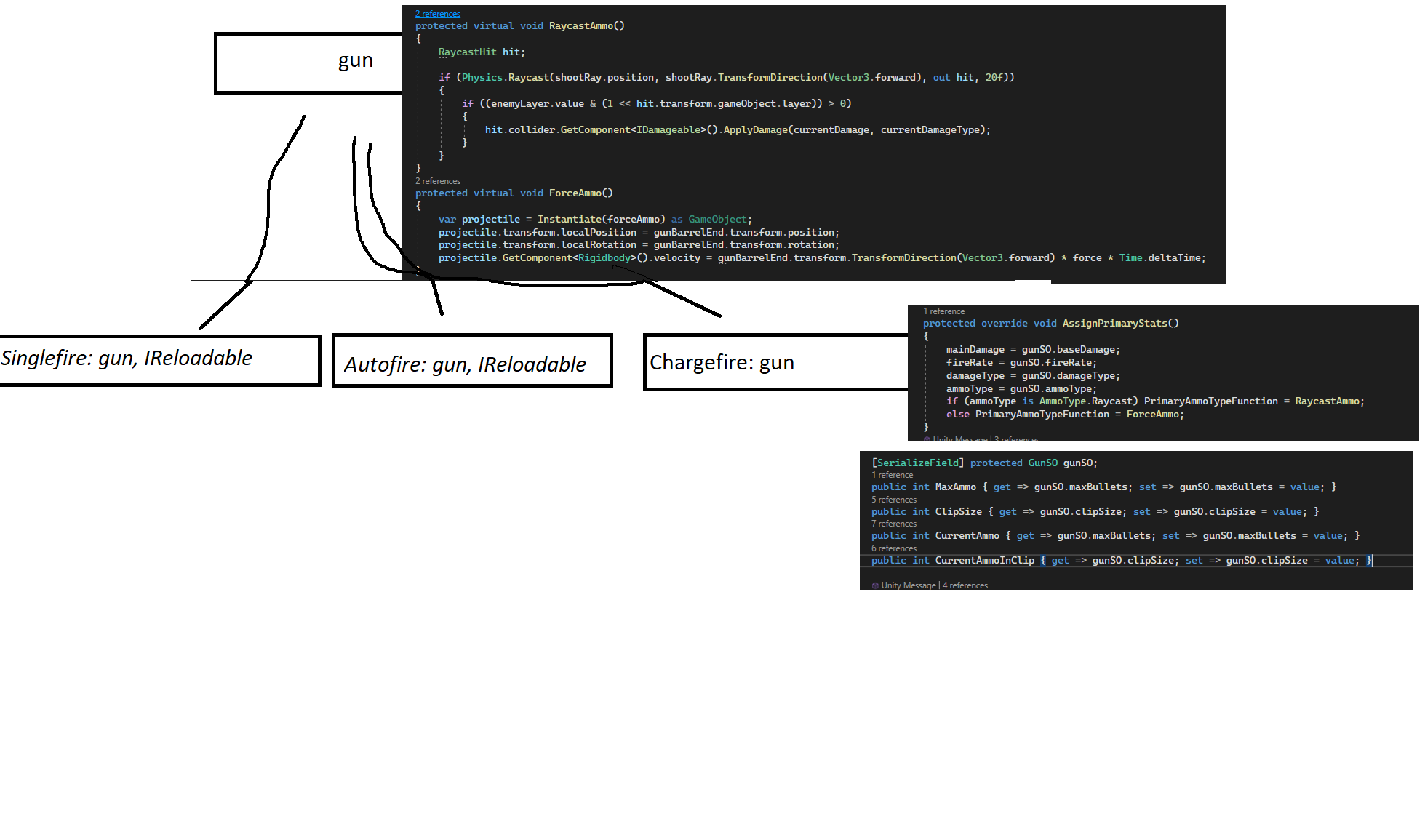
I’ve been trying to figure out how to use it on my weapons, started the whole thing from scratch. But I’m still struggling to find the correct approach, currently trying to implement something like this:
Gun main class holds base info. Also both firetypes raycast and force functions, and depending on the inherited ammotype it changes the delegate. I can’t figure out how to turn these into interfaces while somehow maintaining the right Transform direction and other data as projectile prefab, and how could I change between raycast/projectile with the same interface?
Different firing mechanisms are inherited and use scriptable object for different stats depending on firetype. I also added the IReloadable but I don’t really get why I would use it as I have to put the reload function on update anyway as long as the gun can be reloaded.
I feel like the whole thing is just falling apart as I can’t seem to figure out a valid approach. I searched about abstract classes too and played around with them but couldn’t find any use for them yet
@Kurt_Dekker may I ask you one more question, could you be able to throw an example in pseudo code how you would do it or how it should be done? I’m sure there are many ways to deal with it but I really could use a push to the right direction. I’ll open a new unity project for now and start testing more
The advantage of interfaces is that you won’t care anymore if the object you’re interacting with is a gun, a barrel, a bird or an enemy. You just work with interfaces directly, if you need for example to access the Transform of an IDamageable, just add a property Transform Transform { get; } and you’re done. You need weapons? Just create an IWeapon interface with the relevant methods/properties (void Fire(), bool CanReload(), void Reload()…) and use them.
Reminder: The most powerful feature of Unity regarding Interfaces, is that you can do a GetComponent<IInterface>() on any Transform/GameObject. Like this your code doesn’t need to know nor care which Component/MonoBehaviour to get/use at all. You just grab an Interface (if it exists i.e. implemented by any Component/MonoBehaviour) on that GameObject, and use it!
Reminder 2: Any class can implement an interface (MonoBehaviour, ScriptableObject…)
Reminder 3: Unlike base classes, a class can implement several interfaces. So you can have a class implementing both IDamageable and IWeapon (a damageable weapon!) without the need to add any additional code for this special case.