Need Help With Additional Lights

Where to begin. I guess I’m just not sure exactly how the additional lights function and I know there have been a lot of posts on this, but my head hurts having tried to troubleshoot this for the past week. I’m not that well versed in shading programming so bear with me. Note, I am only trying to retrieve light color information.

The issue: Using additional lights with Unity 6 URP shadergraph in Forward+ throws an undeclared identifier ‘AdditionalLights_float’ if not using the LIGHT_LOOP_BEGIN/END functions. Otherwise, I get an ‘_AdditionalLightsPosition’: implicity array missing initial value at line 169 if I do use the loop.

My search took me all over the place, but still haven’t found a solution yet so this is where I’m at:

#pragma multi_compile _ _FORWARD_PLUS
#pragma multi_compile _ _ADDITIONAL_LIGHTS

#include "Packages/com.unity.render-pipelines.universal/ShaderLibrary/Core.hlsl"
#include "Packages/com.unity.render-pipelines.core/ShaderLibrary/CommonMaterial.hlsl"
#include "Packages/com.unity.render-pipelines.universal/ShaderLibrary/RealtimeLights.hlsl"

void AdditionalLights_float(float3 worldPosition, float3 worldNormal, out float3 color)
{
    color = float3(1, 0, 0); // Default to red if lights don't work

    #if _FORWARD_PLUS
        uint lightCount = GetAdditionalLightsCount();

        InputData inputData = (InputData)0;
        inputData.positionWS = input.PositionWS;

        if (lightCount > 0)
        {
            color = float3(0, 1, 0); // Turn green if lights exist

            LIGHT_LOOP_BEGIN(lightCount)
                uint perObjectLightIndex = GetPerObjectLightIndex(lightIndex);    
                Light light = GetAdditionalLight(perObjectLightIndex, worldPosition);
                
                color += light.color;
            LIGHT_LOOP_END
        }
    #endif
}

The function custom function I’ve isolated into its own graph.

Couple of resources and threads on here and stack overflow I’ve been on for reference on where I’ve been so far. That plus a bunch of different AI’s that are as knowledgeable as I am at this.

https://discussions.unity.com/t/cant-get-additional-lights-from-urp-forward/1563316

https://docs.unity3d.com/6000.0/Documentation/Manual/urp/use-built-in-shader-methods-additional-lights-fplus.html

https://discussions.unity.com/t/forward-not-working-with-custom-shader/912819/8

https://docs.unity3d.com/Packages/com.unity.render-pipelines.universal@14.0/manual/rendering/forward-plus-rendering-path.html

Daniel Ilet’s Unity Shader Graph Basics
Ben Cloward’s Supporting Multiple Lights
Ned’s Custom Lighting in Unity URP Shader Graph

I might be able to help with this. I see one very obvious thing from your screen shot. The _FORWARD_PLUS keyword in your Blackboard needs to be a boolean keyword, not an enum keyword.

Beyond that, I need a bit more information to be able to help. Is your Custom Function node set to Type String or Type File? I usually set mine to Type String and then just copy/paste the code into the the box instead of using an external file. My code looks something like this:

Diffuse = MainDiffuse;
Color = MainColor * MainDiffuse;

#ifndef SHADERGRAPH_PREVIEW
    
    uint pixelLightCount = GetAdditionalLightsCount();

    #if USE_FORWARD_PLUS
        InputData inputData = (InputData)0;
        inputData.normalizedScreenSpaceUV = ScreenPosition;
        inputData.positionWS = WorldPosition;
    #endif

    LIGHT_LOOP_BEGIN(pixelLightCount)
        #if !USE_FORWARD_PLUS
            lightIndex = GetPerObjectLightIndex(lightIndex);
        #endif
        Light light = GetAdditionalPerObjectLight(lightIndex, WorldPosition);
        float NdotL = saturate(dot(WorldNormal, light.direction));
        float thisDiffuse = light.distanceAttenuation * NdotL;
        Diffuse += thisDiffuse;
        Color += light.color * thisDiffuse;
    LIGHT_LOOP_END
    float total = Diffuse;
    Color = total <= 0 ? MainColor : Color / total;
#endif

This will give you the accumulated color and diffuse lighting for all of the light sources that are touching your model. But it looks like you may just be trying to get a specific color for just one light? Is that correct?

The code above would be drawn from a separate file because I’m more familiar with setting the nodes up that way. Definitely not opposed to keeping them as a string either. I would just need to understand how inputs and outputs would are declared if done within the string input rather than from a void function from the HLSL.

These were the parameters I had and they seem to work. They turn the shader in the shadergraph yellow anyways, the object using this shader is only affected by the directional light color, but I’m not receiving any errors which is a great sight hah! Still, the objective is to retrieve all lights and apply their colors to objects using this shader.

INPUT

WorldPosition
WorldNormal
MainColor
MainDiffuse
lightIndex

OUTPUT
Color
Diffuse

Shadergraph

Scene View

The inputs and outputs are declared using the UI in the graph inspector when the Custom Function node is selected. You don’t have to declare them in the code when you use a string (not a file) because the node handles that part of the code for you.

Ohhh I see! So essentially the part that would be void _AdditionalLights_float([insert parameters]) would would be the shader itself since that’s defining the whole shader’s function. That makes a lot of sense.

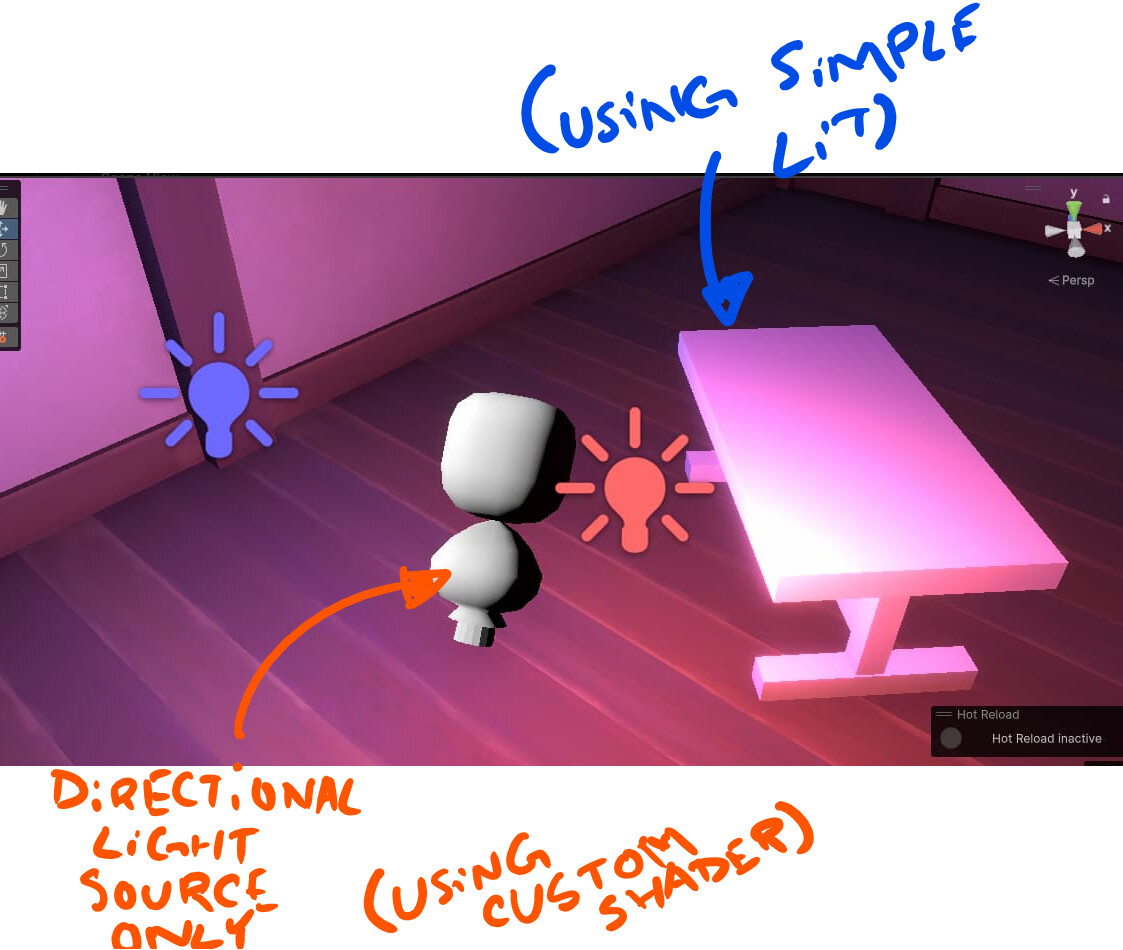
Regarding the shader, I still haven’t gotten the object to receive light information from the point lights yet as seen in the above image. I probably should have marked the object using that material. The table using the default simple lit does receive lighting from the two point lights whereas the dummy model only receives the main light.

Ahah! I finished troubleshooting and found a few issues causing the object to not receive additional light.

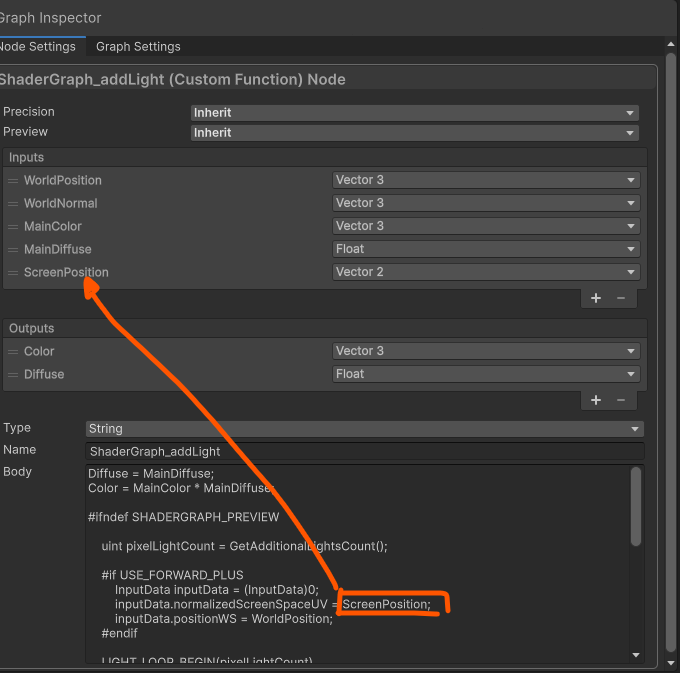
The first problem was that I forgot to add a ScreenPosition (vector2) input meaning the inputData couldn’t normalize the screen UVs in general.

The second cause was regarding the boolean keyword where the reference was not set properly to what was in the script. The other half of this problem was setting the parameter to be overridable. I’m not sure why that is so any information on that would be awesome.

In short, I forgot to add ScreenPosition and the correct boolean keyword setup. Much of the code was provided by Ben Cloward so the credits really goes to him. Here’s the code again:

Diffuse = MainDiffuse;
Color = MainColor * MainDiffuse;

#ifndef SHADERGRAPH_PREVIEW
    
    uint pixelLightCount = GetAdditionalLightsCount();

    #if USE_FORWARD_PLUS
        InputData inputData = (InputData)0;
        inputData.normalizedScreenSpaceUV = ScreenPosition;
        inputData.positionWS = WorldPosition;
    #endif

    LIGHT_LOOP_BEGIN(pixelLightCount)
        #if !USE_FORWARD_PLUS
            lightIndex = GetPerObjectLightIndex(lightIndex);
        #endif
        Light light = GetAdditionalPerObjectLight(lightIndex, WorldPosition);
        float NdotL = saturate(dot(WorldNormal, light.direction));
        float thisDiffuse = light.distanceAttenuation * NdotL;
        Diffuse += thisDiffuse;
        Color += light.color * thisDiffuse;
    LIGHT_LOOP_END
    float total = Diffuse;
    Color = total <= 0 ? MainColor : Color / total;
#endif

Nice work! I’m glad you got it working.

By the way, this was a bit confusing to get working in Deferred. Here is my working version, also to note, you need both the _CLUSTER_LIGHT_LOOP and _ADDITIONAL_LIGHTS keyword bools added. I think the USE_FORWARD_PLUS has changed to CLUSTER_LIGHT_LOOP recently. If anyone knows more, Id love to get a better understanding of this. Thanks!

The USE_FORWARD_PLUS and !USE_FORWARD_PLUS sections were breaking things in deferred (and deferred+).

I guess the docs are accurate, they just don’t explicitly mentioned deferred.

Diffuse = MainDiffuse;
Color = MainColor * MainDiffuse;

#ifndef SHADERGRAPH_PREVIEW
    
    uint pixelLightCount = GetAdditionalLightsCount();

    
          InputData inputData = (InputData)0;

	inputData.normalizedScreenSpaceUV = ScreenPosition;
	inputData.positionWS = WorldPosition;
	inputData.normalWS = WorldNormal;	
    

    LIGHT_LOOP_BEGIN(pixelLightCount)

        Light light = GetAdditionalPerObjectLight(lightIndex, WorldPosition);
        float NdotL = saturate(dot(WorldNormal, light.direction));
        float thisDiffuse = light.distanceAttenuation * NdotL;
        Diffuse += thisDiffuse;
        Color += light.color * thisDiffuse;

    LIGHT_LOOP_END
    float total = Diffuse;
    Color = total <= 0 ? MainColor : Color / total;
#endif

Hello Ben, hope you are doing well, I followed your steps and managed to get the additional lights solution working. However, in the newer version of Unity (6000.2.6f1), I ran into some issues after updating the lighting setup.

Since the USE_FORWARD_PLUS keyword is now deprecated, I migrated to CLUSTER_LIGHT_LOOP as per the latest URP documentation. After some experimentation, I got the lights working, but I’m now facing a few strange rendering issues.

When moving the camera, the additional lights only appear at certain angles or distances.
From far away, the model remains completely black, but as I get closer, the additional lights suddenly start affecting the character.

I recorded a GIF to show the issue (can only upload one image for now due to new account limitations):

Additional Lights Issue 01

  • When using Screen Position mode = Default, lighting disappears completely from a distance.
  • When using Screen Position mode = Pixel, I get this strange banding / pixelated effect — lights appear only near the center of the screen.
  • If I visualize the attenuation (by passing 0), I can see these “bands” clearly rendered across the character.

Here’s the section I’m currently using — it’s based on your example, with CLUSTER_LIGHT_LOOP replacing the deprecated USE_FORWARD_PLUS keyword:

Diffuse = MainDiffuse;
Color = MainColor * MainDiffuse;
Attenuation = MainAttenuation;

#ifndef SHADERGRAPH_PREVIEW
    
    uint pixelLightCount = GetAdditionalLightsCount();

    #if USE_CLUSTER_LIGHT_LOOP
        InputData inputData = (InputData)0;
        inputData.normalizedScreenSpaceUV = GetNormalizedScreenSpaceUV(ScreenPosition);
        inputData.positionWS = WorldPosition;
        inputData.normalWS = WorldNormal;
        inputData.viewDirectionWS = GetWorldSpaceNormalizeViewDir(WorldPosition);
    #endif

    LIGHT_LOOP_BEGIN(pixelLightCount)
        #if !USE_CLUSTER_LIGHT_LOOP
            lightIndex = GetPerObjectLightIndex(lightIndex);
        #endif
        Light light = GetAdditionalLight(lightIndex, WorldPosition, half4(1,1,1,1));
        float NdotL = saturate(dot(WorldNormal, light.direction));
        float thisDiffuse = light.distanceAttenuation * NdotL;
        Diffuse += thisDiffuse;
        Color += light.color * thisDiffuse;
        Attenuation += light.distanceAttenuation;
    LIGHT_LOOP_END
    float total = Diffuse;
    Color = total <= 0 ? MainColor : Color / total;
#endif

From my experimenting, I’m sure the Diffuse value as well as the position and normal vectors (both are set to world in the shadergraph) are working, I’ve correctly setup the all the inputs and outputs too.

I’m still very new to shaders, so I might be missing something obvious, any insight would be greatly appreciated.

I can also share screenshots of my Shader Graph setup and attenuation visualization if needed (just limited to one image per post right now).

Thanks a lot in advance!
S.

This looks like it may be a problem with keywords in the shader. If you update the project to 6.3, you can check the “Keep Lighting Variants” checkbox in the Graph Settings for your Unlit shader and it will manage the lighting keywords for you instead of you needing to include them manually in the Blackboard.

Awesome! I’ll try that and keep you guys posted :slight_smile: Thanks!

For anyone experiencing these issues, The tip from Ben

“If you update the project to 6.3, you can check the “Keep Lighting Variants” checkbox in the Graph Settings for your Unlit shader and it will manage the lighting keywords for you instead of you needing to include them manually in the Blackboard.”

Helped removing the necessity to do the manual keyword configuration. However the flickering behavior I was experiencing was solved a little differently, I simply removed the GetNormalizedScreenSpaceUV from the screen position (this was referenced from the documentation) and now its working flawlessly :slight_smile:

You can simply assign inputData.normalizedScreenSpaceUV = ScreenPosition; directly.