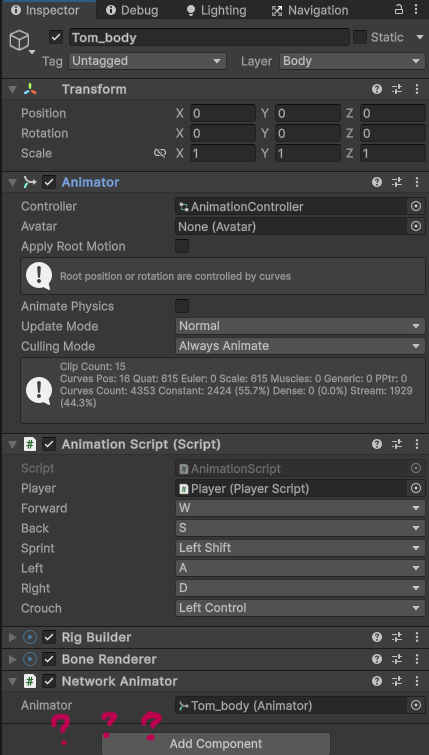
So… I am making a multiplayer fps game and chose unity’s netcode feature. I got to the point where i need to sync players animations through the network (or clients because I am using host-client mode and not server-client).
I have my player prefab with player object (the one with player movement script, network transform (client network transform) and network object) with childreen attached to it. One of them is third person model (for other players to see the player) and it contains:
Animator
Animation script
Rig builder and bone renderer (for holding a flashlight) (not that important i think)
All those components you can see in the picture i attached.
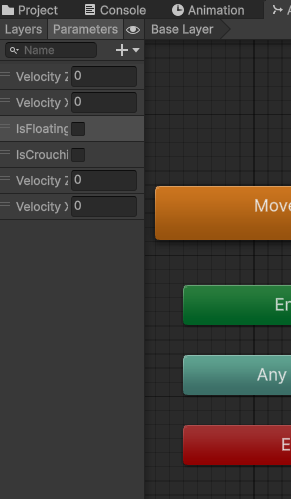
So, Network Animator component syncronizes Animator’s parameters and show them as those little checkboxes, but i cannot see them under that component when i add my Animator to the field. I have 4 floats and 2 bools in my Animator (attached picture). If someone could help me with this annoying issue that I am dealing with for days I would really appreciate it
Other informations:
using Unity 2023.2.18
netcode package: 1.8.1 · February 14, 2024
I am using blend trees inn my animator (if that helps)
Currently, NetworkAnimator will synchronize all Animator parameters automatically and does not provide any references to the the Parameters that will be synchronized within the inspector view.
Is it not working or are you trying to turn off the synchronization of certain Animator parameters (trying to understand the issue better)?
Thank you for making it more clear and yes it is not working. I was of course testing it even without parameters showing in the inspector. I don’t think that i mentioned it but I also have tried switching to Owner authoritative network animator from unity docs and it didn’t work as well. Oh and I don’t want to turn off certain parameters as you asked me. Those are all pretty important.
I also tested something new today. When I am enabling my “third person model for other players” object locally (in the scene hierarchy) it somehow works but is also so buggy. The other player is a client (and the one with animations a host) and as i said animations/parameters are not syncronized properly (It just cuts and goes back normal, back and forth). When i disable it back it does not work again.
I also tried doing this as a client (and the one watching animations is a host) but it of course didn’t work at all because i am using normal network animator instead of going to client/owner authoritative from unity docs right away.
Ok,
Since anything related to NetworkAnimator synchronized animation really requires looking at some kind of replication project, there are two ways that I can take a look to see what the issue could be:
Submit a bug in the unity editor that will include your project. If you do this, then post the ticket (IN) number you get via email after submitting the bug so I can get QA to assign it to the netcode team.
Create a minimal replication project and send it to me via direct message here. If you take this route, then you just need to zip the Assets, Packages, and ProjectSettings folders of your project (keeps the zip file smaller) and attach it to the direct message .
This will be the faster turn around in getting support for your issue.
Okay so after some help this is what i was doing wrong:
I was disabling a third person model for local player in the Start() method. This created the issue because a Start() method comes before spawning a player. Use public override void OnNetworkSpawn() method instead. Even better approach is to just don’t disable a whole object but disable its mesh (skinned mesh renderers object)
Even better approach is to just don’t disable a whole object but disable its mesh (skinned mesh renderers object)
As a side note, here is a PR for 3 new helper components that includes a ComponentController that provides you with the ability to control and synchronize enabling/disabling of anything that derives from UnityEngine.Object and has an enabled property.