Can we Read and Write the svg image for drawing colouring app? if yes then how and if no then why?
You can easily read an SVG file, but we don’t provide any “export to svg” functionality. Is that what you were looking for? I think it would be feasible to write an exporter that takes a Scene object and outputs a text svg file, since the scene representation is roughly translatable to SVG. That said, you may lose some meta information that can’t be stored in the scene object (XML IDs, comments, etc.).
I was just thinking… if you render the svg geometry to a large rendertexture, you could then run it through a shader to do some kind of custom super-sampling to produce a smoother output. The render texture would have to be quite large and be supported on the hardware though, and its questionable trying to go beyond 2048…4096 max texture size. It would be similar to MSAA I suppose, and maybe slower since its running it as a ‘program’ on the gpu rather than some dedicated MSAA hardware functionality.
Any progress on any other options for svg antialiasing, and is unity’s SVG support out of preview now?
I seem to recall in OpenGL there used to be a function where you could switch on antialiasing of triangle edges. I guess if only the edges need antialiasing applied, maybe the edges could be output to some kind of temporary outline buffer (similar to if rendering in wireframe), and then very precise supersampling calculated just for those pixels. Or maybe in the shader it can detect “edge pixels” and do extra calculations there to smooth it. Sort of a localized MSAA that only applies to the actual edge pixels not to the entire buffer.
I was thinking about the antialiasing some more.
Ideally the generation of the antialiased edge pixels should be done before anything is output to the screen. In all methods like MSAA FXAA SMAA etc it’s working on “after the fact” data which has already lost significant information and can’t handle gradual inclines very well. The quality is also not really there, its not perfect. But perfect antialiasing can be generated in a shader IF the shader has enough information about the mathematical properties of the geometry. For example you can make a shader which outputs a circle (within a quad of geometry for example) and perfectly antialiases it based on distance to a threshold etc.
It seems to me though that the problem here is, in order to correctly output any kind of antialiased fragments with the correct coloring and the correct blending, ALL fragments have to output alpha blended with the background. The antialiased edge pixels have to have transparency which forces ALL of the rendering of EVERY triangle into a transparency render queue. And then all those fragments have to perform an alpha-blend operation so now basically the entire geometry is going to have to be rendered as transparent, which obviously incurs something of a performance hit. BUT possibly this performance hit is not “as bad” as various post-processing antialiasing efforts or multi-sample efforts, given that the quality can potentially be perfect. And maybe the tradeoff is worth it given that hardware is now much faster at blending than it used to be years ago.
It could be possible that you modify the geometry of the triangulated svg shapes, so that the main interior of the shapes is rendered solidly with no blending and then a separate thin rim of triangles lives around the outer perimeter of the shape. This outer perimeter is where the semi-transparent pixels live and they are then rendered in a different shader. But the problem now arises that with a whole bunch of “layers” of structured svg shapes, forming an object or scene, there’s going to have to be a correct rendering order, and all that has to be sorted, and likely alternating between transparent and opaque render queues on and off and on and off, which I presume is a ton of draw calls.
One other issue is the way fragments are generated by the pipeline. If e.g a piece of geometry only covers 50% of a pixel, perhaps the pixel will be considered empty, whereas 51% maybe it is considered ‘filled’, generating a fragment. But the problem is that even the pixels which are only 1% filled need to generate a fragment in order to later be able to output that fragment with a low transparency level for antialiasing purposes. In OpenGL there used to be an option to switch on polygon smoothing (see GL_POLYGON_SMOOTH) which would trigger the hardware to calculate coverage of these edge pixels and include the almost-transparent pixels as fragments to be rendered. At some cost of course. But this would be needed in order to correctly calculate the antialiasing. I don’t know if this functionality is still supported. What comes to mind then is possibly some kind of modification to the geometry, perhaps a custom geometry shader for svg, which slightly expands the triangles to cover like an extra half pixel so that the coverage of the edge pixels can be properly calculated in the fragment shader.
I had this other idea too whereby, if we would be comfortable with a slight “shrinkage” in the size of triangles (up to 0.5 pixels), (and triangles could be expanded to compensate) we could feed texture coordinates in with all the vertices. There would be no texture, but the coordinates will then interpolate across the triangle. If they are set up correctly with e.g. Y coords moving away perpendicular to the silhouette edges of triangles, and sized correctly to maintain a consistent rate of change over the coordinate system, then a shader could use the texcoord, in combination with the screen-space rate of change (to support scaling), so that the outer 1 pixel border would produce a soft gradient ranging the transparency from 1 to 0. This would produce a perfect antialiasing effect at the exposed edge. If triangles are exposed on two edges, they will need to be split into 2 triangles, and similarly for a single orphaned triangle it needs to be split into 3. A further variation on that is, if necessary, to treat the texcoord like a signed distance field, so that we can always ensure a perfect 1-pixel-wide antialiasing around the border no matter the camera/scale of the geometry. But I’m thinking maybe that’s not needed. Also interior triangles whose “tips” touch the outer edge need to have texcoords set up as well and may need to be split into two triangles.
Another idea I had is, what if we expand the geometry triangles slightly by roughly 1 pixel (at a given res), and then in the fragment shader we pass in all 3 vertices to EACH vertex, and have it calculate a “virtual triangle” inside the shader. Each fragment will calculate whether it is inside or outside of this virtual procedural triangle and render accordingly, with perfect antialiasing. All triangles are alphablended with the background. The virtual triangle “lines up with” where the original geometric triangle was. It doesn’t need any additional changes to the geometry or any extra triangles, but the shader is a bit more complex with extra vertex data needed (9 vertex coords instead of 3, per vertex), which triples the vertex data.
There is also a method used in ragespline, where an approximately 1-pixel-wide triangle strip is added around the edge of a shape. The strip then uses either a texture or a procedural output, which is a fade of transparency from 1 to 0. This is alphablended with the background. Obviously this means the edge geometry uses a 4-vertex quad per original border triangle, so the vertex count goes up quite a bit. And the edge pixels then have to have a transparent render queue. The procedural fade could be combined with screen-space rate-of-change to always ensure it outputs a 1-pixel width antialiased edge regardless of the camera/geometry scale. This would be similar to treating it like a signed distance field at the edges. I also read that you can do much the same thing, based off a texture, if the texture has a 1-pixel alpha=0 transparent pixel around the edges, and bilinear filtering will then blend between the alpha=0 and alpha=1 based on coverage. But this requires the use of a texture.
One other alternative. … convert the triangles into a high resolution signed-distance-field texture where each triangle is mapped to some portion of the texture, as an atlas. This would produce good antialiasing at a reasonable zoom resolution, at the expense of a texture lookup to calculate how close the pixel is to the threshold, and uses bilinear filtering. The only downsides are 1) high-res texture needed to avoid ‘smoothing’ of corners and 2) texture lookup in the shader and 3) sharp corners/joins become rounded if zoomed in too far. Texture resolution could be adjusted as a tradeoff.
Does any of this sound feasible? I think if Unity had a simple switch on the svg asset whether to render it aliased or antialiased, and an appropriate shader selected for the purpose, people could choose whether to take the performance hit or not. And the quality of the results would be close to perfect, far better than any kind of post-processing/screen-space effects. Essentially the original geometric/mathematical definition of the triangles has to ideally be available in the shader and computed in the shader, in order to correctly rasterize and quantize/fit to pixel grid the output pixels, in order to generate perfect antialiasing on the fly. And in all cases the smoothed edge pixels HAVE to always been alphablended as transparency, otherwise this will not work.
I think the method using a single texture coordinate at each vertex to set up a perpendicular fade at the geometry edges, possibly coupled with a slight expansion of triangle sizes to compensate for the “shrinking”, would be 1) the least increase in vertex data, 2) widely supported, 3) easy and performant fragment shader … requiring in some cases some modification to some triangles (those with 2 or 3 exposed borders) which is probably not that many (convex tips, orphans). It’d be an extra 8-12 bytes per vertex. Rendering should be very fast, except for having to render all triangles as transparent alpha blended. I don’t see any way around this to correctly draw perfectly antialiased overlapping shapes.
The ideal hardware approach is the gl_polygon_smooth, but I don’t know if it’s widely supported on modern devices.
1 Like
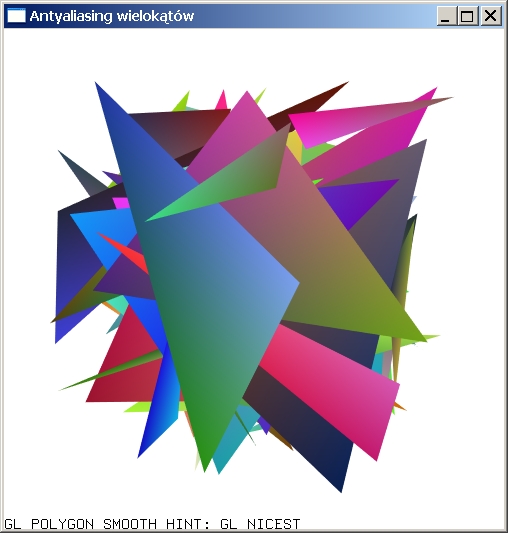
Here’s a pic of the gl_polygon_smooth result, coupled with alpha-blended triangles. The result is perfect antialiasing. This is how it was designed to be done many years ago, and is exactly correct and great quality no matter the size, zoom, rotation, shape etc. But it requires (activates) larger pixel/fragment generation and coverage calculations at each pixel. Does this still work on modern hardware, or could it be reproduced with a geometry shader and/or vertex shader? Perhaps the vertex shader can pass on a modified alpha channel to the fragment shader, after calculating how close to the ‘edge outline’ the fragment is. Might have to modify the vertex positions as well somehow, or customize/expand the geometry, and pass in extra vertex data to allow these calculations for each pixel.
Example of using texture coordinates to smooth interior edges… a rough mockup… some triangles have to be split in order to allow ‘corner points’ to be represented as two adjacent gradients. If that same triangle has other exposed edges it has to be split even more. The interior light-gray triangle there is a ‘hole’. The width of the transparency fade would be ideally around 1 pixel at all times, adjusted dynamically based off the texcoord and the screen-space rate of change spatially. I suppose this means as you zoom in, the geometry will seem to expand slightly?
I suppose rather than being just internal, since we’re in the business of adjusting the geometry, we could alternatively add geometry OUTSIDE the existing shape (even to the extend of producing an overall rectangle containing the shape), and then adjust the texture coords so that 0.5 lies on the exact edges of the triangles rather than inside. This requires extra triangles but is more accurate.

I can see this might present issues for very acute triangles that need a really long corner point ‘within’ another triangle and gets cut off or fights with a subtriangle.
This seems to be a somewhat similar approach measuring the distance to the edge: http://iryoku.com/aacourse/downloads/10-Distance-to-edge-AA-(DEAA).pdf
Something like this may work… Edge-distance anti-aliasing | Woohoo
Basically expand the triangles by about half a pixel in screen-space (derivatives etc), to include all needed fragments, then calculate the distance from the the fragment to the nearest edge and color the alpha channel appropriately. This would run mainly in a vertex shader. But it needs to be fed extra data describing the triangle.
Not only that, but I’m not aware of this feature on D3D and Vulkan. The modern way of doing the equivalent effect is to used a multisampled framebuffer.
We have explored ideas like these. They give pretty good results. As you mentioned, you need to provide an additional 3 vertices (9 floats) per vertex so that they have the full triangle information. This means that you cannot have shared edges anymore, and you’ll also have to duplicate some vertices when they are shared between multiple triangles. You also need additional per-vertex information to avoid smoothing interior edges.
However, we borrowed from some of the techniques you mentioned to prototype some ideas. Instead of encoding a full triangle per vertex, we encode curve data in an efficient manner. This has two benefits:
- We can compute the distance to the curve and evaluate sub-pixel coverage for antialiasing
- We don’t have to over-tessellate the curve into triangles.
Interesting. I realize that if the mathematical representation of the curve/edge is provided to the shader, then it can successfully perfectly output an antialiased border. Anything that is done “after” the shader outputs, such as post-processing or multisampling of the buffer etc, can NEVER produce the perfect results you’ll get from outputting the correct antialiased coverage values from the source data.
Microsoft had a way of calculating a 3-point bezier in a triangle using the texture coords, which was interesting. But they patented it. It sounds like you’re finding a way to better represent the mathematical ‘object’ through minimal vertex data so that the shader can output beautifully accurate vector shapes. I look forward to seeing that little checkbox that says “antialiasing on/off”. It sounds like if you can pass ‘perfect curves’ to the shader then you need far less geometry to enclose the fragments, maybe just a handful of triangles to output a really large infinite curve. The only overhead I then see is the required alpha blending.
Any rough idea how long it may take before this feature becomes stable and available?
I don’t have an ETA at this time. The work to bring this feature to production is planned, but not officially tackled yet.
It’s been a while. … revisiting this … has any progress been made on. built-in high-quality antialiasing for SVG … ie not MSAA etc. ?
Yes. We have implemented a new antialiasing technique to be used by UI Toolkit (which has similar vector graphics requirements than the SVG package). It was briefly mentioned in this “What’s New” blog post (in the “Harness crisp textureless UI rendering capabilities” section):
https://blog.unity.com/technology/whats-new-in-ui-toolkit
We implemented an (almost) complete vector graphics system using this technique, which will be used by the SVG package later on.
It’s still not ready yet, but progress is being made. Stay tuned!
If I may ask, how does the new antialiasing work?
To make a long story short, we subdivide curved paths into multiple arcs that matches the curve shape. We extrude some geometry around the arc and a very simple per-fragment signed-distance to the arc is used to compute the pixel coverage. In many cases, this allows a very rough tessellation, while rendering infinitely smooth antialiased shapes, all of this with a rather trivial shader. The main cost is on the CPU, when trying to find arcs that matches complex curves (such as Beziers). But we have fast paths for simpler shapes, such as circles, lines, etc.
Neat, so not only you get antialiasing perfectly you also can become resolution independent on the triangle count, ie zooming real big still has completely smooth curved edges. Sounds like a win win. And I presume it also works fine with any kind of zooming in and out etc, always a 1-pixel-wide antialiasing?
So this is not actually out yet?
Yes, exactly.
This is currently in use by the UI Toolkit rendering backend, and the upcoming vector API that will be included by UI Toolkit (will be out probably in 2022.1 or 2022.2). When completed, the SVG package will be available to use the same vector API.
cool. btw in the unity ‘manual’, I could find practically zero references to the importing of SVG assets. I did find ‘vectorimage’ in the scripting area. There doesn’t appear to be a page dedicated to it?
You are correct, the documentation team is working on it as we speak! 
How does the new system lend itself to animation, like the morphing of vector objects from one shape to another?
It depends what kind of animation you are dealing with. If you are moving the vector shapes control points, the output will be re-tessellated and everything should work just fine.
However, if you were thinking about using the 2D animation system, this only works with meshes, so this won’t work out of the box (although we would like to make it work with vector input eventually).