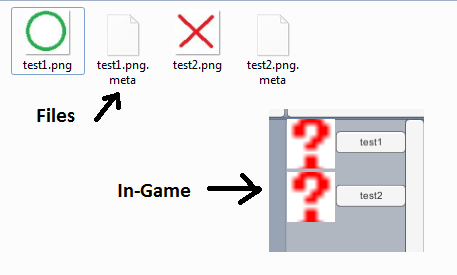
Posting this here for a signal boost. Everything I’m finding on the subject is left unanswered and my project has ground to a halt because of this.
I have a block of code designed to locate an image in a file (“something”.png) and load it as a texture2d, then convert that texture2d in to a sprite for display on the user interface. My problem is that when it does, the sprite displayed is a question mark.
According to my reading, this means that the texture2d wasn’t created correctly. However, in testing my code, I know that it is loading the correct file, and it’s converting it to a sprite properly.
My question is, what am I doing wrong in the sense that the png file isn’t getting loaded correctly?
Function below:
public static Sprite LoadImage (ImageType type, string fileName)
     {
         Debug.Log (fileName); //it is getting passed the correct file name
         string targetDirectory = ImageTypeToString (type) + "/" + fileName + ".png";
         Debug.Log (targetDirectory); //the directory is being converted to the proper location
         byte[] fileData = File.ReadAllBytes (targetDirectory); //this line doesn't throw an error saying that it can't find the file, so it IS finding a file
         Debug.Log (fileData.Length); //returns the exact number of bits in the file (12342)
         Texture2D texture = new Texture2D (2, 2);
         texture.LoadImage (fileData); //wrapping this line in debug.log shows that it returns true, but it's still a ?
         Sprite newSprite = Sprite.Create (texture,
             new Rect (0, 0, texture.width, texture.height),
             new Vector2 (texture.width / 2, texture.height / 2),
             100f);
         return newSprite;
     }
Question in Answers location: http://answers.unity3d.com/questions/976854/question-mark-sprite.html