For reference, I was really thinking it may have to do with UTF-8 with or without BOM signatures. But I couldn’t see much difference when saving using all text editing tools, such as Visual Studio 2013, Sublime Text 3, Notepad, and Notepad++.
Here’s my Shader code:
//Goal Outline Shader:
//http://wiki.unity3d.com/index.php?title=Silhouette-Outlined_Diffuse

Shader "Custom/Outline" {
    Properties {
        _Color ("Main Color", Color) = (0.5, 0.5, 0.5, 1)
        _OutlineColor ("Outline Color", Color) = (0, 0, 0, 1)
        _Outline ("Outline Width", Range(0.0, 0.05)) = 0.005
        _MainTex ("Base (RGB)", 2D) = "white" {}
    }

CGINCLUDE
#include "UnityCG.cginc"

struct appdata {
    float4 vertex : POSITION;
    float3 normal : NORMAL;
}

struct vertex2float {
    float4 pos : POSITION;
    float4 color : COLOR;
}

uniform float _Outline;
uniform float4 _OutlineColor;


    SubShader {
        Tags { "RenderType"="Opaque" }
        LOD 200

        CGPROGRAM
        #pragma surface surf Lambert

        sampler2D _MainTex;

        struct Input {
            float2 uv_MainTex;
        };

        void surf (Input IN, inout SurfaceOutput o) {
            half4 c = tex2D (_MainTex, IN.uv_MainTex);
            o.Albedo = c.rgb;
            o.Alpha = c.a;
        }
        ENDCG
    }

    Fallback "Diffuse"   //<---------------   LINE 50
}
Fallback “Diffuse” is on line 50, which is what the editor is telling me in the Inspector.
But I never get any error messages in the Console. So, anyone knows what I need to do?
I do know the error message really
Dolkar
July 5, 2015, 10:57pm
2
You’re missing an ENDCG for the CGINCLUDE block
Oh wow, I didn’t see that.
I wished it was telling me about this instead of a vague “syntax error” message. Otherwise, I couldn’t even tell without help.
Thank you!
I just did a small Unity update. Apparently, I didn’t update correctly. Now, I’m at the latest stable version.
And now the Shader code is telling me I have a syntax error on line 16.
//Goal Outline Shader:
//http://wiki.unity3d.com/index.php?title=Silhouette-Outlined_Diffuse

Shader "Custom/Outline" {
    Properties {
        _Color ("Main Color", Color) = (0.5, 0.5, 0.5, 1)
        _OutlineColor ("Outline Color", Color) = (0, 0, 0, 1)
        _Outline ("Outline Width", Range(0.0, 0.05)) = 0.005
        _MainTex ("Base (RGB)", 2D) = "white" {}
    }

CGINCLUDE
#include "UnityCG.cginc"
ENDCG

struct appdata {    //<------------------------------- LINE 16, ERROR
    float4 vertex : POSITION;
    float3 normal : NORMAL;
}

struct vertex2float {
    float4 pos : POSITION;
    float4 color : COLOR;
}

uniform float _Outline;
uniform float4 _OutlineColor;


    SubShader {
        Tags { "RenderType"="Opaque" }
        LOD 200

        CGPROGRAM
        #pragma surface surf Lambert

        sampler2D _MainTex;

        struct Input {
            float2 uv_MainTex;
        };

        void surf (Input IN, inout SurfaceOutput o) {
            half4 c = tex2D (_MainTex, IN.uv_MainTex);
            o.Albedo = c.rgb;
            o.Alpha = c.a;
        }
        ENDCG
    }

    Fallback "Diffuse"
}
From the post above me, all I did was I added the ENDCG after CGINCLUDE. Doesn’t seem to be the case.
@Dolkar Would you know anything else that is wrong?
Dolkar
July 9, 2015, 11:43am
5
The ENDCG should be at the end of the HLSL shader code, so before the SubShader keyword.
You see, Unity’s shaders basically have a language within a language. The first is Unity’s ShaderLab, which allows you to set stuff like properties, tags, multiple passes, fallbacks, etc… The second is HLSL, the actual shader in a conventional sense, which is the actual code the graphics card can run. That’s where you define your functions, structs and logic. It needs to be separated from the ShaderLab code by CGPROGRAM/CGINCLUDE and ENDCG keywords, otherwise you get errors because either the ShaderLab compiler is trying to read HLSL code, or the HLSL compiler attempts to compile ShaderLab keywords.
@Dolkar
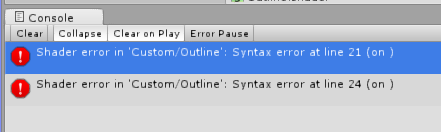
I placed ENDCG just before the SubShader keyword, and now it’s giving two different errors:
And here’s the updated ShaderLab codes:
//Goal Outline Shader:
//http://wiki.unity3d.com/index.php?title=Silhouette-Outlined_Diffuse

Shader "Custom/Outline" {
    Properties {
        _Color ("Main Color", Color) = (0.5, 0.5, 0.5, 1)
        _OutlineColor ("Outline Color", Color) = (0, 0, 0, 1)
        _Outline ("Outline Width", Range(0.0, 0.05)) = 0.005
        _MainTex ("Base (RGB)", 2D) = "white" {}
    }

    CGINCLUDE
    #include "UnityCG.cginc"

    struct appdata {
        float4 vertex : POSITION;
        float3 normal : NORMAL;
    }

    struct vertex2float {
        float4 pos : POSITION;   //<-----------------    ERROR :  LINE 21
        float4 color : COLOR;
    }
                               //<--------------------   ERROR : LINE 24.
    uniform float _Outline;
    uniform float4 _OutlineColor;
    ENDCG           //<-----------------------   ENDCG Location

    SubShader {
        Tags { "RenderType"="Opaque" }
        LOD 200

        CGPROGRAM
        #pragma surface surf Lambert

        sampler2D _MainTex;

        struct Input {
            float2 uv_MainTex;
        };

        void surf (Input IN, inout SurfaceOutput o) {
            half4 c = tex2D (_MainTex, IN.uv_MainTex);
            o.Albedo = c.rgb;
            o.Alpha = c.a;
        }
        ENDCG
    }
    Fallback "Diffuse"
}
Dolkar
July 10, 2015, 12:57pm
7
The definitions of structs need to end with a semicolon, like so:
    struct appdata {
        float4 vertex : POSITION;
        float3 normal : NORMAL;
    };
I completely agree with you that the error messages are largely unhelpful… Perhaps this could be considered a bug, because even the hlsl compiler at least elaborates on the syntax error and gives “unexpected token ‘struct’”