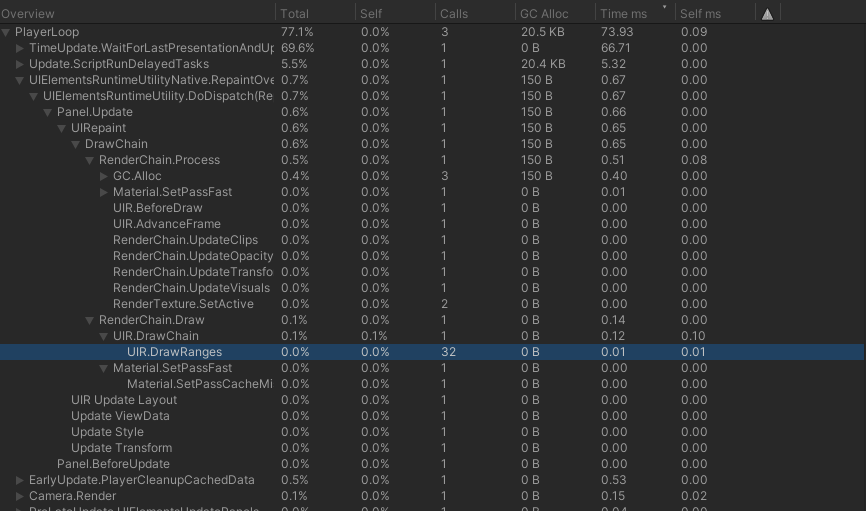
I experienced very bad performance of the UI Toolkit when using it with the WebGL Player.
When attaching the profiler it displays that the function UIR.DrawRanges costs between 24ms and 72 ms of cpu time while running in the editor it only takes <1ms of time.
I’m attaching two screenshots of the profiler (the app was displaying the same scene)
Is there something I can do here or is it just the state that ui toolkit is in right now?!
Unity 2020.2.1f1 was used and browsers were Safari 14.0.2 and Chrome 87
UiToolkit Version 1.0.0-preview.13
Performance is worst on WebGL because this platform doesn’t support mapped-buffer ranges, which UI Toolkit uses to update sub-regions of the vertex buffers on (almost) any other platform.
This means that even when updating a single VisualElement’s geometry, the whole buffer has to be re-uploaded to GPU memory. This is less than ideal, but there are ways to avoid this.
If the transform of your elements is changing (position, scaling, rotation), then you can set the usageHints = UsageHints.DynamicTransform hint on that element. This will avoid modifying the geometry of the element when the transform changes.
Otherwise, if you can share some details on your particular use-case, maybe that would help us identify some bottlenecks.
Thanks for the detailed answer!
I managed to reduce the time with more use of atlases … but I tried the usageHints with the moving stuff…
and once I set the usage hints … I could not see the VisualElements at all (in compiled WebGL)
We have a patch coming soon that fixes a situation where dynamic elements would disappear. This occurred particularly when there are many dynamic elements (say, more than 500). If that’s your situation, I think the next patch will fix it. If not, I’d like more details about your setup, and a bug report
Hmm this was the only element I set dynamic specifically … but in general yeah there are more than 500 Visualelements on screen … ill investigate some more and might come back with a bug report with more info
thanks