Physics + Netcode not syncing right or something

I am attempting to go from the netcode sample NetCube, some changes here and there, and now I can’t move my character anymore
It stopped working when I added physics body to the character, I’ve already “Update Component List + Generate Code” in the prefab.

using Unity.Burst;
using Unity.Entities;
using Unity.NetCode;
using Unity.Networking.Transport;
using Unity.Physics;
using UnityEngine;

public struct PlayerInput : ICommandData<PlayerInput> {
    public uint Tick => tick;
    public uint tick;
    public int horizontal;
    public int vertical;

    public void Deserialize(uint tick, DataStreamReader reader, ref DataStreamReader.Context ctx) {
        this.tick = tick;
        horizontal = reader.ReadInt(ref ctx);
        vertical = reader.ReadInt(ref ctx);
    }

    public void Serialize(DataStreamWriter writer) {
        writer.Write(horizontal);
        writer.Write(vertical);
    }

    public void Deserialize(uint tick, DataStreamReader reader, ref DataStreamReader.Context ctx, PlayerInput baseline,
        NetworkCompressionModel compressionModel) {
        Deserialize(tick, reader, ref ctx);
    }

    public void Serialize(DataStreamWriter writer, PlayerInput baseline, NetworkCompressionModel compressionModel) {
        Serialize(writer);
    }
}

public class PlayerSendCommandSystem : CommandSendSystem<PlayerInput> { }
public class PlayerReceiveCommandSystem : CommandReceiveSystem<PlayerInput> { }

[UpdateInGroup(typeof(ClientSimulationSystemGroup))]
public class SamplePlayerInput : ComponentSystem {
    protected override void OnCreate() {
        RequireSingletonForUpdate<NetworkIdComponent>();
        RequireSingletonForUpdate<EnableDOTSMMOGhostReceiveSystemComponent>();
    }

    protected override void OnUpdate() {
        var localInput = GetSingleton<CommandTargetComponent>().targetEntity;
        if (localInput == Entity.Null) {
            var localPlayerId = GetSingleton<NetworkIdComponent>().Value;
            Entities.WithNone<PlayerInput>().ForEach((Entity ent, ref PlayerIDComponent player) => {
                if (player.PlayerId == localPlayerId) {
                    PostUpdateCommands.AddBuffer<PlayerInput>(ent);
                    PostUpdateCommands.SetComponent(GetSingletonEntity<CommandTargetComponent>(), new CommandTargetComponent { targetEntity = ent });
                }
            });
            return;
        }
        var input = default(PlayerInput);
        input.tick = World.GetExistingSystem<ClientSimulationSystemGroup>().ServerTick;
        if (Input.GetKey("a"))
            input.horizontal -= 1;
        if (Input.GetKey("d"))
            input.horizontal += 1;
        if (Input.GetKey("s"))
            input.vertical -= 1;
        if (Input.GetKey("w"))
            input.vertical += 1;
        var inputBuffer = EntityManager.GetBuffer<PlayerInput>(localInput);
        inputBuffer.AddCommandData(input);
    }
}

[BurstCompile]
[UpdateInGroup(typeof(GhostPredictionSystemGroup))]
public class MovePlayerSystem : JobComponentSystem {
    protected override Unity.Jobs.JobHandle OnUpdate(Unity.Jobs.JobHandle handle) {
        handle.Complete();
        var group = World.GetExistingSystem<GhostPredictionSystemGroup>();
        var tick = group.PredictingTick;
        var deltaTime = Time.DeltaTime;
        Entities.ForEach((DynamicBuffer<PlayerInput> inputBuffer, ref PhysicsVelocity vel, ref PlayerAcceleration acc, ref PlayerMaxSpeed speed, ref PredictedGhostComponent prediction) => {
            if (!GhostPredictionSystemGroup.ShouldPredict(tick, prediction)) {
                Debug.Log(World.Name + " did not predict");
                return;
            }
            PlayerInput input;
            inputBuffer.GetDataAtTick(tick, out input);
            if (input.horizontal > 0)
                vel.Linear.x = Mathf.Clamp(vel.Linear.x + deltaTime * acc.Acceleration, -speed.MaxSpeed, speed.MaxSpeed);
            else if (input.horizontal < 0)
                vel.Linear.x = Mathf.Clamp(vel.Linear.x - deltaTime * acc.Acceleration, -speed.MaxSpeed, speed.MaxSpeed);
            if (input.vertical > 0)
                vel.Linear.z = Mathf.Clamp(vel.Linear.z + deltaTime * acc.Acceleration, -speed.MaxSpeed, speed.MaxSpeed);
            else if (input.vertical < 0)
                vel.Linear.z = Mathf.Clamp(vel.Linear.z - deltaTime * acc.Acceleration, -speed.MaxSpeed, speed.MaxSpeed);
            Debug.Log(World.Name + " did predict: " + input.horizontal + ", " + input.vertical + vel.Linear);
        }).WithoutBurst().Run();// (handle);
        return default;
    }
}

Last 8 lines of the console, for some reason the console shows 4 servers then 4 clients then repeats rather than 1 client 1 server repeat

ServerWorld did predict: 1, 1float3(0.1666656f, -1.8441E-06f, 0.1666667f)
ServerWorld did predict: 1, 1float3(0.1666675f, -1.68932E-06f, 0.1666666f)
ServerWorld did predict: 1, 1float3(0.1666656f, -1.842527E-06f, 0.1666667f)
ServerWorld did predict: 1, 1float3(0.1666675f, 2.041573E-06f, 0.1666666f)
ClientWorld0 did predict: 1, 1float3(5f, 1.57506f, 5f)

The Project: https://www.mediafire.com/file/7ll2s2dz12nvf9s/Untituled_DOTS_MMO.zip/file
Same here. How to move rigidbodies with netcode?

Make sure that the physics body and collider components are enabled, they’re disabled in the sample project.
I quickly tested it using the following code and it works as expected.

[UpdateInGroup(typeof(GhostPredictionSystemGroup))]
public class MoveCubeSystem : ComponentSystem
{
    protected override void OnUpdate()
    {
        var group = World.GetExistingSystem<GhostPredictionSystemGroup>();
        var tick = group.PredictingTick;
        var deltaTime = Time.DeltaTime;
        Entities.ForEach((DynamicBuffer<CubeInput> inputBuffer, ref PhysicsVelocity vel, ref PredictedGhostComponent prediction) =>
        {
            if (!GhostPredictionSystemGroup.ShouldPredict(tick, prediction))
                return;
            CubeInput input;
            inputBuffer.GetDataAtTick(tick, out input);
            vel.Linear.x = input.horizontal;
            vel.Linear.z = input.vertical;
        });
    }
}

It works in sample project. But if I copy NetCube code to my empty project (or write from scratch), the cube does’t move, until I remove Physics Body. Am I miss something?

It turned out that you need an extra system to manually update the translation.
The system was hidden in the Asteroids sample.

using Unity.Entities;
using Unity.Jobs;
using Unity.NetCode;
using Unity.Transforms;

namespace Asteroids.Server
{
    [UpdateInGroup(typeof(ServerSimulationSystemGroup))]
    [UpdateBefore(typeof(GhostSimulationSystemGroup))]
    public class UpdateConnectionPositionSystem : JobComponentSystem
    {
        protected override JobHandle OnUpdate(JobHandle inputDeps)
        {
            var translationFromEntity = GetComponentDataFromEntity<Translation>(true);
            return Entities.WithNativeDisableContainerSafetyRestriction(translationFromEntity).ForEach(
                (ref GhostConnectionPosition conPos, in CommandTargetComponent target) =>
                {
                    if (!translationFromEntity.Exists(target.targetEntity))
                        return;
                    conPos = new GhostConnectionPosition
                    {
                        Position = translationFromEntity[target.targetEntity].Value
                    };
                }).Schedule(inputDeps);
        }
    }
}

Logically you would need to update the rotation too if necessary.

Running physics on the client for ghosts is currently not supported.
Running physics simulation on a interpolated object makes not sense since it would just do a bad prediction for one frame based on the received state.
Running physics simulation as part of the prediction would mean that the physics systems would have to run for a select entity inside the prediction group, which is not possible at the moment. Running physics after the prediction is not the right thing to do, it would be similar to running physics for interpolated objects.

If you just want to run physics on the server and have it replicated to the client you have to add a PhysicsBody and make sure to uncheck Predicted client and interpolated client for the PhysicsDamping, PhysicsMass and PhysicsVelocity so the physics simulation is run on the server only.

There is also a problem with physics and netcode not knowing about each other which can mess up the ordering of the systems. You can ensure correct ordering by adding something like this

    [UpdateBefore(typeof(BuildPhysicsWorld))]
    [UpdateAfter(typeof(GhostSimulationSystemGroup))]
    public class PhysicsNetCodeOrderingSystem : JobComponentSystem
    {
        protected override JobHandle OnUpdate(JobHandle inputDeps)
        {
            return inputDeps;
        }
    }

We are investigating ways to make that easier.

We will look closer at using physics in prediction later, for now our recommendation is to use a raycast based character controller for prediction - that is what we do in DotsSample.

This system has nothing to do with physics, this is copying the player position to the connection entity so the position can be used for distance based priority - nothing else. Adding more systems will also affect the ordering of systems, so if it fixed anything it is likely just because it reordered the systems to something that happens to work.

5 Likes

Strangely it was the only system I had to keep to make it work, anyway thanks for clearing that up.

So should we still run the move system in the GhostPredictionSystemGroup then, even if it’s not really predicted due to using server-side physics?

What about other systems that affect the physics velocity, like wind or any kind of force that should be applied after the move system. In which system group are they supposed to run?

1 Like

Does it mean this feature will come in future or should we not expect something like this?
E.g. running the RaycastCar Demo with netcode and of course client prediction?
There, for the car we do a lot of physic changes, apply impulses etc., if I try to apply an impulse right now to a ghost with prediction with 1sec delay, it will behave very strange.

It is something we want to support and we have been experimenting a bit, but I do not have any ETA on when that will be available.

5 Likes

Is the plan to fully support physics prediction and rollback on the client?

Meaning to be able to have a fully physics-based environment (with joints, collisions etc.) which would work with netcode?

(if so that would be fantastic news)

We want to make the full physics simulation work in prediction, but it will have additional constraints and limitations.
For example I don’t know what would happen if you have physics on both predicted and interpolated objects, but I would expect that it is either not supported or one set is treated as kinematic or ignored when the other is updating. I do not expect that we will automatically ghost the joints from the server to the clients, at least not in all cases (join between ghost and non-ghost entity).

The “Predicted client and interpolated client” checkboxes are not removed.
For no 1 component, they are simply not removed.
What should I do about it?

Unity 2021.1.0f1.
NetCode 0.6.

Obviously, you won’t be releasing a fixed version because of this.
But can you throw off the corrected script so that I can replace it in the package?
Please! Just checkboxes.

I don’t understand the question. What are you trying to do and how is it not working?

I think this is probably the case. In Netcode 0.3 and higher, the Ghost Component Inspector only shows how ghosts are organized in code, so you can’t change that checkbox manually.

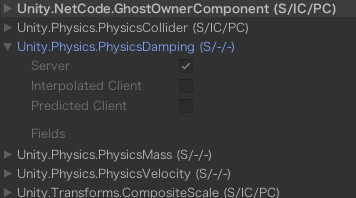
I needed to set [GhostComponent (PrefabType = GhostPrefabType.Server)] in PhysicsMass, PhysicsVelocity, and PhysicsDamping to get physics working in Netcode. As a result, it looks like the image.

However, this method directly rewrites the source code of Unity Physics, and I would like you to support this setting by default if possible. Is it possible?

6999977--827162--2021-04-02.png

1 Like

The overrides per ghost prefab are partially restored so it is possible to override some things per prefab again - I think that’s in 0.6

Yes, see https://docs.unity3d.com/Packages/com.unity.netcode@0.6/manual/ghost-snapshots.html#ghost-authoring-component specifically the last paragraph:

As well as adding attributes, you can specify rules for components which you do not have source access to by creating an assembly with a name ending with .NetCodeGen. This assembly should contain a class implementing the interface IGhostDefaultOverridesModifier. Implement the method public void Modify(Dictionary<string, GhostAuthoringComponentEditor.GhostComponent> overrides) and add an entry to the dictionary with the full name of the component as key and a value containing the desired override attributes.

I overlooked that. Thank you. I think that will solve it.

Does Netcode support physics in prediction now?

Yes

2 Likes

bro just switch on interpolate in Rigidbody o.o