Hi! I’m currently working on a project where I have to pick up items and add them in the inventory of my player! I’ve found the unity team tutorial (Adventure Game Phase 2: Inventory System - Unity Learn) for the inventory and followed their steps. Everything was just right 'till the moment when I had to pickup the object and place it inside the inventory! My question is how can i pickup a random object with some key let’s say with button “E” and add it to the inventory and than if i want to place it somewhere to drop it with different key or with the same one? I’m going to add a picture so you can have a brief idea what I want to do!
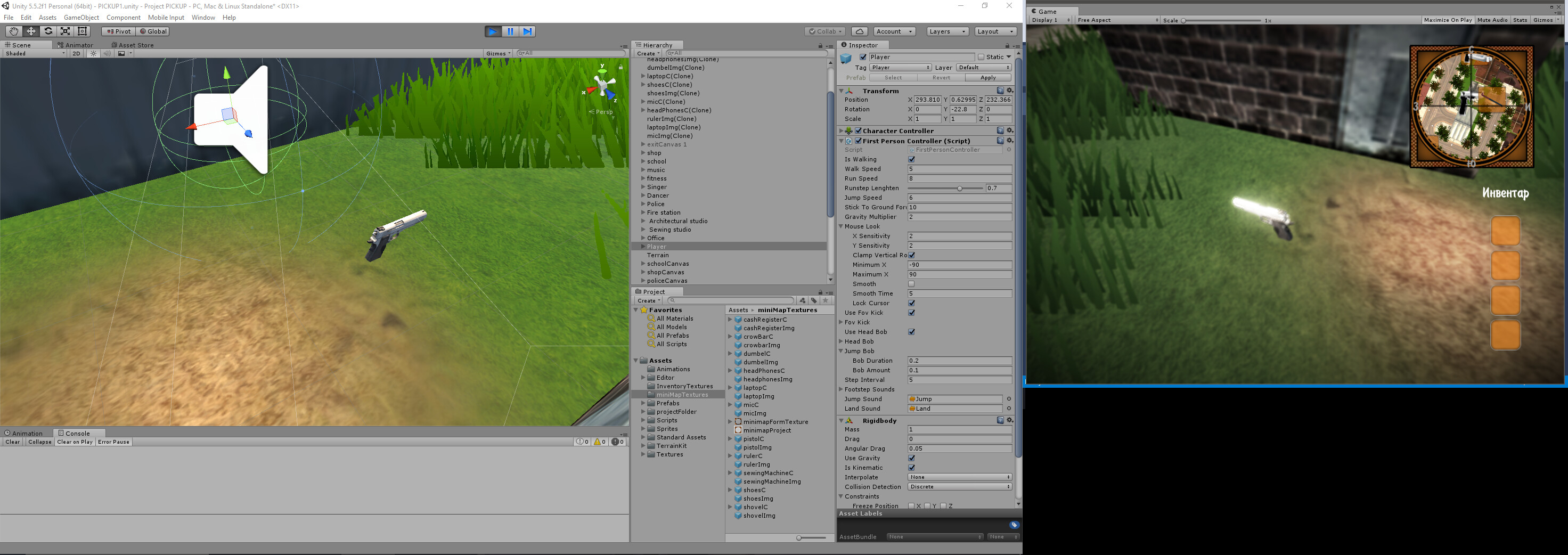
Depends on your setup. Picking up with a key if you’re within range is not a problem.
Being able to put down that item might require you to choose which item you want to put down? if you pick up 5, then “put one down” - which one? the last one? Any of them?
As for adding to your inventory; I didn’t watch the tutorial, but is that a List that you have stored somewhere?
If you post a little bit of code that might help.
Hi! So I’m using public arrays to store the information and than we have a loop to check if the slots are empty! And than we have custom editor to arrange the images and the items!
Here is the code -
public class Inventory : MonoBehaviour
{
   public Image[] itemImages = new Image[numItemSlots];
   public Item[] items = new Item[numItemSlots];
   public const int numItemSlots = 4;
   public void AddItem(Item itemToAdd)
   {
       for (int i = 0; i < items.Length; i++)
       {
           if (items == null)
           {
               items = itemToAdd;
               itemImages.sprite = itemToAdd.sprite;
               itemImages.enabled = true;
               return;
           }
       }
   }
   public void RemoveItem (Item itemToRemove)
   {
       for (int i = 0; i < items.Length; i++)
       {
           if (items == itemToRemove)
           {
               items = null;
               itemImages.sprite = null;
               itemImages.enabled = false;
               return;
           }
       }
   }
}
this is the inventory editor script -
```csharp
*[CustomEditor(typeof(Inventory))]
public class InventoryEditor : Editor
{
private bool showItemSlots = new bool[Inventory.numItemSlots];
private SerializedProperty itemImagesProperty;
private SerializedProperty itemsProperty;
private const string inventoryPropItemImagesName = “itemImages”;
private const string inventoryPropItemsName = “items”;
private void OnEnable ()
{
itemImagesProperty = serializedObject.FindProperty (inventoryPropItemImagesName);
itemsProperty = serializedObject.FindProperty (inventoryPropItemsName);
}
public override void OnInspectorGUI ()
{
serializedObject.Update ();
for (int i = 0; i < Inventory.numItemSlots; i++)
{
ItemSlotGUI (i);
}
serializedObject.ApplyModifiedProperties ();
}
private void ItemSlotGUI (int index)
{
EditorGUILayout.BeginVertical (GUI.skin.box);
EditorGUI.indentLevel++;
   showItemSlots[index] = EditorGUILayout.Foldout (showItemSlots[index], "Item slot " + index);
   if (showItemSlots[index])
   {
       EditorGUILayout.PropertyField (itemImagesProperty.GetArrayElementAtIndex (index));
       EditorGUILayout.PropertyField (itemsProperty.GetArrayElementAtIndex (index));
   }
   EditorGUI.indentLevel--;
   EditorGUILayout.EndVertical ();
}
}
_```*
As far as for the items dropping! I’ve forgot to put that I want to pick them with the keys from 1 to 4 and than drop them with a different key._
First, I have to say, please use code tags. There is an insert icon in the editing options to insert code, or you can type them manually : (Code=CSharp) * your code here * (/Code) but use square brackets.
Okay, my editor knowledge is limited (near zero), so I cannot help you there.
For the inventory items, you are not checking the Item at the items index. You are checking if the entire array is null in your loop(s), and also comparing the array to an Item (which is not what you want.) 
public void AddItem(Item itemToAdd)
{
for (int i = 0; i < items.Length; i++)
{
if (items[i] == null)
{
items[i] = itemToAdd;
itemImages[i].sprite = itemToAdd.sprite;
itemImages[i].enabled = true;
return;
}
}
That assumes that you’re using items and itemImages both for slots in the inventory (one for items , the other for the image). If that’s not what they’re for, some editing may be required
As for the picking up & dropping portion, I’m happy to help more later.
1 Like
Thanks! Appreciate it!
I’m hoping/guessing, from your response, that that got some stuff working?
Yes! I’ve managed to pull out an icon in the inventory after adding an item. This is where I’ve been wrong!
using UnityEngine;


[CreateAssetMenu]
public class Item : ScriptableObject
{
    public Sprite spirte;
}
After adding this script I’ve managed to get the icon but still no progress with the picking up, dropping…  I’ve downloaded the unity project from the tutorial to look for some ideas but everything there is stuff that I don’t need…

I’m glad you have some things working
Okay , so if you have 4 items (from one of your earlier posts) and you want to pick up with 1…4 keys.
Your hotkeys 1…4 could do an overlapsphere call to see if anything is within range (based on the key) and pick it up if it’s there. That’s just 1 example.
As for dropping an item: If you only ever have 4 slots, check for keys 1 through 4 in your update loop and if you get any of those, check the inventory slot at the (index - 1) (ie: 0, 1, 2, 3 ) = 4 slots
if the item is not null, drop it.
If you have more than 4 slots later on someday, then it’s different, because how do you know which item to drop? The user can’t type “25” as an option, so you might switch to a click to drop or something. Does that make sense?
Sorry for the late reply! So I’ve managed to make the pickup and the drop! Thanks! But I got some problems with retrieving the inventory items! When I want to put them on the ground everything is “Ok” expect the fact they’re not showing…
Here is my pickup code - the actual pickup is when the player triggers with the object this way is better since I’m going to add a points system!
    private bool isTrigger;
    public GameObject player;
    public inventory inventory;
    public Item item;

    void Update()
    {
        if (isTrigger == false)
        {
            gameObject.GetComponent<Rigidbody>().useGravity = true;
            gameObject.GetComponent<Rigidbody>().isKinematic = false;
            gameObject.GetComponent<BoxCollider>().isTrigger = false;
        }
        isTrigger = true;
    }

    void OnTriggerEnter(Collider co)
    {
        if(co.gameObject.name == "Player")
        {
//adding the item to the inventory
            inventory.AddItem(item);
            GameObject.DestroyObject(this.gameObject);
        }
    }

    void OnTriggerExit(Collider co)
    {
        isTrigger = false;
    }

    void OnCollisionEnter(Collision col)
    {
        if(col.gameObject.name == "Terrain" )
        {
            gameObject.GetComponent<Rigidbody>().useGravity = false;
            gameObject.GetComponent<Rigidbody>().isKinematic = true;
            gameObject.GetComponent<BoxCollider>().isTrigger = true;
        } else if (col.gameObject.name == null)
        {
            isTrigger = false;
        }
    }
and the updated tutorial one -
//this is new
 void Update()
    {
        if (Input.GetKeyDown(KeyCode.Alpha1))
        {
           RemoveItem(items[0]);
        }
        else if (Input.GetKeyDown(KeyCode.Alpha2))
        {
            RemoveItem(items[1]);
        }
        else if (Input.GetKeyDown(KeyCode.Alpha3))
        {
            RemoveItem(items[2]);
        }
        else if (Input.GetKeyDown(KeyCode.Alpha4))
        {
            RemoveItem(items[3]);
        }

    }
//everything else is the same
    public void AddItem(Item item)
    {
        for (int i = 0; i < items.Length; i++)
        {
            if (items[i] == null)
            {
                items[i] = item;
                itemImages[i].sprite = item.sprite;
                itemImages[i].enabled = true;
                return;
            }
        }
    }

    public void RemoveItem(Item item)
    {
        for (int i = 0; i < items.Length; i++)
        {
            if (items[i] == item)
            {
                items[i] = null;
                itemImages[i].sprite = null;
                itemImages[i].enabled = false;
            }
        }
    }
Okay, cool that you have some parts working. When you say they’re not showing, do you mean in the world or in the inventory they don’t appear?
For the trigger idea, you shouldn’t need an update loop (or even a rigidbody, I would say , unless you’re using physics for the objects in the world, for some reason).
Hi! They’re not showing in the world after I pick them up and than drop them the item is getting removed from the inventory but not dropping on the ground! As far for the loop yes I’m using physics because the last update of the game you’re able to pick an item and walk around with and you can drop it too. Like Skyrim where you can get items and move them around if you know what I mean !
I do not know Skyrim, but I do get the concept in my head I guess what I meant is that … if the object is not rolling or bumping into anything (Just pick up & drop off), it does not need physics necessarily. However, that’s not the reason you can’t see it when you drop it… Okay, so I’m glad that you explained that. I thought it wasn’t showing up when you picked it up…If it’s leaving your inventory but you don’t see it on the ground, that’s probably because I don’t see any code that is creating a GameObject and placing it in the world You need the inverse of the pickup. You need a GameObject , as reference , which you can Instantiate and place next to your character on drop. (same kind you use to pick up from the world).
Hi! So I’ve made some kind of dropping… But right now I’m spawning items when I pres one of the keys(1-4) which isn’t good… The good is that if I pick them they’re dropping ! The other problem here is that I’m using the buttons from 1-4 directly so that mean i need to pick the items in correct order in order drop the right one which isn’t good too…
the updated code -
    void Update()
    {

        if (Input.GetKeyDown(KeyCode.Alpha1))
        {
            RemoveItem(items[0]);
        }
        else if (Input.GetKeyDown(KeyCode.Alpha2))
        {
            RemoveItem(items[1]);
        }
        else if (Input.GetKeyDown(KeyCode.Alpha3))
        {
            RemoveItem(items[2]);
        }
        else if (Input.GetKeyDown(KeyCode.Alpha4))
        {
            RemoveItem(items[3]);
        }

    }

    public void AddItem(Item item)
    {
        for (int i = 0; i < items.Length; i++)
        {
            if (items[i] == null)
            {
                items[i] = item;
                itemImages[i].sprite = item.sprite;
                itemImages[i].enabled = true;
                return;
            }
        }
    }

    public void RemoveItem(Item item)
    {
        GameObject currentItem;
        for (int i = 0; i < items.Length; i++)
        {
            if (items[i] == item)
            {
                items[i] = null;
                itemImages[i].sprite = null;
                itemImages[i].enabled = false;
                currentItem = Instantiate(itemsToRemove[i], player.transform.position, Quaternion.identity);
                currentItem.transform.position = player.transform.position;
                return;
            }
        }
    }
Okay… You have things working (from your original post).
Are you looking to have more than 4 items? Or are you just looking to put items 1 through 4 into the right spots when you pick them up, so you can get/drop them correctly (without having to go in order) ?
Yeah kind off… So I’ve got 11 items but I want my inventory to be able to hold only 4 items! And when I pick them(there is no right order of picking the items you can pick them differently) to drop the with the keys from 1-4!
Ah okay. So that sounds pretty simple. I have a better idea of what you’re after now, too. So, using keys 1-4 to drop an item is perfectly acceptable in your situation, because it should drop whichever item is in the Spot #.
You want to be able to pick up any item (but only if there’s room)… up to a count of 4. And drop any of the four items, by the keys 1 through 4. That right? Anything I missed, please repeat it to me lol
If you post your updated code I could offer a little more feedback without making some bad guesses as to what it might look like in its entirety.
Yes! You got it right! So for the code in my inventory I’m instantiating a gameobject after removing the images(icons) of the object I’m spawning the object… But right now everything that the scrip do is to throw them in the air and I can use the items even if they’re not picked
public class inventory : MonoBehaviour
{
    public GameObject player;
    public Image[] itemImages = new Image[numItemSlots];
    public Item[] items = new Item[numItemSlots];
    public GameObject[] itemsToRemove = new GameObject[numItemSlots];

    public const int numItemSlots = 4;

    void Update()
    {
        if (Input.GetKeyDown(KeyCode.Alpha1))
        {
            RemoveItem(items[0]);
        }
        else if (Input.GetKeyDown(KeyCode.Alpha2))
        {
            RemoveItem(items[1]);
        }
        else if (Input.GetKeyDown(KeyCode.Alpha3))
        {
            RemoveItem(items[2]);
        }
        else if (Input.GetKeyDown(KeyCode.Alpha4))
        {
            RemoveItem(items[3]);
        }
    }

    public void AddItem(Item item)
    {
        for (int i = 0; i < items.Length; i++)
        {
            if (items[i] == null)
            {
                items[i] = item;
                itemImages[i].sprite = item.sprite;
                itemImages[i].enabled = true;
                return;
            }
        }
    }

    public void RemoveItem(Item item)
    {
        GameObject currentItem;
        for (int i = 0; i < items.Length; i++)
        {
            if (items[i] == item)
            {
                items[i] = null;
                itemImages[i].sprite = null;
                itemImages[i].enabled = false;

                if (items[i] == null)
                {
                    currentItem = Instantiate(itemsToRemove[i], player.transform.position, Quaternion.identity);
                    currentItem.transform.position = player.transform.position;
                }
                return;
            }
        }
    }
}
2 things.
- observation: you do not need to check items == null inside the removeItem a second time, since you have assigned null to it just 3 lines before
2) when you say you can still use it despite having dropped it, where is the code that “uses” something?
So those lines of code are spawning the object -
currentItem = Instantiate(itemsToRemove[i], player.transform.position, Quaternion.identity);
                    currentItem.transform.position = player.transform.position;
and from the update method I’m accessing it and giving each of the object a key to be able to be dropped but right now I can use them when ever I want! I don’t know how to check if there is item in the array and if there is on which key it is…
        if (Input.GetKeyDown(KeyCode.Alpha1))
        {
            RemoveItem(items[0]);
        }
        else if (Input.GetKeyDown(KeyCode.Alpha2))
        {
            RemoveItem(items[1]);
        }
        else if (Input.GetKeyDown(KeyCode.Alpha3))
        {
            RemoveItem(items[2]);
        }
        else if (Input.GetKeyDown(KeyCode.Alpha4))
        {
            RemoveItem(items[3]);
        }
By “use them” you don’t mean drop them, but something else? Can you show me the code where you “use” them?