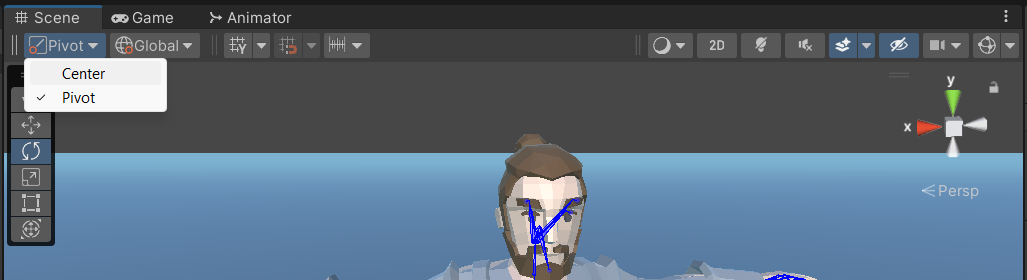
We exported an animated character from Maya to fbx. We intended to animate the head to look at some point by rotating the neck bone.
We found that once imported in Unity, all the bones’ pivot points were out of place (looks like it’s placed in the geometric center of the model). Thus, we can’t do anything with them through scripting, since the rotation is centered in the wrong world point.
Is this a feature or a bug, and is there any way to solve this?
Thanks in advance!
joe@threemelons
The culprit here is the often misunderstood pivot point button at the top left of the scene view pane.

1 Like
Hello!
I just had a problem like that: I had an object witha a simple animation, tilting back and forth around its joint’s pivot in Maya. When I exported the first time, its rotation was out of place in Unity. I tried hiting the Local/Global - Pivot/Center buttons, but it wouldn’t help anyway… The animation must be imported and played right immediately in Unity. So, I went back into Maya and tried this:
- In the viewport options, go to Show/Joints to see the joints in the scene
- Select the mesh of the object
- Hold down the “D” key to show the mesh pivot
- Then, hold down “V” in order to align it with the joints
- Move the pivot until it’s perfectly aligned with the joint you want
- Export .fbx again
- Import in Unity
- Hit Play to test
It did work here, and I hope this helps you too!
For anyone having this issue 15 years later, the pivot switch in newer Unity versions is here: