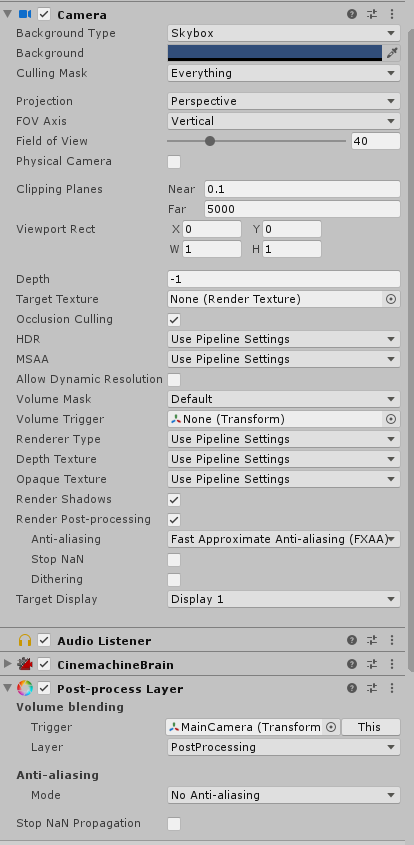
I observe that when I change the anti-aliasing mode via the additional camera properties, it is applied, but the Anti-Aliasing set through the PostProcessLayer never takes effect.
The PostProcessLayer component is part of the Post Processing Stack v2, which is no longer compatible with the scriptable render pipeline since 2019.3. Basically, you can delete the entire package from the project
You’ll only need a Volume set up as you have already, and the “Render Post-processing” checkbox ticked on the camera.
Thanks a lot, I can’t remove the PostProcess package though since apparently LWRP still depends on it.
Do you also have an idea where I can find fog settings? All I’m currently seeing in the volume overrides are post processing effects. The fog checkbox in the lighting inspector is greyed out.
Since 2019.3 the Lightweight RP just acts as an installer for the Universal RP package, these are currently the same pipeline, just renamed. So you can remove the Lightweight RP package along with the Post Processing package at this point.
As far as I know the URP only has post processing volume components, whereas the HDRP has sky, lighting and fog components. I don’t know what causes the fog settings to disable for you, I’m using the same Unity version (but with URP) and can use the default fog settings.
I can’t find the equivalent of the PostProcessLayer, PostProcessProfiler and PostProcessVolume classes and I am baffled by the lack of references in the documentation. It’s like it was supposed to work or we are supposed to know what we should do?
Install URP package via package manager.
[Post processing via package manager does not install. It’s not necessary. URP does not support PPv2]
Create Global Volume in hierarchy.
[ex. create 3dobject > cube]
—> Right click > volume > global volume
—> click on new button[create volume profile]
—> Add override > post processing > add any effect.
[Must set in your URP rendering pipeline > Post processing > Featured Set : Integrated ]
How can enable post processing.
—-> MainCamera > Rendering > post processing Tick in check box.
[it’s not necessary to add post processing layer component to camera or VR camera.
please remove the post processing layer in camera.it’s not supported in URP]
 ´
´