While attempting to make my in-editor AO baker compatible with URP, I’ve found this page stating that Camera.Render and Camera.RenderWithShader are not supported. Is there a current or planned replacement for this? Without them, it seems impossible to render custom depth maps, a very powerful feature.
2 Likes
There’s a replacement:
Renderer Features, especially the built-in RenderObjects renderer feature.
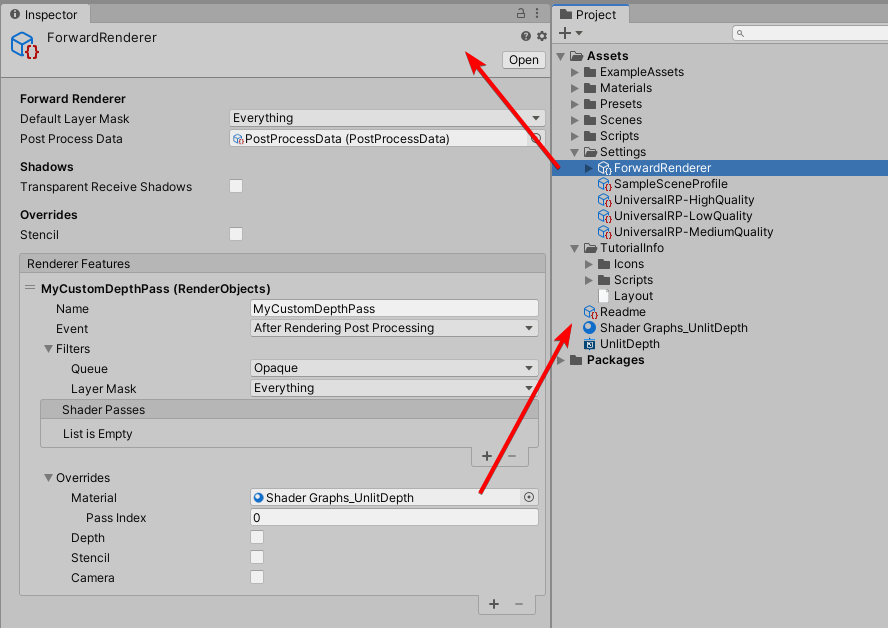
Your actual camera that you want to render depth with needs the right Renderer assigned, and also can have Culling set to none so that you’re not rendering double:

Result of the above:

Yeah… lack of RenderWithShader is most annoying thing in SRP. Lucky you can switch to standard on the fly, bake what you want, and switch back.
Using Renderer Features seems like using a sledgehammer to crack a nut-kind of solution. Previously I could just call a single function. Any input from Unity on if this is the intended way to replace Camera.Render? I’m a little confused as to why URP makes it incompatible, anyway.
3 Likes
This in not URP specific issue. SRP just don`t have RenderWithShader functionality.
@phil_lira any idea how this can be achieved? seems useful for a lot of quick tooling and bouncing back and forth between URP and built-in seems taxing…
I can only repeat that RendererFeatures have been previously said to be the replacement for URP. I’d also hope this to be easier and more consistent between pipelines… Looking forward to official Unity feedback.
Run into the same problem. Any updates?
Hi, any updates on this ?
Is it at all possible to render a camera with a custom replacement shader in any URP version ?
Thanks
Nope, it seems to be a design limitation.
1 Like
I see, thanks
I am trying to port SEGI global illumination to URP and seems wont be so easy, if possible without this feature
This could be what you need (landed in 2022.2) shader replacement for SRP's (v3) · Unity-Technologies/Graphics@d1c61da · GitHub
6 Likes
With the new feature linked by AljoshaD this problem should be solvable. In fHerbst’s screenshot there is only a material override. In newer versions there is also a Shader override property that allows you to maintain properties from the current materials on your objects. This is similar to how replacement shader/RenderWithShader in the built-in renderer works.
What I found to work well is to create an extra UniversalRenderData asset (Create > Rendering > URP Universal Renderer) where I set the Filtering to “Nothing”. Then add the Render Objects Renderer Feature and specify which layers you want to draw. Set the override mode to Shader and you should be good to go.
By using an extra Universal Render Data asset it’s easy to have a camera use it from code without having to toggle a bunch of settings every time you want to render. Especially with the updates to the Render Request API. Which makes it easier to trigger SRP renders from code.
var request = new RenderPipeline.StandardRequest();
request.destination = aoRT;
camera.GetUniversalAdditionalCameraData().SetRenderer(k_AOBakeRendererID);
RenderPipeline.SubmitRenderRequest(camera, request);
Looking forward to any other questions and/or feedback!
8 Likes
The updates to the RenderRequest api that Robin mentioned also landed in 2022.2 2022.2/renderrequest-refactor to 2022.2/staging · Unity-Technologies/Graphics@76150c8 · GitHub
5 Likes
I am literally hitting a wall today because I wanted to create a custom debug view similar to what the Rendering Debugger window does and not being able to reproduce the functionality or attach my own stuff to the existing URP classes BUT we are updating our project to 2022.2 next week. So this feature might just come at the right time for me.
Replacement shaders has always been incredibly useful thanks for finally adding this 
edit:
because someone liked this post today, a quick update.
The render objects feature includes a shader overwrite by now, which is great because it brings one a long way, but unfortunately it can’t use SRP batching it seems (at least not for me) which again makes it … questionable.
The rendering debugger addition mentioned above works though, although it was not easy and it suffers from that no batching issue and regular rendering has be disabled using the layermask (which is a bit tricky to get access to).
3 Likes
I’m crying in unity2021.
