Dear community,
in the last years I have worked in several engines and setup assets in many different hierarchys and group nodes. Every new engine brings new questions, I need to clear. I join Unity development last year and work now my content forward into the engine.Unity have a very comfortable workflow and only a few nuts are need to crack.
When I prepare my big harbor asset for Unity, I started in the setup I normally use. This means: For optimal and effective LOD-management I cut big area meshes (like the wooden landing stages) in different parts. At my harbor I cut it into 3 pieces (for every pier side 1). Former engines needs to setup then a new material in cost of draw calls but in result it was possible to handle this submodel as once and switch the LODs to 1 or 2 when the player walk along the 3rd landing stage or more away into a town. The same with the stone border around the harbor.
- My first question is: I am acutal a little bit confused, how Unity handles those big assets in LOD management. In my Unity test setups, LODs switching normal by the distance but when I check them manual, all LODs change parallel to each other. When you take a look to the attached hierarchy, you see what I mean. For example: When I switch sandstone15_group to LOD2, all other LODs switch to LOD2 too but these who have not a LOD2, will be empty. The assets looks then horrible inclomplete.
My question is now how Unity need to setup scenes like mine right:
→ First option is the same, I used former: I set many submodels (with the same material) and give after the splitting each submodel a new material (with same textures). In the past, engines think then its an autark node. This system cost draw calls but handles LODs more effective to break down fast polycount.
This method requires 32 materials and 32 submodels.
→ Second option is to combine all submodels with the same material and use at least 1 material per 1 mesh (with it LODs). The cost is going here to polycount because the size of the asset is so big, that LOD-switching is very late when the player figure is walking on an island or drive a ship.
This method requires 9 materials and 9 submodels.
What makes me think curious: When I import the shown asset into Unity it meld down the materials to 9 at still 32 submodels. What is the right way for the LODs here?
- My second question is:
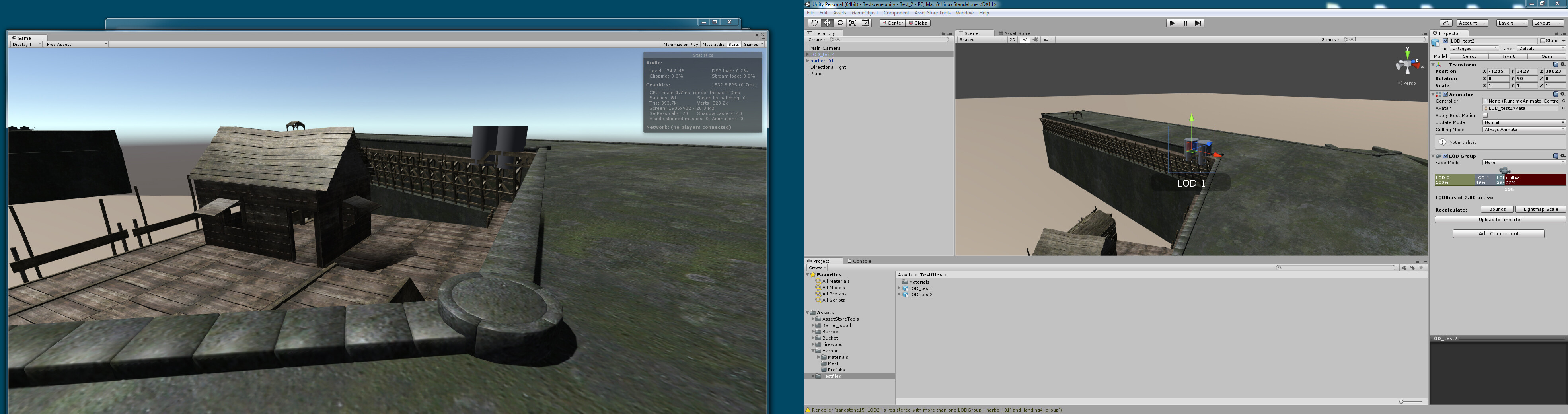
Like in question 1 noted, when I set manual LODs preview, all LODs switch to the chosen one and when one group node doesn´t have the LOD I chose (for example LOD2) then all other group nodes mesh will drawn empty on the screen. For my harbor it means: Only LOD2 submodels will be drawn. Please see attached pictures.
Is this situation only happend in preview in the scene when I manual set LODs or do need every submodel the same count on LODs?
As attachment you see 5 pictures:
1.) LOD0 (rendermesh)

- ) Actual Hierarchy

3.) When chosen manual LOD0 in only one group node, the scene shows all LOD0s:

4.) When I chose manual LOD1 in any group node, all LOD1 switches but group node who not have a LOD0 stays empty. This is the result:

5.) Same with LOD2. When I chose it manual in only one group, all LOD2 switches but group nodes who doen´t have a LOD2 stay blank. This is the result:

Thank you very much for help!
EDIT:
It seems Unity sets automaticly 1 rendering “LOD-Group” component to the top node of the hierarchy. When I understand the system right, this component steers all LODs for it same timing BUT left of open LOD-stages when meshes pass the border to switch into the next LOD. I have tried to set manually the missing LODs in the “renderers” field and it works but it is a big amount of work for all submodels. Maybe anyone have an idea for a easyer way?
EDIT 2:
Well, after a hard night of trial and error I have found out an solution. Maybe other users are interest in it. When you export out of Maya a huge asset like this (“huge” means dimension) and you are not able to split it in several small models then the workaround I think is the best one:
1.) When you import the asset first time in Unity, it creates automaticly a LOD-group in the top node. Set at first all missing LOD-stages to the LODs below. Means: Highlight at the bar in inspector “LOD0”. Note all meshes it shows. Highlight then LOD1. You will note that a few meshes are missing. Meshes who doesn´t have a LOD stage below 0. If one simple submodel like a “cube” only have LOD0, please add those models manual to the LOD stages 1 and 2 etc. in the “renderers”-field.
Set after this setup the switching distance to your prefered values and copy this LOD-components settings by using “copy component”. Do not erase top nodes LOD component!
2.) Add now to the nodes below a new LOD-component and use the option “paste component values”. Now all nodes gets the same settings as the top node and all LOD switch correct to the same stages.
At my harbor it needs a bit tuning by hand when you move the camera around it. But the LODs switch very effective now.