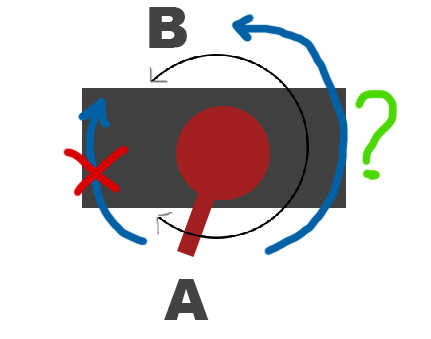
I’ve got a turret on a moving object, let’s say a tank. The turret points in the direction of the right thumbstick on the gamepad. So current turret rotation is Rotation A, the angle of the thumbstick is Rotation B and the turret moves from A to B to get in position. Thumbstick to the right means the turret rotate towards that point. Thumbstick up means the turret rotates towards that point, and so on.
That part isn’t difficult to get working and this is the code I’m using:
Where I’m stuck is, is gradually moving from A to B with that limit on the maximum rotation in place. The script wants to rotate in the direction that gets fastest from A to B, even when it can’t rotate due to the limit. What happens is the turret won’t rotate even to the thumbstick is pointing in a direction it should be able to rotate to. Only when turning the other way around will get it faster to point B will it start turning.
How can I ‘tell’ the turret to move the other way around, despite that being the longer route, because the shortest route is blocked?
You start by observing there are always two solutions to any aiming attempt.
Next, you disqualify each angular motion that would carry you over a forbidden section.
Finally, if there are still two solutions, you give priority to the shorter angular distance.
Now, working with angles is somewhat tricky.
You want to define the forbidden sector in absolute terms to get rid of any ambiguity.
That means you want to define the target angle in absolute terms as well, but then you need to be able to extract relative differences for the actual rotations. Let’s call these “deltas”. By convention, a positive delta should carry you counter-clockwise.
And when I say “absolute angle” that means that (1, 0) direction is 0 degrees, and (0, 1) direction is 90 degrees and so on.
I don’t have time right now, if you need more help, I can later show you how to formally define this.
Your second link doesn’t work for me. I get a 401 on that. I took a look at the code in the first link, but that’s a bit above my level of scripting I’m afraid. Gonna still pick through it to see if and what I can learn from it. Thanks!
I did what you said, made a sphere and put this script on it and it works like a charm! Don’t know why it works, so gonna have to figure that out, but I like reverse engineering code with the goal of trying to understand what it does and how I can implement it in a way that fits my needs. Thank you very much!
@orionsyndrome The big issue, for me at least, is that working with angles and rotation can get tricky really fast. All of the sudden a lot of pretty complex calculations are introduced and code starts to look more like Chinese. Doesn’t help either that my understanding of C# is pretty basic, but I’m still interested in how you would define the solution to my problem. If you have the time that is. To you also, thank you!
There are two ways to work with rotations. Either with simple planar (aka Euler) angles, or with quaternions.
Quaternions can be used in all contexts but they are more difficult to work with if you don’t understand them.
In your case you’re doing 2D however, so I can show you the simpler case.
In general, you avoid using Euler angles, specifically the eponymous API, everything that has euler in its name, because Unity is secretly running on quaternions exclusively, and Euler angles are only provided as a convenient conversion.
The only only exception here is Quaternion.Euler but you can very easily make your own substitute for it by using Quaternion.AngleAxis. It is really just a convenience because sometimes it’s easier to define an angle through degrees instead of radians. Sometimes. Most of the time, everything is tied to trigonometry anyway, so it’s better to work with radians, there is no much difference, it’s just less readable, but you can always convert for output.
Anyway, let’s start by differentiating between absolute and relative. When I say absolute, I mean “world space” angle. By mathematical convention, angles are measured so that 0-90 ends up being the first (top right) quadrant of the coordinate space, ordered in a counter-clockwise fashion.
So if you have your coordinate origin (0, 0) and some point A (10, 6) you can very easily determine the absolute angle to it by using arctan. Because tan(a) = sin(a) / cos(a), inverse is a = arctan(sin(a) / cos(a)). Observe that because both take ratios, sine and cosine can be scaled proportionally, so it doesn’t have to be on a unit circle. So when you have a point at (10, 6) you don’t need to find a normalized direction to it, you just do atan(6/10)
We btw use atan2 because it checks out the signs to find the exact quadrant and so
var angle = MathF.Atan2(6f, 10f); // 0.540419 (or 30.96 degrees)
That’s the absolute angle. The relative angle would be if you had another point B i.e. (12, 12) and you want to check the difference between the two. The angle should be positive going from A to B, and negative going from B to A.
So you do
var a = MathF.Atan2(6f, 10f); // equivalent to 30.96 (Atan2 arguments are y,x, don't get confused by this)
var b = MathF.Atan2(12f, 12f); // equivalent to 45
var r = b - a; // read as 'a to b'
And you get 14.04, which is fine. But this doesn’t work well if you go past certain distance. Imagine this
var a = MathF.Atan2(-6f, 10f); // equivalent to 329.03 deg
var b = MathF.Atan2(12f, 12f); // equivalent to 45
var r = a2 - a1;
Suddenly you get -284.036 as the answer. Not only you get a quantity that’s too big, it’s also signed wrongly. When doing deltas like that, you can check if the absolute quantity is greater than 180, because the result should not go beyond ± 180 anyway. So in a way, it’s modular (meaning it repeats in a set interval) but it’s not in the interval [0 … 360) but [-180 … +180). Let’s see how these two intervals map to each other
A general conversion should be X - 360 when X >= 180
But in this case we got -284.036 for right hand side interval, which is outside of [-180…+180). To fix this we should add 360 to get it back. Delta of 75.964 is the correct value. But this gets a bit confusing already.
Here are some general purpose methods to make your life easier in this regard
static readonly float PI = MathF.PI;
static readonly float TAU = 2f * PI;
static float angle(Vector2 v) => MathF.Atan2(v.y, v.x);
static float modularAngle(float a) => (a %= TAU) < 0f? a + TAU : a;
static float angleDiff(float a, float b) { var d = modularAngle(b - a); return d < PI? d : d - TAU; }
static float deg(float rad) => rad * (180f / PI);
static float rad(float deg) => deg * (PI / 180f);
Let’s try this again
var a = angle(new Vector2(10f, -6f)); // this is now x,y as opposed to y,x; equivalent to 30.96
var b = angle(new Vector2(12f, 12f)); // equivalent to 45
var diff = angleDiff(a, b);
Debug.Log(deg(diff)); // 75.96375
Now you have a reliable way of getting the differences, the means of getting the absolute angles, and radians-degrees conversions.
Next, we can proceed with the algorithm I outlined in the last post.
There are always two solutions for every target point T. We know that we’ll get the best solution by doing angleDiff, and the other one always satisfies the following constraints: 1) abs(solution1) + abs(solution2) = 360, 2) sign(solution1) = -sign(solution2).
So you can take the sign of the solution, and apply the opposite of it to (360 - abs(solution))
var diff2 = -MathF.Sign(diff1) * (360f - MathF.Abs(diff1));
This looks like it can be simplified, rest assured it cannot. If you naively change this to
var diff2 = diff1 - 360;
You’ll get some results wrongly because of modularity (the landing angles will be correct, but you want these values to reflect on angular distances, so -165.96 and -525.96 is not a good answer but -165.96 and 194.03 is).
Here’s an example
var a = angle(10f, -6f);
var b = angle(12f, 12f);
var diff = angleDiff(a, b);
Debug.Log($"Solution1: {deg(diff)}"); // 75.96375
Debug.Log($"Solution2: {deg(-MathF.Sign(diff) * (TAU - MathF.Abs(diff)))}"); // -284.03625
Then you want to prohibit certain arcs of the circle from traversing. To do this we need some convention, like doing minimum/maximum in absolute angle framework. For example +135/+225 would ban the angle 180, but not the angle 0. Similarly +315/+45 would ban the angle 0 but not the angle 180, however +45/+315 would do the opposite. This convention matters.
The way to make this work is to check all steps from your starting absolute angle, and invalidate the path as soon as you end up in the illegal interval. Now you have your two paths defined as diffs, so you can tell what’s the ending absolute angle is.
But you don’t want to naively check if a > min && a < max, because this isn’t guaranteed to be continuous at all times, instead you apply a trick here. You find the angle right in the middle of minimum and maximum (by doing (minimum + maximum) / 2). And since you know minimum and maximum are exactly (maximum - minimum) / 2 away from it, you can use angleDiff to tell whether you’re inside this interval. We also make sure the min…max interval is locally continuous. Edit3: In the end I’ve decided to change this to center/halfRange notation, to combat inconsistencies, but also it’s the most intuitive way to set this up. Now the start/end of the interval is obtained via angle±halfrange.
(Notice that step can be really large, the only thing that matters is that it won’t step over the interval, rendering a false-positive. (Edit: this means step should be only slightly smaller than 2f * illegalHalfRange, making this function capable of detecting an invalid path in only a couple of steps, not hundreds.) All parameters here are in radians. Btw you can have more than one illegal interval, this is just an example.)
Here’s how you call this
getPaths(angle, targetAngle, out var path1, out var path2);
var step = rad(0.1f);
var pathOk1 = isLegalPath(angle, path1, illegalCenter, illegalHalfRange, step);
var pathOk2 = isLegalPath(angle, path2, illegalCenter, illegalHalfRange, step);
Btw, to get a point (or direction) back from the angle you need this
I haven’t tested insideInterval or isLegalPath functions, and maybe I made an error somewhere, but the core idea is there. Good luck!
edit: fixed some errors
edit2: switched from min-max logic to min-range, which should be more consistent to set and validate
edit3: switched the interval to a more intuitive center-aligned center/halfRange
@zulo3d I’ve been playing with your code, but I can’t get it to work in relation to a parent object. With localEulerAngles when the parent object rotates the turret will no longer correctly look at the mouse position. With eulerAngles it will correcty look at the mouse position but the min and max angle will not stay in place when the parent rotates.
I’ve tried using the rotation of the parent as an offset to correct the min and max angle based on the parent, but at a certain moment the min angle becomes bigger than the max angle, which messes up the code. Any idea how to fix this?
@orionsyndrome First and foremost, thank you very much for your detailed explanation! But, your code and use of mathematical equations goes quite abit beyond my understanding. I kind of know what you’re saying because your explanation is really good, but there’s no way I can implement your examples in my own piece of code. That’s why I like the code @zulo3d provided. It’s easy enough for me to understand and tinker with, and it gets the job done. Well, not entirely in this case, but you get the point.
The direction needs to be localized to the turret. Drag the script below onto the turret of your tank and use the inspector to drag an object onto its target transform.
using UnityEngine;

public class RestrictedTurret : MonoBehaviour
{
    public Transform target;

    void Update()
    {
        Vector3 direction=(target.position-transform.position).normalized;
        direction.y=0;
        float startAngle=transform.localEulerAngles.y;
        direction=Quaternion.Euler(0,startAngle,0)*direction; // localize the direction to the turret
        float goalAngle=Vector3.SignedAngle(transform.forward,direction,Vector3.up);
        if (goalAngle<0)
            goalAngle+=360;
        goalAngle=Mathf.Clamp(goalAngle,30,330); // clamp it
        float delta=(goalAngle-startAngle)*0.1f;
        transform.Rotate(new Vector3(0,delta,0));
    }
}
You’re welcome, and it’s alright. However, this is all pretty basic math, I deliberately didn’t do anything that I would normally do. Working with plain angles is sometimes more convoluted than other approaches, even though they appear easy on the surface, there are always a lot of edge cases and weird problems due to modularity. Just be aware that game dev is normally slightly more complicated than this, on median.