I am making custom lighting solution just for research mainly but might use it in live projects, but I came to a
slow down, I wanted to raycast faster so I changed to RaycastCommand, but it does not improve performance.
It is same or slower than just using loop with Physics.Raycast, it does not seem to split onto other threads but instead be on main thread one by one. Is there a way to put it onto other threads?
Update:
Fixed by Using IJobParallelFor to create RaycastCommands and then using that handle as a Dependency in RaycastCommand.ScheduleBatch
Also the third parameter is ‘minCommandsPerJob’, setting this to the same length as your array doesn’t let the job divide the array. It will give each thread that number of indices to start unless it runs out.
I tried that and didnt seem to work, but I found solution where I had to prepare my RaycastCommands in one Job, use that as dependency for ScheduleBatch and that worked. After that I am now doing more of the logic but this is now fixed.
Also I have to have my ‘minCommandsPerJob’ at 15 as in the Job I am iterating 15 times, if I give any other number it just breakes mutlithreading.
I may be missing something, or I misinterpret “minCommandsPerJob” to be equal to “innerLoopBatchCount” in IJobParallelFor, but you want lower numbers than what your array length is. If you have 4 threads and 16 items, a parameter of 4 would give each thread 4 to work with, anything >= 16 would only give the work to 1 thread.
But if you only have 15 raycasts it might actually be slower no matter what due to job scheduling overhead. With RaycastCommand you’re kinda limited what you can make a job after the batch, because non DOTS colliders break the jobs system.
It is 15 raycasts per probe, but I got it working and can go above but does not seem to change performace when giving more ‘minCommandsPerJob’ currently I have around 16000 probes, they are occluded so around 12000 active * 15 Raycasts so its quite the number
So are you in a loop that isn’t included in the photos? If thats the case then you could make arrays that are “probe count * 15” in length, when you access the results you can use an offset(should be “probe index * 15”). Then you can bump up the minCommandsPerJob.
If you’re in a loop you’re paying the Schedule + Allocation + Complete() cost for each probe.
I am having the same issue, I am working on simulating a CT scan in Unity and I need to speed up about ~9 million raycasts. I tried to implement a solution with IJobParallelFor and RaycastCommand but my knowledge of Unity jobs is very limited and I definitely goofed something up, The whole calculation still only runs on one of my cpu cores and is now way slower than just sequentially calling Physics.Raycast. Could you post your working implementation that managed to run split into several threads? Unfortunately there seems to be very little information on this problem out there.
Thanks for the reply, I believe I have implemented these steps though I am not entirely sure if it is actually working.
Here is a simplified version of my code that I made for testing.
    [BurstCompile]
    struct SetupJob : IJobParallelFor
    {
        public NativeArray<RaycastCommand> Commands;
        public Vector3 Origin;
        public NativeArray<Vector3> DetectorPoints;
        public void Execute(int index)
        {
            Commands[index] = new RaycastCommand(Origin, DetectorPoints[index]);
        }
    }
void CalcIrradiationLengthAsyncSingle()
{
        var results = new NativeArray<RaycastHit>(4000000, Allocator.TempJob);
        var commands = new NativeArray<RaycastCommand>(4000000, Allocator.TempJob);

        //getting directions for the rays to be cast in
        NativeArray<Vector3> directions = new NativeArray<Vector3>(commands.Length, Allocator.TempJob);
        for (int i = 0; i < 4000000; i++)
        {
            directions[i] = xrays[i].GetDetectorPoint();
            origins[i] = Vector3.zero;
        }

        //set up a new job for the raycast commands to be filles
        var setupJob = new SetupJob()
        {
            Commands = commands,
            Origin = Vector3.zero,
            DetectorPoints = directions
        };

        JobHandle deps = setupJob.Schedule(commands.Length, 1, default(JobHandle));

        deps = RaycastCommand.ScheduleBatch(commands, results, 1, deps);

        deps.Complete();

        //evaluating, saving the results
        var hits = 0;
        for (int i = 0; i < 4000000; i++)
        {
            if (!results[i].transform.name.Equals("Detektor"))
            {
                xrays[i].AddSection(results[i].point);
                hits++;
            }
        }
}
Sadly I’m not sure if this is working correctly, I did try to look into the unity profiler and it says pretty much all workers are idle, though this code blocks the main thread so no frames are being updated and this also blocks the profiler. Did I correctly follow your description? How can I make sure it is now actually running in parallel?
Edit: As a test I just casted the same amount of rays sequentially (simply in a for loop) and it takes about the same time (around 9 seconds) so my attempt at parallelizing this probably isn’t working.
I tried out your code with small modifications so I can acutally run it and it works fine for me.
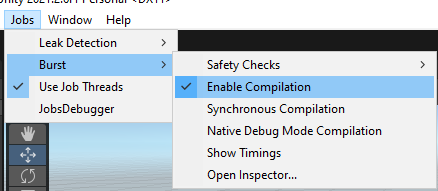
So what I found out is make sure you have Use Job Threads enabled This will allow Jobs to use Multiple threads not only Main Thread
Secondly you have [BurstCompile] tag so make sure you have Burst/Enable Compilation enabled This enables compilation of [BurstCompile] tags across the all scripts that have this tag in it
Here is the modified code, did not touch the jobs or scheduling
using System.Collections.Generic;
using Unity.Burst;
using Unity.Collections;
using Unity.Jobs;
using UnityEngine;

public class RayCastTest : MonoBehaviour
{
    List<Vector3> dirs = new List<Vector3>();
    List<Vector3> outPoints = new List<Vector3>();

    //Fill my directions
    private void Awake()
    {
        for (int i = 0; i < 40000; i++)
        {
            dirs.Add(new Vector3(Random.Range(0f, 1f), Random.Range(0f, 1f), Random.Range(0f, 1f)));
        }
    }

    //Call it everyframe
    public void Update()
    {
        CalcIrradiationLengthAsyncSingle();
    }

    [BurstCompile]
    struct SetupJob : IJobParallelFor
    {
        public NativeArray<RaycastCommand> Commands;
        public Vector3 Origin;
        public NativeArray<Vector3> DetectorPoints;
        public void Execute(int index)
        {
            Commands[index] = new RaycastCommand(Origin, DetectorPoints[index]);
        }
    }

    void CalcIrradiationLengthAsyncSingle()
    {
        var results = new NativeArray<RaycastHit>(40000, Allocator.TempJob);
        var commands = new NativeArray<RaycastCommand>(40000, Allocator.TempJob);

        //getting directions for the rays to be cast in
        NativeArray<Vector3> directions = new NativeArray<Vector3>(commands.Length, Allocator.TempJob);
        for (int i = 0; i < 40000; i++)
        {
            directions[i] = dirs[i];
            //origins[i] = Vector3.zero; // Not Used?
        }

        //set up a new job for the raycast commands to be filles
        var setupJob = new SetupJob()
        {
            Commands = commands,
            Origin = Vector3.zero,
            DetectorPoints = directions
        };

        JobHandle deps = setupJob.Schedule(commands.Length, 1, default(JobHandle));

        deps = RaycastCommand.ScheduleBatch(commands, results, 1, deps);

        deps.Complete();

        //Modified (Tons of GC Alloc)
        //evaluating, saving the results
        var hits = 0;
        for (int i = 0; i < 40000; i++)
        {
            if (results[i].transform == null)
                continue;
            if (!results[i].transform.name.Equals("Detektor"))
            {
                outPoints.Add(results[i].point);
                hits++;
            }
        }
    }
}
Thank you so much for your help, you really are a godsend in this situation.
I didn’t know I had to install a preview version of the jobs system through the unity package manager. I did this and enabled “use job threads”. Performance of a test case I built which casts 8 million rays successively a couple of times seems about 50% faster now but one problem still persists. I have been monitoring my CPU cores while running my simulation and have observed some strange behavior (this behavior stayed the same after enabling job threads).
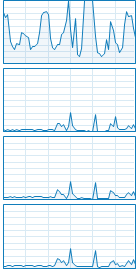
While running the simulation I can see spikes of cpu usage on all of my cores simultaneously, it goes down again for a few seconds and then it spikes again on all cores at the same time. Here is a screenshot of 4 CPU threads in task manager.
As you can see the spikes are quite apparent, moving from idle to about 30% usage on all cores and then moving to idle again a second later. This is how all of my 12 CPU cores/24 threads behave when I run the simulation. For me this looks like unity is only running a very short section of the workload in multiple threads and the rest then runs on a single core.
As you can see in this second screenshot that right between the first two spikes on the lower 3 cores, the top core is pegged at 100%. The other activity on the top core is just other applications running pretty sure. But this consistently looks like very short bursts (around a second) are running multithreaded and then the heavy lifting is being done by a single thread for several seconds. I would like to minimize the compute time as much as possible because I need to apply this to casting hundreds of millions of rays in batches of a couple million each, so ideally I would like to see unity not only using 20-30% of each core at once, but spending as much time multithreaded as possible and then using as close to 100% of each core as possible. I believe I read that unity by default only has access to a couple of cores but I can’t remember where I read this or what the suggested solution was. Also this doesn’t seem to be the issue as all cores are being used, just in short weak bursts.
Do you have any idea what could be the cause of this behavior and how I can further optimize the multithreaded behavior?
IMO, for something like this you should be using the Unity Physics for DOTS Package instead of the standard API. This will allow you to write a single burst ijobchunk for raycasting.
Additional is this is in a build or in editor? I find the only way to honestly performance test dots is in build.
Preparation of the ray directions take a lot of time before even jobs start running.
GC allocation is humongous [The red part] as your evaluation part is not multithreaded and is constantly reading data and then writing data. For that either use specialized functions without GC mess or you could make this multithreaded too by doing evaluation on seperate threads and then only read the clean output array.
I hope you did not forget to Dispose of the NativeArray’s that you made, you can quickly run into full memory as even when having TempJob you need to dispose of the old data as it will just pile up taking up RAM and Paging space until unity crashes.
So if you write your code clean you can get 100% of all cores, you just have to put all of the overhead onto those cores.
I think it’s caused by the name string compare, when you nuke that and replace by a collidID int compare it goes away.
After a couple fixes I get a nice boost on an i7-1280p, thanks everyone for the legwork.
using System;
using System.Collections.Generic;
using Unity.Burst;
using Unity.Collections;
using Unity.Jobs;
using Unity.Mathematics;
using UnityEngine;
using Random = UnityEngine.Random;

public class RaycastCommand_test : MonoBehaviour
{
    List<Vector3> dirs = new();
    List<Vector3> outPoints = new(40000);
    JobHandle _dependency;
    NativeArray<RaycastHit> _results;
    public bool completeOnLateUpdate;
    public bool vanillaRaycast;

    //Fill my directions
    void Awake()
    {
        for (var i = 0; i < 40000; i++) dirs.Add(new Vector3(Random.Range(-100f, 100f), Random.Range(-100f, 100f), Random.Range(-100f, 100f)));
    }

    public GameObject prefab;
    public int instanceCount = 1000;
    public float radius = 100;
    NativeArray<RaycastCommand> _commands;
    NativeArray<Vector3> _directions;

    void Start()
    {
        for (var i = 0; i < instanceCount; i++) Instantiate(prefab, Random.insideUnitSphere * radius, quaternion.identity);
    }

    //Call it everyframe
    public void Update()
    {
        if (vanillaRaycast) RaycastVanilla();
        else
            RaycastJobbified();
    }

    void RaycastVanilla()
    {
        outPoints.Clear();
        for (var i = 0; i < 40000; i++)
            if (Physics.Raycast(Random.insideUnitSphere * 100, dirs[i], out var hit))
                outPoints.Add(hit.point);
    }

    [BurstCompile]
    struct SetupCommandJob : IJobParallelFor
    {
        public NativeArray<RaycastCommand> commands;
        [ReadOnly] public NativeArray<Vector3> detectorPoints, origins;
        public void Execute(int index) { commands[index] = new RaycastCommand(origins[index], detectorPoints[index]); }
    }

    void RaycastJobbified()
    {
        _results = new NativeArray<RaycastHit>(40000, Allocator.TempJob);
        _commands = new NativeArray<RaycastCommand>(40000, Allocator.TempJob);
        _directions = new NativeArray<Vector3>(_commands.Length, Allocator.TempJob);
        for (var i = 0; i < 40000; i++) _directions[i] = dirs[i];
        //origins[i] = Vector3.zero; // Not Used?
        //set up a new job for the raycast commands to be filled
        var setupCommandsJob = new SetupCommandJob() {commands = _commands, origins = _directions, detectorPoints = _directions};
        _dependency = setupCommandsJob.Schedule(_commands.Length, 1, default);
        _dependency = RaycastCommand.ScheduleBatch(_commands, _results, 1, _dependency);
        if (!completeOnLateUpdate) CompleteThenDoTheRestOfTheWork();
    }

    void LateUpdate()
    {
        if (completeOnLateUpdate)
            CompleteThenDoTheRestOfTheWork();
    }

    void CompleteThenDoTheRestOfTheWork()
    {
        _dependency.Complete();
        outPoints.Clear();

        //evaluating, saving the results
        for (var i = 0; i < 40000; i++)
        {
            // collider ID = 0 means no hit
            if (_results[i].colliderInstanceID == 0)
                continue;
            outPoints.Add(_results[i].point);
        }
        _commands.Dispose();
        _results.Dispose();
        _directions.Dispose();
    }
}