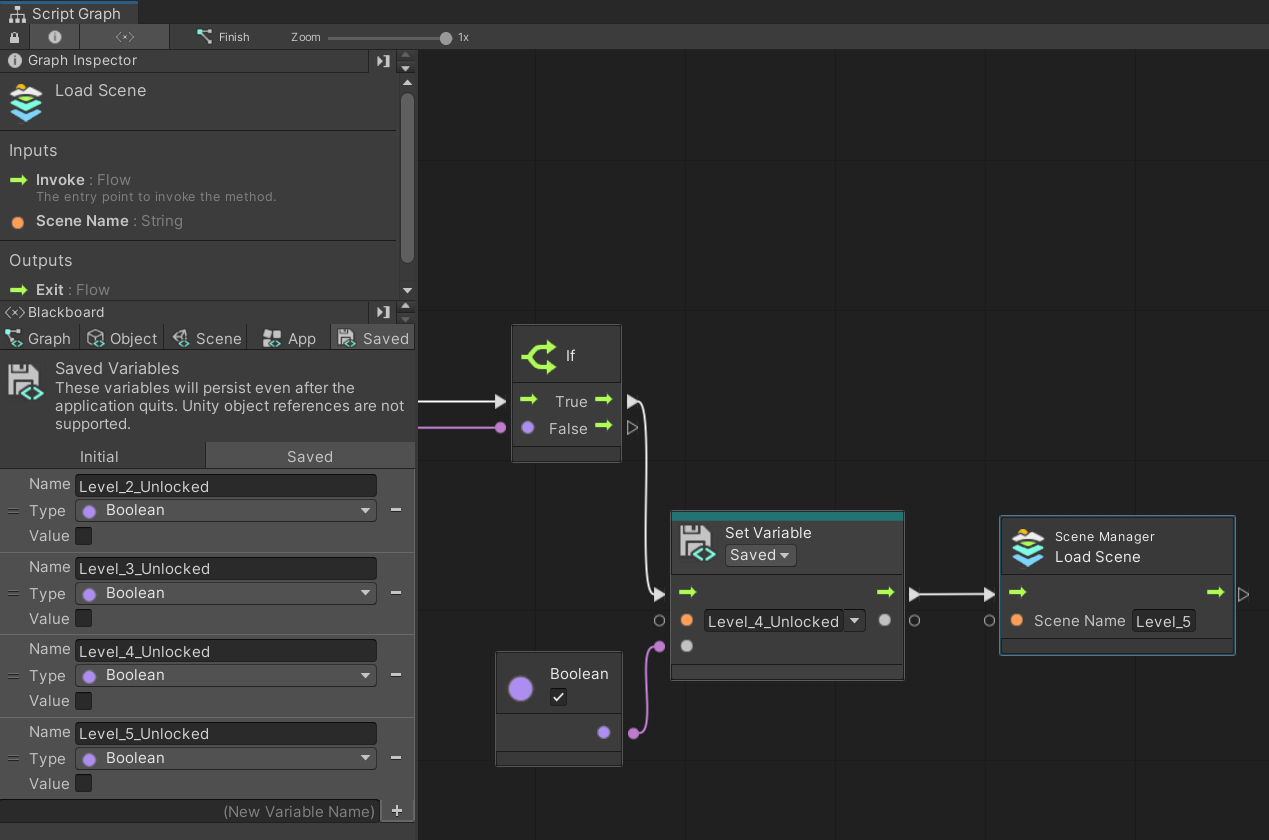
Hello, could you please help me solve the problem? There are five levels in my game. The first level is available immediately, the second after completing the first. The third after completing the second level and so on. Completing a level makes the button to select that level interactive. And everything works fine in Unity, but does not work in the build. For some reason, in the build all the level selection buttons are interactive. But only the first level selection button should be interactive. Could you please help me solve this problem?
Here are screenshots of how I am trying to implement this system.
Level:
Everything works in Unity, but for some reason it doesn’t in the build. In the build, all buttons become interactable.
Or maybe it’s that I just went through all the levels in the build, then deleted this build. Then I created a new one, and it contained the saves of the old build. Could this be possible? If so, what folder can savegames be stored in?
yea i think it did not reset your progress and i do not know what folder it saves in and on pc i think it saves in the registry but i could be wrong you can just add a button to reset your progress and set all the variables to false
Yea, saved variables serialize to PlayerPrefs. Technically, editor and build should have different locations but I don’t know how UVS folks are handling it so it might be saving to default target location instead of the editor one.
You could try PlayerPrefs.DeleteKey with one of your variable names to see if it resolves your button issue in build.
Also, using Unity’s JsonUtility to save to Application.persistentDataPath would pay off in the long term. Saved variables are not reliable or easy to debug.