Scripting Help: Moving Player GameObject from POINT A to POINT B to POINT A

Over the weekend and the past few days I have been stuck getting this feature to work in my game.

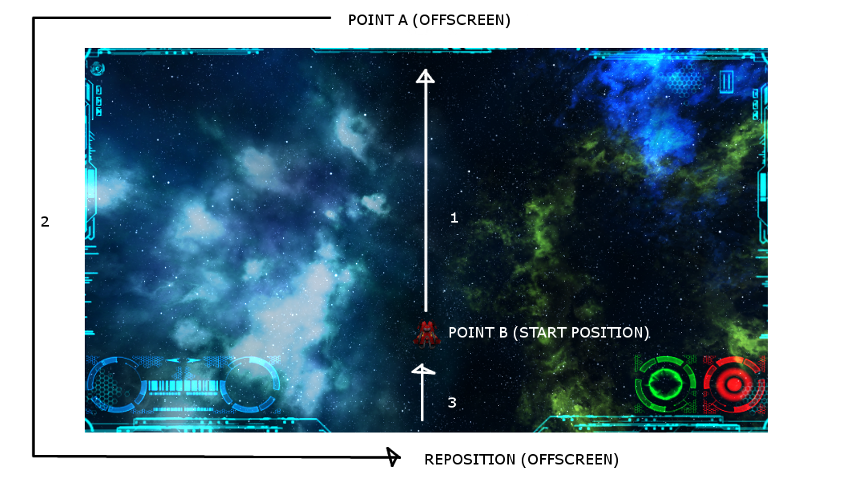
GOAL: When the player reaches a score, bool levelUp, is true. I would like to move the ship gameobject up the Y Axis off the screen, POINT A to POINT B (Offscreen), then reposition just off screen at the bottom, then move the ship up the Y Axis back to POSITION A. Player state is then set to playing and the game continues.

I have NOT accomplished and the results have been unacceptable. Close. I thought I had it working well, but realized it was only working after I fired a projectile detected the collision, exploded the object, THEN the ship would come to rest in the proper place, POINT A.

I have used coroutines, Vector3.movetowards, for(…) with if statements in all of them and they have all worked the same way. I simply need help.

The ships behavior flies up, repositions itself at the bottom/off screen, flies across the screen and off, repositions at bottom/off screen etc, until I have an, for lack of better words, an UPDATE or interruption when I destroy another gameobject with a projectile. At times I had bool variables being switched true/false all over the place. (Desperation, :neutral: ) Anyways, I would like to solve this any efficient way I can with your help. And learn something.

This was one of many ways that yielded the same result. I could post all my flailings, but I’ll spare you the tedium. May be good for a laugh. After this is solved.

THANK YOU for taking your time to look at the code below and suggest other methods for accomplishing the goal above.

void Update () 
{
...

		CheckScoreLevelUp(Score); //Function to check score and whether to LEVELUP
		
		if(LevelUp)
		{
			StartCoroutine(LevelUpShipFlyUp());
			StartCoroutine(LevelUpShipRepoOntoScreen());
		}
}

	IEnumerator LevelUpShipFlyUp()
	{
		if(LevelUp)
		{
			state = State.Invincible;
			if (transform.position.y < levelThreshold)  //Change levelThreshold to another less than POINT A
			{
				float amtToMove = shipMoveOnToScreenSpeed * Time.deltaTime;
				Booster.SetActive(true);
				transform.position = new Vector3(transform.position.x, transform.position.y + amtToMove, 
                                                                                transform.position.z);
				
				if(transform.position.y >= 6.5)
				{
					transform.position = new Vector3(0f, -11.0f, transform.position.z); //REPOSITION
					levelThreshold = -2.4f;
					Booster.SetActive(false);
					state = State.Playing;
					
					yield break;
				}
				
				Debug.Log ("SHIP FLY UP");			
	
			}

		}
		
	}

	void CheckScoreLevelUp(int Score)
	{
		Debug.Log ("SCORE: " + Score);

		switch(Score)
		{
			case 500:
			LevelUp = true;
			break;
			
			case 1000:
			LevelUp = true;
			break;
			
			case 2000:
			LevelUp = true;
			break;	
		}
	}

	IEnumerator LevelUpShipRepoOntoScreen()
	{	
			while(transform.position.y < -2.40)
				{
					// MOVE SHIP INTO PLAY AREA (UP)
					float amtToMove = shipMoveOnToScreenSpeed * Time.deltaTime;
					transform.position = new Vector3(0f, transform.position.y + amtToMove, transform.position.z);
					
					yield return 0; 
					
				}
	}

Without getting into too much of your details, if you want to move a player from A to B to A…

void Start(){
	StartCoroutine("moveToA");
}

IEnumerator moveToA(){
	playerNotAtPos = true;
	while(playerNotAtPos){
		player.position = Vector3.MoveTowards(player.position, ptA, speed);
		yield return null;
	}

	///if here, we can assume we have made it to A
	playerNotAtPos = false;
	StartCoroutine("moveToB");
}

IEnumerator moveToB(){
	playerNotAtPos= true;
	while(playerNotAtPos){
		player.position = Vector3.MoveTowards(player.position, ptB, speed);
		yield return null;
	}
	playerNotAtPos = false;
	StartCoroutine("moveToA");
}

And so goes the cycle.

Yah Man Games, thank you for your reply. I can honestly say your post made my eyes feel better. I will work with your response. After cleaning all the fodder in my own.

Thanks, again. I will reply with results…

Hi, I just looked at my code. I think it had a logical error.
I have set the while() condition to never have the chance to become false.

I have adjusted the code. Logically, it works, but one thing to consider, and I apologize, but it is late, asking, " if player pos == ptA, is a bit risky, as player pos may never be exactly the same as ptA.

Something to consider.

void Start(){
	StartCoroutine("moveToA");
}

IEnumerator moveToA(){
	playerNotAtPos = true;
	while(playerNotAtPos){
		player.position = Vector3.MoveTowards(player.position, ptA, speed);
		if(player.position == ptA)
		playerNotAtPos = false;
		yield return null;
	}

	///if here, we can assume we have made it to A
	StartCoroutine("moveToB");
}

IEnumerator moveToB(){
	playerNotAtPos= true;
	while(playerNotAtPos){
		player.position = Vector3.MoveTowards(player.position, ptB, speed);
		if(player.position == ptB)
		playerNotAtPos = false;
		yield return null;
	}
	StartCoroutine("moveToA");
}

Don’t use the equality operator (==) to compare Vectors. Because they’re comprised of floats you run a high risk of them never being completely equal.

Thanks, renman3000! Thanks, KelsoMRK!

OK. I got the script to work. However, it only works once. From what I understand, Start() is only called once. It works beautifully when the script is enabled or using below code.

However, this script needs to execute at each level up. I tried ENABLED, then DISABLED the script but it doesn’t work. Then I tried in the PLAYER script, UPDATE() the following. It works great without the enable and disabling, but I can only run it once.

private bool runOnce = false;

void Update()

...
                        // Level up routine.  When player scores specific amounts, then move ship up and off screen, re-position off screen 
                        // bottom, move ship up into player start position.

			if(!runOnce)
			{
				runOnce = true;
				GameObject.Find ("Player").GetComponent<LevelUpScript>().Other(); 
			}

If you want it to work via enable/disable then change Start to OnEnable

Ok. Thanks for the prompt reply. The behavior moves the ship from Point A to Point B, repositions, then back to point A, then I want it to stop. It continues the to do this behavior after disabling. (In the wrong place.) From the Player script, I enable. From the LevelUpScript I disable. If I change to disabling from Player script, the ship flies bottom to top in a flurry of speed and continues to loop. Any help is appreciated.

	IEnumerator moveToA()
	{
		
		playerNotAtPos = true;
		while(playerNotAtPos)
		{
			transform.position = Vector3.MoveTowards(transform.position, ptA, vel);
			if(transform.position.y == ptA.y)
				playerNotAtPos = false;
			yield return null;
		}
		
		transform.position = new Vector3(transform.position.x, -7.0f, transform.position.z);
		
		//if here, we can assume we have made it to A
		StartCoroutine("moveToB");
		
	}

	IEnumerator moveToB()
	{
		playerNotAtPos = true;
		while(playerNotAtPos)
		{
			transform.position = Vector3.MoveTowards (transform.position, ptB, vel);
			if(transform.position.y == ptB.y)
				playerNotAtPos = false;
			yield return null;
			
		}

		GameObject.Find("Player").GetComponent<LevelUpScript>().enabled = false;
		
	}

KelsoMRK, I have tried changing the operators, but they are producing albeit slightly different behaviors other the ==, they loop also.

Checking the equality of 2 floats is as unreliable as checking the equality of 2 vectors for the same reason. I don’t see any code that moves from B back to A.

I should rephrase the title and caption now. The code is from Start Position to POINT A (Off Screen), RE-position (To bottom off screen), then to POINT B (Start Position) then STOP, player resumes playing (I haven’t decided yet if I want to disable player control while it does this controlled, code sequence.). A Warp up level up.

Ok - so there is really no code present that does that. :slight_smile: You can do the whole thing in one big coroutine.
IEnumerator Foo()
{
    float distanceThreshold = 0.2f;
    ship.LookAt(pointA.position);
    while (Vector3.Distance(ship.position, pointA.position) > distanceThreshold)
    {
        ship.position += ship.forward * shipSpeed * Time.deltaTime;
        yield return null;
    }

    ship.position = offScreenSomewhere;
    yield return new WaitForSeconds(1);

    ship.LookAt(pointB.position);

    while (Vector3.Distance(ship.position, pointB.position) > distanceThreshold)
    {
        ship.position += ship.forward * shipSpeed * Time.deltaTime;
        yield return null;
    }
}

Thanks for taking your time and energy to address this obstacle. On the road for the moment, will work with the code in a bit.

I tested your code inside and outside of my game project. I hope you will be able to help me with implementation.

From my GAMEMANAGER script I have a static bool variable, LevelUp. When LevelUp is TRUE, this enables the LEVELUPROUTINE script attached to the PLAYER gameobject. OnEnable the coroutine executes. (This works well with some additions to your code to account for the player, pressing keys, holding down on buttons etc. Caused quite a bit of deviations, but I think I was able to address the issue effectively. I wanted to leave some of the illusion of control in the player’s hands.)

Now, the issues. ONE LEVEL UP is fine and everything functions to design. When the coroutine LEVELUP in script LEVELUPROUTINE is finished I state: GameManager.LevelUp = false;

If I add: GameObject.Find(“Player”).GetComponent().enabled = false;

The coroutine cycles and the ship races across the screen. I do not know how to disable the script so I can enable it on subsequent level ups. I also noticed if in my PLAYER script if I surround the movement (effectively removing horizontal control from the player) Even though in the coroutine I state that GameManager.LevelUp = false. At the end of the coroutine the player’s horizontal controls remain disabled.

Any input would be helpful. Any scripting comments and criticisms are welcomed.

Look forward… Cheers.

PLAYER.CS

void Update()
{
                        ...

//			if(!GameManager.LevelUp)
//			{
				// Amount to move.
				float amtToMove = Input.GetAxisRaw("Horizontal") * PlayerSpeed * Time.deltaTime;
				// Move Player
				transform.Translate (Vector3.right * amtToMove);
//			}
                        ...

}

GAMEMANAGER.CS

	void Update () 
	{
		if(!LevelUp)
		{
			CheckScoreLevelUp(Score);
			
		}
		else
		{
			GameObject.Find("Player").GetComponent<LevelUpRoutine>().enabled = true;
			
		}
		
	}

	void CheckScoreLevelUp(int Score)
	{
		Debug.Log ("SCORE: " + Score);

		switch(Score)
		{
			case 500:
			LevelUp = true;
			break;
			
			case 1000:
			LevelUp = true;
			break;
			
			case 2000:
			LevelUp = true;
			break;
			
			case 2500:
			LevelUp = true;
			break;

			case 3000:
			LevelUp = true;
			break;
			
		}	
	}

LEVELUPROUTINE.CS

using UnityEngine;
using System.Collections;

public class LevelUpRoutine: MonoBehaviour {
	
	private Vector3 pointA;
	private Vector3 pointB;
	private Vector3 offScreen;
	
	void OnEnable () 
	{
		pointA = new Vector3(0.0f, 6.5f, 0.0f);
		pointB = new Vector3(0.0f, -2.4f, 0.0f);
		offScreen = new Vector3(0.0f, -7.0f, 0.0f);
		
		StartCoroutine(LevelUp());
	}
	
	void Update () 
	{
	
	}
	
	IEnumerator LevelUp()
	
	{
	
	    float distanceThreshold = .20f;
	
	    transform.LookAt(pointA);
		transform.rotation = Quaternion.Euler(270f, 180f, 0.0f); 
	
	    while (Vector3.Distance(transform.position, pointA) > distanceThreshold)
	
	    {
			//If Player is pres
			if(transform.position.y > 8.0f)
			{
				transform.position = pointA;
				
				yield return null;
			}
			else
			{
	        	transform.position += transform.forward * 15f * Time.deltaTime;
	
	        	yield return null;
			}
	
	    }

	   	transform.position = offScreen;
	
	    yield return new WaitForSeconds(1);
	
	    transform.LookAt(pointB);
		transform.rotation = Quaternion.Euler(270f, 180f, 0.0f);

	    while (Vector3.Distance(transform.position, pointB) > distanceThreshold)
	
	    {
			if(transform.position.x > 0.0f || transform.position.x < 0.0f)
			{
				transform.position = offScreen;
				
				yield return null;
			}
			else
			{
			
	        	transform.position += transform.forward * 15f * Time.deltaTime;
	
	        	yield return null;
			}
	
	    }

		GameManager.LevelUp = false;

	}
}

Any input KelsoMRK, or renman3000? Anyone else…? Whenever I try to set the variables back, the code loops and excutes the code over and over. Behavior would be the ship moves from a START POSITION, to POSITION A, the ship is then REPOSITIONED ‘offscreen’ below, the moves to POINT B. I don’t know how to call the routine again. Maybe ENABLE and DISABLING the script is not the way to go. I need to be able to repeat executions of this code which controls this ‘animation’ of the gameobject. What must be done?

Any help out there. BUMP +.

Suggestions? I’ve tried a number of ways, including the suggested. They work, but only once. Can I call the LevelUpRoutine. I’ve only recently immersed myself in the Unity world using the C Sharp programming language. Help? The last part of this post with the scripts is the code I am working with.

Can you in a concise way, explain what you are trying to do, and the issue you have?

I’ve attached an image of what I would like to do and what the scripts above accomplish.

The ISSUE: Currently, I am using ONENABLE() in the LEVELUPROUTINE script (SEE ABOVE) and when a levelup event occurs, the script is enabled and the LevelUpRoutine is executed. The problem is if I disable after the coroutine event has been executed, the script LevelUpRoutine.cs, it appears to run in a loop racing the ship from bottom to top, doing the coroutine with noexit. What can I do instead? I have no way to execute the script again. Even if I disable it. It doesn’t function after being run once. I would like to be able to run the script at subsequent leveling up events.

Why don’t you just call the LevelUp coroutine using StartCoroutine?