Hi all.
I’m currently trying to create a river shader graph for a project. The game has a pixel art-style in a 3D space, and using procedural shader graphs help to make work easier.
One such thing I plan on using shader graphs for is flowing rivers. I’ve got the model in Blender, with the UVs straightened out so that the water will flow in the correct direction, as seen here:
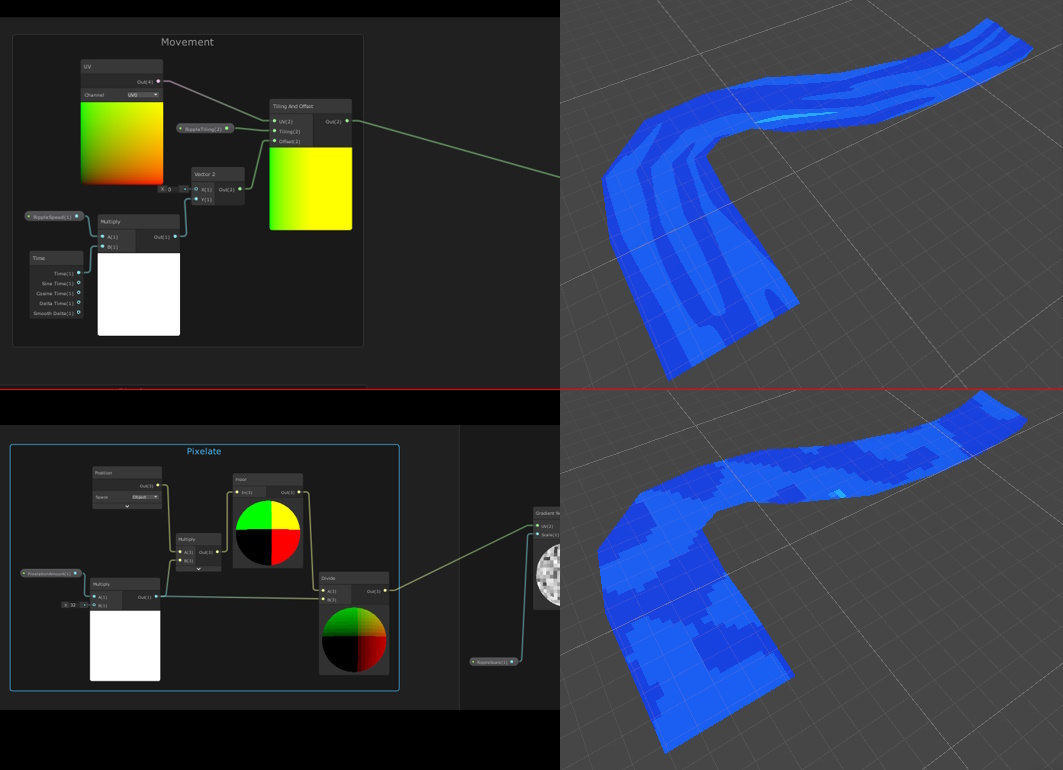
Then once in Unity, I give it the texture using the shader graph. I can figure out how to make the water flow using the UV node (top), and pixelation is done through the Position node (bottom), with both effects being fed into a gradient noise node.
The problem is trying to combine the two so the water flows in the right direction while keeping the correct pixelation, since every method I’ve thought of ends up distorting the pixels, or colours will “bleed” through from one pixel to another. Is it possible to get the desired effect, and what would the theory for it be?
Thanks for any and all help
1 Answer
1
It’s an intriguing problem. The thing is that a fragment shader only “knows” about a single point on the surface of the object. When you pixelate the world position, you get a different point in world space. To apply that pixelation to the UV coordinates, you have to figure out which UVs correspond to the new point in world space. This is kinda possible with a bit of black magic. GPUs always shade (at least) 2x2 adjacent pixels at the same time so that they can efficiently compute numerical screen-space derivatives of any value used in a shader. Internally this is used for mipmapping but we have access to this strange but useful capability in HLSL via ddx() and ddy(). Basically, ddx(v) and ddy(v) tell us how v changes as we move vertically or horizontally accross the screen. We can use these in a custom function node to approximately apply any (small) change (e.g. pixelation) of any value (e.g. world position) to any other value.
Edit:
I made a mistake in my previous answer. I assumed that ddx and ddy are orthogonal, which isn’t necessarily the case. You actually have to solve a linear system of equations. The goal is to represent the difference vector as a linear combination of the screen-space derivatives. This system is overdetermined if you use 3D inputs but it looks like you mostly want to pixelate in the xz-plane so you can swizzle the position to get 2D inputs and a 2x2 system. I’ve updated the code and screenshot below. It still won’t always work perfectly (it’s still just an approximation) but it should be an improvement.
This is the code for the custom function node:
float2x2 M = float2x2(ddx(Original.x), ddy(Original.x), ddx(Original.y), ddy(Original.y));
float2x2 I = float2x2(M._22, -M._12, -M._21, M._11) / determinant(M);
float2 delta = mul(I, Modified - Original);
Out = UV + ddx(UV) * delta.x + ddy(UV) * delta.y;
Remember to name the custom function node.


Thanks for the answer, and sorry I took so long to get back to you. I gave it a try like you suggested, and it works nicely! It's pixelatted properly, and the currents of the river move in the right direction. There are however some strange effects in the pixels, though it's hardly noticable when it's in motion and a higher resolution to match the pixel scale of the actual environment. I'll continue to play around with it to see if I can perfect it. [206741-riverwithapplytouv.png|206741] Thanks again!
– TastyCakeStudios