Shooter AI – The Ultimate Artificial Intelligence Solution

ASSET STORE LINK

Ever dreamt of the perfect action packed FPS, or an advanced tactical close-combat strategy game, but always stumbled across the ever known problem of having to program overcomplicated AI? After 5 months of development, Gateway Games is proud to announce Shooter AI, the AI solution to ANY shooter based game, be it stealth, strategy or FPS, Shooter AI fits perfectly.

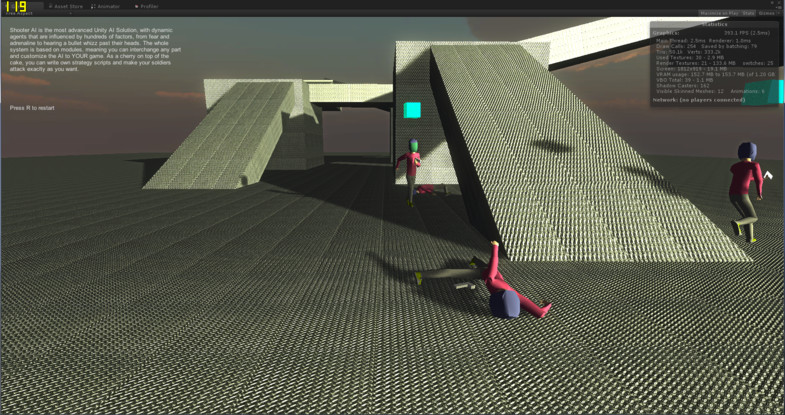
Shooter AI takes less than 5 minutes to deploy (without a single line of code), and gives you fully dynamic AI capable of adapting to any environment and situation. Another vital aspect of the AI is that it actually feels fear and adrenaline, meaning that each AI character reacts totally individually (like a personality), allowing a small scene to be replayed many times over without the AI repeating itself. Shooter AI fully handles all animations and Inverse Kinematics (e.g. the hands grab the gun), so the only thing you need to make is sound, everything else is fully finished. What makes Shooter AI really stand out is the ability to customize it to ANY situation, allowing you to insert scripts at vital events, such as when the player is first seen. If you’re really good, you can reprogram the whole brain, as Shooter AI is written completely in C# with no DLLs, thus making it fully deployable with any platform. By the way, it can also fight each other, letting you create epic coop missions where the player fights alongside AI against a common enemy.

Did I mention it works out of the box with UFPS, has a 27 page manual, gives you a choice between 2 different pathfinding systems, and ALL features work with Unity Free?

Here are a few demos:
AI vs AI
Shooter AI with UFPS (Ultra hard)

We have a YouTube tutorial playlist:
YouTube Playlist

Here is the manual:
Manual

Feature list:

  • Dynamic shooter AI, with advanced cover finding
  • Deployment in less than 5 mins; Drag-and-drop usage; All features work in Unity Free
  • Choose between Unity Navmesh or A*
  • 27 page manual
  • Eyes, ears and tactile input feed the AI brain for total comprehension of the environment
  • Dynamic fear and adrenaline settings never let the same situation play out twice
  • Ability to customize each and every AI character so that they react in their own individual way, though default values already allow fully operational character
  • Melee attack: make AI characters fight only with melee weapons, or use their gun (when they run out of ammo) to suicidally charge; as usual everything works right out of the box and ANY weapon can be used as a melee armament
  • Shooter AI takes over all animations and IK, so you just concentrate on making the perfect model; AI procedurally reacts to hits, falls and gets back up!
  • Fully open source C# code; no DLLs; all properties can be edited in-game
  • Insert own code at vital events, to make the game create the atmosphere you want
  • AI powered characters fight against each other or together
  • Whole system modular, making it possible to fully exchange components
  • And so, so much more

Shooter AI runs smoothly at 60 FPS with up to 20 unoptimized AIs at the same time (PC, no VSYNC), though this limitation depends on Unity and can be greatly optimized using basic parameters. We have tested successfully 24 AIs at over 140 FPS using medium poly models.
L:atest version:

1.5.1

  • IK bugs
  • Angles being measured from incorrect locations → weird animations
  • Fixed health manager y-scale bug
  • Added auditory (only max hearing distance) and sight gizmos

I played your demo. It looks good, but the group on the upper level always seemed to lose due to two or three of the members waiting until the enemies were right on top of them. They didn’t seem to react to the sounds of combat and thus were always ambushed.

Is there a difference between the two groups AI setup?

Hello! Thanks for playing the demo! The difference in setup is zero, BUT the demo shows how important location is and how critical it is to notice the enemy quickly.

Most of the time when the AI on the top gets ambushed. its because they were puzzled by where the shots came from, as the top team was grouped together whilst the bottom team was more dispersed, meaning the bottom team attacked from more than one side thus puzzling and stunning the top AI for the few vital seconds that decide whether they live or die.

Try playing the demo a couple of times: you will see some very interesting results sometimes.

Saw some of your intro video, the weapon creation wizard seems to imply you support ranged “gun” type weapons only - does this system support thrown weapons and/or melee?

Unfortunately, at this stage Shooter AI doesn’t support melee attack, though i will implement this feature either before release or in an update.

To create thrown weapons, you can make an “gun” object that doesn’t have a model, but uses a “bullet” that looks like the thrown object. Then add a little script that makes a throw animation when the “gun” is fired. That way you can make thrown objects, though if this feature needs simplification, i will also include it either before release or in an update soon after.

EDIT: Melee system now integrated!

Could you may show the cover system in depth? =)

1 Like

Sure!

The cover system was designed to cope with dynamic environments so that you can make the level dynamically change in game, with the AI adapting to it.

Basically, the AI first shoots a specified number of rays into a field of view (i saw that 360 degrees made the most realistic results, as us humans have very good spacial awareness, even behind us), and checks whether any of them hit anything. Any ray that hits something gets a second ray starting from that point, that goes to the object that we’re trying to hide from. Any ray that gets a hit between those 2 points is a potentials cover, though that doesn’t guarantee that its good cover. Then from each of those points we send 3-10 rays that are ± 1 meter (or so) to check whether the cover is large enough to cover a whole character. Any potential points that go through all those tests then get stored in an array, and a small algorithm picks out the best cover (based on stuff like distance, how many objects between that cover and the enemy etc…) and then uses that Vector3 as the go to point.

The cover function gets called every few seconds (depends on fear, adrenaline etc…) as to simulate that, just like humans, that spacial awareness is isn’t always perfect.

Though this system often gives out good covers, it sometimes picks poor choices, though that also simulates human behavior.

1 Like

Any requests on how to implement melee fighting system?

Yes! I was about to ask if this is suitable for melee fighting?
Also, how many NPCs can it handle without a big impact on performance?
Finally, how is pathfinding handled? Is is possible to use my own pathfinding system (which I absolutely need because I’m working with voxel terrains generated at runtime)?

  1. It can handle usually up to 10 unoptimized fighting AI, though you can have more in the background that don’t fight. You can probably increase this number if you use low poly models and optimize the bullets a bit more. I once ran a test of 32 vs 32, but the frames were around 25 FPS because of the sheer amount of bullets.

  2. We’re using the standard Unity’s built-in NavMesh, but the whole system is modular, meaning to swap it for another pathfinding system, you’ll just need to change 5 functions (around 20 lines of code) so that the brain uses your pathfinder. I’ll make this system even easier either before release or in an update soon after.

Regarding the melee fighting: i haven’t yet started making the system (though it shouldn’t take too long), and wanted to know what functions should it be able to do?

UPDATE: Can now support up to 35 unoptimized AI, 60-100 if fully optimized + low poly models

Just finished the first revision of the manual!

Manual!

UPDATE: Just added full melee functionality, with customizable animations and VERY quick setup. You can literally use any gun as melee weapon, if the need arises, or make the AI only melee meaning you could breath life into RPG AI, so that it really feels like they are alive.

Please keep sending in your requests!

I think demos showing compatibility with Realistic FPS Kit and UFPS would really drive sales :slight_smile:

That saying, im already quite interested as it is :smile:

I will try and post some demos next week. Any feature requests?

Good to hear there is a melee functionality! I’m actually making a RPG so I would use that intensively. I’ll be waiting for the new demos. I hope you planed to do a demo showing melee AI :slight_smile:

I also agree with TheNorthridge, it would be great if it was possible to make it compatible with UFPS (every people who are making a game with a first person camera are using UFPS, really).
Actually the only thing I think about is that UFPS has is own “Damage Handler” script which receive damage from weapons and manage character’s health (so basically every NPC has it). That would be really nice if your system was able to work with it out of the box (something like if GetComponent<vp_DamageHandler>() != null then do something special with it), or at least replace it and still get damages from UFPS weapons.

I think such functionality will be appreciated by a lot of people!

If the melee works well and if it’s compatible with UFPS then you have a customer! :slight_smile:

EDIT: Could you tell me what path-finding methods are needed by your system? My path finder basically has only one method: PathFinder.ComputePath(Vector3 start, Vector3 end). Would it be enough to integrate it with your system?

I already started looking into UFPS and it seems like it uses raycasts to deliver shots (whilst we use real bullet objects that simulate bullet drop, ricochet etc…), but i already worked out a system that should work with it, though i may need to modify/replace the player’s health management.

EDIT:

For the pathfinding system you need the following methods:

  • Compute the paths
  • Make the AI stop
  • Make the AI go again

You will need the following attributes:

  • Radius, height, speed, agularspeed (though you can manually calculate that)

Nice to hear!

About pathfinding, that shouldn’t be too hard to do.
About methods “Make the AI stop” and “Make the AI go again” you mean a component that makes the NPC follow the path?

That and also eg. make speed 0 when it should stop and then make speed “n” when it goes again.

Ok, but what about obstacle avoidance? Will it still be handled by your AI system?
Concerning path-smoothing I think I will have to do it myself (seems logical as I have my own pathfinder), right?

Can’t wait to see the release on the AssetStore!

Obstacle avoidance, if not using Unity’s NavMeshSystem, has to be made by you unfortunately, as we can’t know exactly what type of nav system you’re using.
Yes, path smoothing will has to be done by you as well.

On a different note, Shooter AI will be compatible with UFPS out of the box (around 2 mins setup to get the tags set)! Right now finishing a small demo which should be up in a few days.