What does it do?
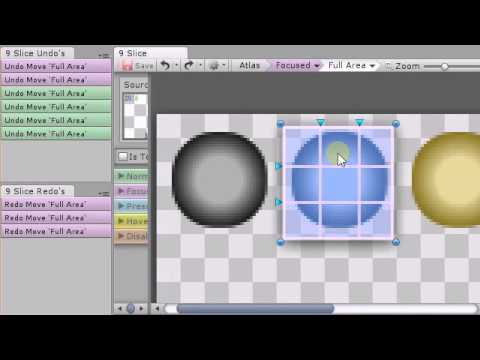
I planned to use a single texture atlas that contained multiple button backgrounds, and allow the user to visually setup the 9 Slices (as well as other settings later). This is still in the planning / prototyping stages.
Why did I make it?
It was my 1st attempt at working with Unity3D and i’m trying to learn how the Unity Editor worked. Not to mention, my own frustration with Unity3D in not being able to visually see how the GUIStyle Borders are actually affecting the button slicing. It was all guessing game until i got what i was looking for. But thats for 2D GUI, this is for 3D GUI though, but most of the same concepts still apply for 9 Sliced control texture backgrounds.
What sets it apart from the rest?
I made it for myself. And since i’m a visual kinda guy, I want to visually see and edit things about the Style… in this case, its the Border Style of the controls background. And I wanted to use a single texture atlas to define a larger number of backgrounds, including the different states like the default idle (or Normal) state, Pressed down state, Hover Over state, currently Focused control state, and something that i wish was part of the GUIStyle… ability to set the background/style for a Disabled state.
How far have I gotten?
I’m working on the tough stuff now, and just finished the Pan and Zoom portion of the editor which allows the users to define the 9 Slices Visually using a number of grab handles.
Currently this is what the Editor looks like (could change later):
How do I add Undo/Redo support?
After struggling with the in-built Undo and trying to tell the difference between my Undo’s apart from Undo’s performed in the Scene view (or other views), i gave up on trying to use Undo.RegisterUndo… and started working on a custom undo for my Editor Window.
In this screencast, i try and show my 1st attempt / progress with adding custom Undo/Redo features.
So…
bottom left: looks like a square, but has 1/4 eaten away, and Moves the while Group area.
top left: looks like a circle, but has 1/4 eaten away, and might be used to Rotate a GUI Control… not sure if a GUI Group needs to be rotated?!?
four sides: arrows used to resize the GUI Group or GUI Control (when able to, if auto Resize To not set to say the GameView)
And when I call it on WIDTH, Height still using .IntField()
this is what i get now. You can left click drag the mouse while over the label to change the Int Value.
 But thats for 2D GUI, this is for 3D GUI though, but most of the same concepts still apply for 9 Sliced control texture backgrounds.
 And since i’m a visual kinda guy, I want to visually see and edit things about the Style… in this case, its the Border Style of the controls background. And I wanted to use a single texture atlas to define a larger number of backgrounds, including the different states like the default idle (or Normal) state, Pressed down state, Hover Over state, currently Focused control state, and something that i wish was part of the GUIStyle… ability to set the background/style for a Disabled state.