I’ve been googling around for a few hours and now I’ll just give up and ask…
I have a scene that I’ve upgraded to 2018.3.9f1. Unity created a folder called _TerrainAutoUpgrade and created new terrain layers. They show up with the wonderful pink broken shader color when viewed in the scene. The terrain layers themselves seem to be fine.
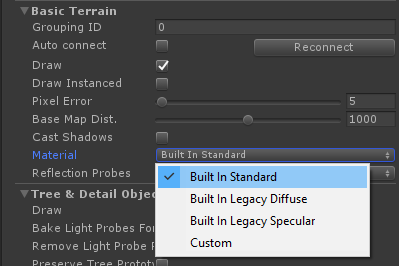
If I check under the terrain settings I see this:
“Ok!” I say. “The terrain is using the Standard Shader. These need to use a LWRP compatible shader!”
But if I choose “Custom”, I can’t assign a shader, a slot appears and it apparently wants a MATERIAL!
I can put a material into that slot:
But if I do, then the terrain is mapped 1:1 with the material (texture/shader) - which is ridiculous - and the system seems to ignore the terrain layers and the spat map.
How do I upgrade the terrain layers to use the LWRP so they work on the terrain?
P.S.: There is some talk about selecting “Draw Instanced” as a solution, but no: Draw Instanced simply makes the terrain invisible… and then the psychedelic artifacts come out when the scene view camera is moved.
Also works by creating a new material with the default shader “Lightweight Render Pipeline/Terrain/Lit” and linking it to the terrain in the debug inspector.
I want to add this little detail too. This little button is very important because it unhides package materials in asset picker window so you can see TerrainLit material.
i could fix the trees, the terrain but not the grass? how to fix that, there’s no way to change the shader of the grass, & the lwrp package doesn’t come with a grass shader anyway