An issue I just spent hours on –
I’m starting a game where I see no use for a camera, since everything is on the canvas, and the canvas is “screen space-overlay”.
I have a background image stretched on the canvas, and I want to place square tiles on top of it.
Whatever I’ve tried (layers, sorting order, z axis, even messing with the camera I don’t need),
I always end up with the background image above the tiles.
My “Tile” is a prefab, and I noticed that even if I drag and drop any other prefab image to the scene, I get the same result - the background is over the image, so this isn’t a code thing.
Any ideas would be welcomed.
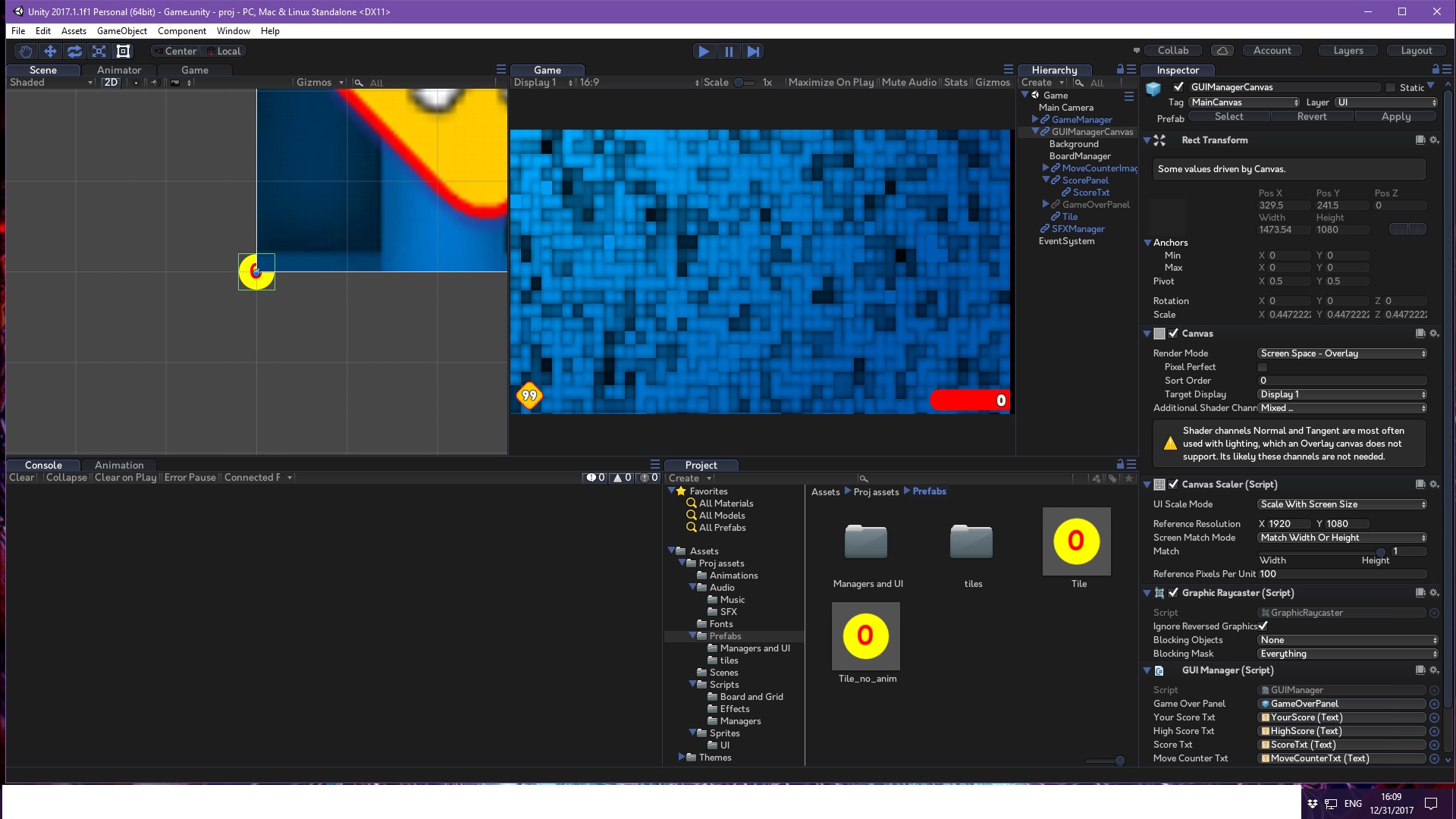
Here are my background image, canvas and tile (all in the scene with inspector information) :
Draw order on a canvas is determined by renderers’ positions in the Hierarchy. Higher objects are drawn first, i.e. will be behind everything listed below it. I don’t know whether using sprite senderers in a Canvas will affect this.
I can’t make out what’s going on in your screen shot, but are the tiles below the background in the Hierarchy?
You can set an entire canvas’ sorting order, so maybe that’s what you need to do to adjust draw order relative to sprite renderers.
Thank you for your reply -
The background is the first child of the canvas, and the tile is also a child of the (one and only) canvas, near the end of its’ children.
In the scene view the circle with number is the tile, and the blue rectangle is part of the background.
I’ll try checking sorting order again in the coming days, but I know other objects can be above the background in the same position on the hierarchy.
The template I’m building on (took some code to start off) has a “move counter” (the “99” in game view) which is perfectly well above the background.
I’ve checked it out and it’s just an Image component with a canvas renderer component.
That’s why I tried to add a canvas renderer into the tile hoping the canvas would render it…
Both ways failed.
Perhaps an image goes to UI layer, and my sprite refuses to for some reason?
I will come back to this soon for a second close inspection…
I haven’t had a good look at this yet, but I know I had a similar problem and found it helpful to change the 2D view to 3D and have a look at where things sat. Maybe give it a go. (Top left, just under Animator in your screenshot, you can see where it says 2D, you can click it and change to 3D)
I’ve looked over in 3d, and below is the result -
Left side : the tile is in the right Z position in front of the background, just like the other red object.
Right side : If I change the angle on the view, the background starts to hide the tile.
Some conclusions –
The Canvas and the background image are on the same space on x and y (different z), but I noticed that it is not the canvas that is obscuring the tile, but the “background” object. If I uncheck the “background” object checkbox or its’ image, the background disappears and the tile is visible on the canvas with no issues.
The only difference seems to be that the tile is a sprite and the background is an “Image”, like all other objects.
How do sprites differ from images?
Could it be the image importer settings?
I also tried some sorting order options of the canvas, but that didn’t change anything.
On a personal note, thank you for joining in my pain and helping – I’m trying to startup my rusty programming skills without getting panic attacks…
So I’m taking it slowly, and I’m sure this is some minor issue that will be found, but it still eludes me.
Thanks for your thoughts.
Ok, so I found a workaround but the reason remains unclear.
I had the hint that Images are shown on top of the background and my sprite isn’t.
I also did some experiments with disabling and enabling components, and when I unchecked the “Canvas” component of my one and only canvas, everything disappeared as they are all children of the Canvas, but my sprite DIDN’T.
Conclusion===>
Somehow the sprite isn’t seen as a UI element under Canvas! (why?? it is in UI layer, child of the canvas)
So my tile isn’t over the background Since all UI elements render in front of everything else, and I want my game to be all UI elements.
My workaround is not to use a sprite, but instead to use a UI Image component (which works!!), at least until I understand why my sprite is not considered UI… Any ideas on that fellas?
After some digging I found out a paragraph on the web explaining why the sprite is showing behind the background - it has to do with the sprite material (!!) rendering :
“Sprites are rendered in the transparent geometry queue (unless you use another material than the default). UI Images are also rendered in the transparent geometry queue (Render.TransparentGeometry), unless you use the overlay rendering mode in which case it will be rendered through Canvas.RenderOverlay.”
So my images are rendered through the Canvas, as they should, but sprites are rendered on the “transparent geometry queue” depending on their material.
When changing from the default to other materials, some materials do show on top of the background.
However, they change the appearance of the sprite significantly
Now I’ll have to understand materials to perhaps find one that suits me or just use images (which starts to sound like the correct way to go when everything is UI).
If anyone has anything to add to this, I’ll gladly hear it out.
I had a problem with this. I had a tilemap and a canvas with a joystick. My joystick was behind my tilemap. I just followed the hint of MrKjeld to change to 3D and see what’s happening. I always try to set all to the origin point (0, 0 ,0), so my tilemap was in 0 in the Z axis and my camera too, but my canvas was set to stay 100 units away of my camera (plane distance in canvas component) then I just set to 10 and my camera Z coordinate to -10 so the canvas could be in 0 z.
 –
–